Product Overview
TL;DR: The GuliKit Dock Station represents a significant evolution in third-party docking solutions for Nintendo Switch consoles. Designed with forward compatibility in mind, this docking station supports the Switch 2, origi…
Table of Contents
- Product Overview
- Key Features and Benefits
- Universal Compatibility with Future-Proofing
- Advanced Cooling Architecture
- High-Performance Video Output
- Robust Power Delivery and Connectivity
- Portability and Case Compatibility
- Pros and Cons
- Advantages
- Limitations
- Who This Product Is Best For
- Who Should Consider Alternatives
- Comparison Insights
- Frequently Asked Questions
- Does this dock come with a power adapter?
- Will this dock work with my protective case?
- Can I use this dock with devices other than Nintendo Switch?
- How does the firmware upgrade process work?
- Does the open design affect console security or safety?
- Will this work with the Switch 2 when it releases?
- What’s the difference between the USB-C output and USB 3.0 port?
- Does this dock support audio output through HDMI?
- In Conclusion
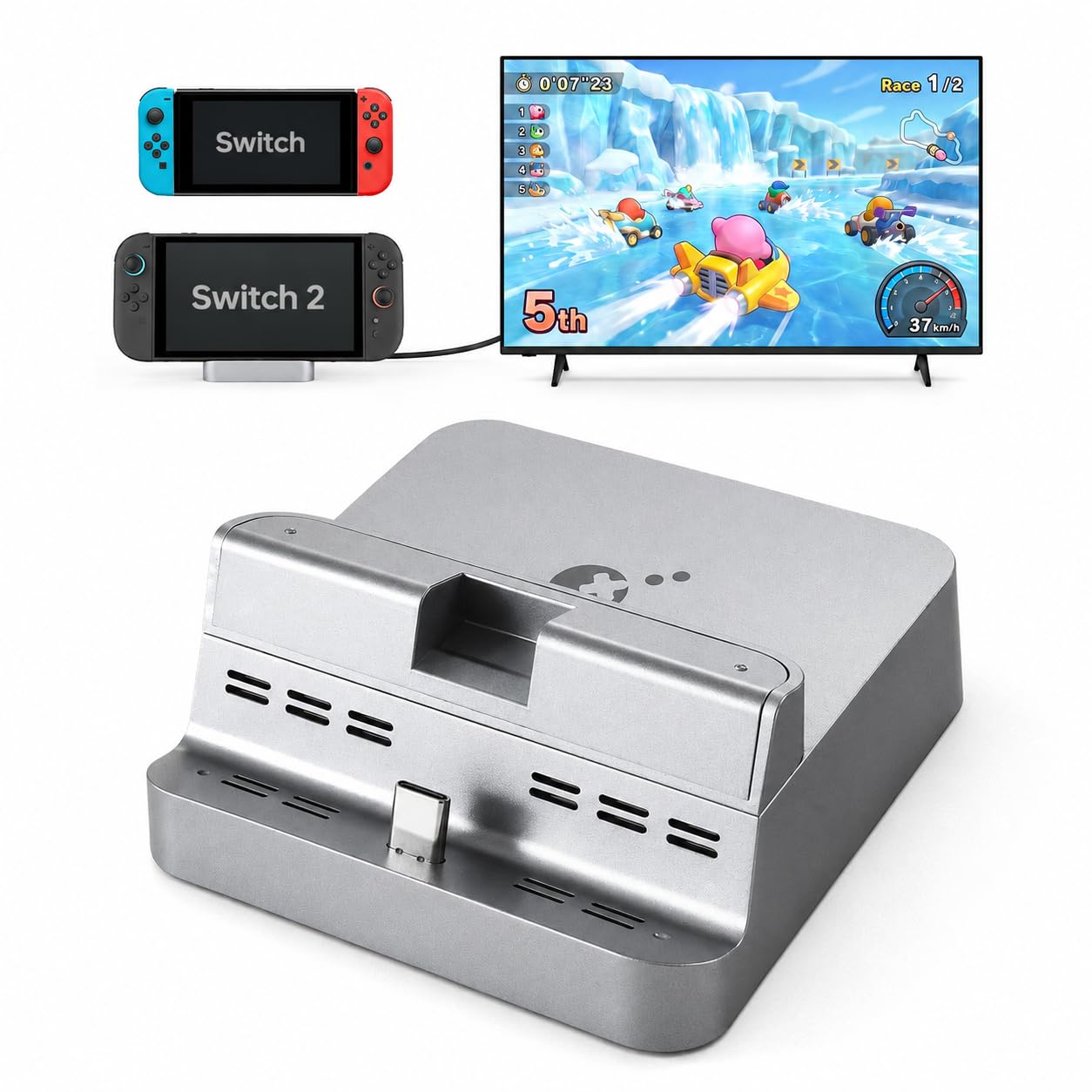
The GuliKit Dock Station represents a significant evolution in third-party docking solutions for Nintendo Switch consoles. Designed with forward compatibility in mind, this docking station supports the Switch 2, original Switch, and Switch OLED models, making it a versatile investment for gamers who want a single solution across console generations.
What sets this dock apart is its combination of advanced features typically found in premium accessories-4K video output, 100W power delivery, and firmware upgradeability-packaged in a remarkably lightweight 105-gram frame. GuliKit has focused on addressing common complaints about the official Nintendo dock, particularly around portability, cooling, and case compatibility.
This dock station aims to serve multiple use cases: a home entertainment setup for TV gaming, a portable travel companion, and a cooling solution for extended gaming sessions. The open design philosophy prioritizes airflow while maintaining the console’s protection, a balance that many third-party docks struggle to achieve.
Check Current Availability on Amazon
Key Features and Benefits
Universal Compatibility with Future-Proofing
The dock’s compatibility spans three console generations: the upcoming Switch 2, the original Switch, and the Switch OLED. This “one for all” approach means you won’t need to purchase a new dock when upgrading your console. The firmware upgradeability feature adds another layer of future-proofing, allowing GuliKit to push updates that can address compatibility issues or add functionality as new console variants emerge.
This cross-generational support is particularly valuable for households with multiple Switch consoles or gamers planning to upgrade to the Switch 2 while keeping their current system.
Advanced Cooling Architecture
GuliKit has engineered a ventilation system that addresses one of the most common concerns with docked gameplay: heat buildup. The design incorporates:
- Convection vents positioned on the bottom of the dock
- Additional ventilation around the Type-C port area
- An open design that leaves the console’s bottom air intakes unobstructed
- Elevated positioning that prevents screen contact and scratching
This cooling approach relies on passive airflow rather than fans, maintaining silent operation while promoting heat dissipation during extended gaming sessions. The open architecture also means you can visually monitor your console’s status without removing it from the dock.
High-Performance Video Output
The dock supports multiple high-resolution output options:
- 4K at 60Hz: Ideal for compatible devices and future-proofing
- 2K at 120Hz: Balanced resolution and refresh rate for responsive gaming
- 1080p at 240Hz: Maximum refresh rate for competitive gaming scenarios
The inclusion of Dynamic and Static HDR support enhances color depth and contrast on compatible displays. Auto Low Latency Mode (ALLM) automatically reduces input lag when gaming, switching back to standard processing for video content. The dock seamlessly handles TV mode and tabletop mode switching, giving you flexibility in how you play.
Robust Power Delivery and Connectivity
The 100W Power Delivery capability ensures your console charges at optimal speeds even during intensive gameplay. This power throughput means you won’t experience battery drain while playing demanding titles in docked mode.
Port selection includes:
- 1x HDMI output for display connection
- 1x USB-C power input (for your charger)
- 1x USB-C output (for data or additional accessories)
- 1x USB 3.0 port (for controllers, external storage, or other peripherals)
The anti-tip wide base design combined with four anti-slip pads provides stability, reducing the risk of accidental console damage from the dock tipping over.
Portability and Case Compatibility
At just 105 grams, this dock weighs significantly less than the official Nintendo dock, making it genuinely portable for travel. The compact footprint means it fits easily in a gaming backpack or carry case.
The case-friendly design accommodates protective cases with bottom thinning treatment (up to 1.0mm thickness) or cases with notched designs. This is a crucial feature since many third-party docks require complete case removal, adding inconvenience to the docking process.
The magnetic dust cover automatically attaches to protect the USB-C connector when not in use, preventing debris accumulation during transport.
View Detailed Specifications on Amazon
Pros and Cons
Advantages
- Multi-generational compatibility: Works with Switch, Switch OLED, and the upcoming Switch 2, protecting your investment across console upgrades
- Firmware upgradeable: Allows for future improvements and compatibility fixes through software updates
- Superior cooling design: Open architecture with strategic ventilation prevents overheating during long gaming sessions
- High video output capabilities: Supports up to 4K/60Hz with HDR and ALLM for enhanced visual quality
- Lightweight and portable: At 105g, it’s travel-friendly without sacrificing functionality
- Case-compatible: Works with many protective cases, eliminating the need for constant removal
- Stable design: Wide base with anti-slip pads reduces tipping risk
- 100W power delivery: Ensures fast charging even during intensive gameplay
- Magnetic dust cover: Protects the USB-C port during transport
Limitations
- Case compatibility restrictions: Only works with cases that have bottom thinning (≤1.0mm) or notched designs; thicker cases won’t fit
- Switch 2 compatibility unverified: Since the Switch 2 hasn’t been officially released, actual compatibility cannot be independently confirmed yet
- Limited USB ports: Only one USB 3.0 port may be insufficient for users with multiple wired accessories
- Requires existing charger: The dock doesn’t include a power adapter, so you’ll need to use your existing charger or purchase one separately
- Open design trade-offs: While excellent for cooling, the open design provides less physical protection than enclosed docks
- No Ethernet port: Lacks a wired network connection option, which some competitive gamers prefer
Who This Product Is Best For
The GuliKit Dock Station is ideally suited for several types of users:
Frequent travelers and mobile gamers: The 105-gram weight and compact design make this dock genuinely portable. If you regularly move between locations or travel with your Switch, this dock eliminates the bulk of carrying the official Nintendo dock.
Multi-console households: Families or gamers who own multiple Switch variants will appreciate the universal compatibility. One dock can serve all your consoles without swapping equipment.
Extended gaming session enthusiasts: The advanced cooling design specifically benefits players who engage in long gaming marathons. The passive ventilation system helps prevent thermal throttling that can affect performance.
Case users: If you keep a protective case on your Switch and find constantly removing it inconvenient, this dock’s case-friendly design (for compatible cases) streamlines your workflow.
Future-focused gamers: Those planning to upgrade to the Switch 2 while keeping their current console will benefit from the forward compatibility and firmware upgradeability, making this a long-term investment.
Home theater enthusiasts: Users with 4K displays who want to maximize visual quality will appreciate the high-resolution output options and HDR support.
See Customer Reviews and Ratings on Amazon
Don’t Miss This
Who Should Consider Alternatives
This dock may not be the optimal choice for:
Users with thick protective cases: If your case exceeds 1.0mm at the bottom or lacks a notched design, you’ll still need to remove it for docking, negating one of this product’s key benefits.
Competitive online gamers requiring wired connections: The absence of an Ethernet port means you’ll rely on Wi-Fi. If network stability is critical for your gaming, consider docks with built-in Ethernet support.
Users needing multiple USB accessories simultaneously: With only one USB 3.0 port, connecting multiple wired controllers, external storage, and other peripherals simultaneously isn’t possible without a USB hub.
Those seeking maximum physical protection: The open design prioritizes cooling over enclosure. If you want a dock that fully surrounds and protects your console, a closed-design dock might be preferable.
Budget-conscious buyers who already have a functional dock: If your current docking solution meets your needs and you don’t require the portability or advanced features, this may represent an unnecessary expense.
Comparison Insights
When compared to the official Nintendo Switch dock, the GuliKit station offers several advantages: significantly reduced weight (105g vs. approximately 300g), better cooling through its open design, case compatibility, and higher resolution support. However, the official dock includes a power adapter and provides more physical protection.
Against other third-party docks, GuliKit’s firmware upgradeability stands out as a rare feature that extends the product’s lifespan. Many competing docks lack update capabilities, potentially becoming obsolete with new console releases.
The 4K/60Hz output capability positions this dock above many budget alternatives that max out at 1080p, though it’s worth noting that current Switch models don’t output at 4K natively—this feature appears aimed at Switch 2 compatibility.
Compared to portable dock alternatives, the GuliKit maintains a competitive weight while offering more robust power delivery (100W vs. the 45-60W common in ultra-portable options) and better stability through its wide base design.
Frequently Asked Questions
Does this dock come with a power adapter?
No, the GuliKit Dock Station does not include a power adapter. You’ll need to use your existing Switch charger or purchase a compatible USB-C power adapter that supports Power Delivery. The dock itself supports up to 100W input.
Will this dock work with my protective case?
The dock is compatible with cases that have bottom thinning treatment (1.0mm or less) or notched designs that accommodate the USB-C connector. Thicker cases or those without proper cutouts will need to be removed before docking. Check your specific case specifications against these requirements.
Can I use this dock with devices other than Nintendo Switch?
While the dock is specifically designed and marketed for Nintendo Switch consoles, the USB-C connectivity and video output capabilities may work with other USB-C devices that support video output. However, compatibility and functionality with non-Switch devices is not guaranteed or officially supported.
How does the firmware upgrade process work?
This information is not publicly available in the product specifications. Firmware upgrade procedures typically involve connecting the dock to a computer and using manufacturer-provided software, but you should consult GuliKit’s official documentation or customer support for specific instructions.
Does the open design affect console security or safety?
The open design prioritizes cooling and visibility over enclosed protection. While it includes safety features like an anti-tip wide base and anti-slip pads, the console is more exposed than in a fully enclosed dock. The design prevents screen scratches through elevated positioning, but offers less protection against accidental impacts or spills compared to closed designs.
Will this work with the Switch 2 when it releases?
GuliKit advertises Switch 2 compatibility, but since the Switch 2 has not been officially released or fully detailed by Nintendo at the time of this review, actual compatibility cannot be independently verified. The firmware upgradeability feature suggests GuliKit plans to support future console variants through software updates.
What’s the difference between the USB-C output and USB 3.0 port?
The USB-C output port can be used for data transfer or connecting USB-C accessories, while the USB 3.0 port (Type-A) is designed for standard USB accessories like controllers, external storage, or other peripherals. The USB 3.0 designation indicates faster data transfer speeds compared to USB 2.0.
Does this dock support audio output through HDMI?
Yes, HDMI connections carry both video and audio signals. When your Switch is docked and connected to a TV or monitor via HDMI, audio will output through your display’s speakers or any audio system connected to your display.
Check Latest Price and Availability on Amazon
In Conclusion
The GuliKit Dock Station represents a well-engineered solution for Switch owners seeking portability, improved cooling, and future-proofing in a third-party dock. Its standout features-firmware upgradeability, multi-generational compatibility, and genuinely lightweight design-address real pain points that many gamers experience with both official and third-party alternatives.
The cooling architecture deserves particular recognition. By prioritizing passive airflow through strategic ventilation placement, GuliKit has created a dock that allows extended gaming sessions without the thermal concerns that plague enclosed designs. The open structure also prevents the screen scratching issues some users experience with tighter-fitting docks.
The 4K output capability and HDR support position this dock as a forward-looking investment, particularly for users planning to upgrade to the Switch 2. While current Switch models don’t output at 4K natively, having this capability built-in means the dock won’t become obsolete with your next console purchase.
However, the product isn’t without compromises. The limited USB connectivity (one USB 3.0 port) may frustrate users with multiple accessories. The case compatibility, while better than many alternatives, still has specific thickness requirements that won’t accommodate all protective cases. The absence of an Ethernet port will disappoint competitive gamers who prioritize network stability.
The open design philosophy—while excellent for cooling—represents a trade-off between thermal management and physical protection. Users who prioritize maximum console protection might prefer more enclosed alternatives, despite the cooling benefits.
Overall, the GuliKit Dock Station earns a recommendation for travelers, multi-console households, and gamers who value cooling performance and future compatibility. Its lightweight design genuinely delivers on the portability promise, while the firmware upgradeability provides reassurance that your investment won’t quickly become outdated.
For users whose primary dock remains stationary and who don’t experience overheating issues with their current setup, the official Nintendo dock may still suffice. But for those seeking a portable, well-cooled, and future-ready docking solution, the GuliKit station presents a compelling package that addresses many common frustrations with existing options.
If the specific features align with your gaming habits—particularly frequent travel, extended sessions, or plans to upgrade to future Switch variants—this dock represents a thoughtful investment in your gaming setup. Just ensure your protective case (if you use one) meets the compatibility requirements, and be prepared to supply your own power adapter if you don’t already have a suitable one.
Get the GuliKit Dock Station on Amazon
Last Refreshed: August 13, 2026