

Finding a good laptop for less than $500 isn’t as difficult as it used to be. You can now get a reliable machine with a sharp display, decent battery life, and enough processing power to handle everyday work without spending a fortune.
The challenge is knowing which laptops are actually worth buying.
Some budget laptops look impressive on paper but struggle when you open several browser tabs. Others have fast processors but disappointing screens, uncomfortable keyboards, or batteries that barely last through a workday.
Whether you’re a college student, working from home, running a small business, or simply replacing an aging computer, there’s no reason to spend $800 on a laptop if a $400 model can handle everything you need.
We’ve narrowed the options to 10 laptops worth considering in 2026, focusing on performance, display quality, battery life, build quality, and overall value.
A note about testing: These rankings are based on published specifications, independent reviews, and buying considerations, not hands-on testing conducted by this publication. Before publishing the article under the title “Tested & Ranked,” the testing claims should be backed by actual hands-on results or clearly attributed independent tests.
Best laptops under $500 in 2026 at a glance
Here are our top picks, ranked by their usefulness for different buyers. Prices change frequently, so check the exact configuration before ordering.
| Rank | Laptop | Best for |
|---|---|---|
| 1 | Lenovo IdeaPad Slim 3x | Best overall |
| 2 | Acer Aspire 3 (A315-24P) | Best budget Windows laptop |
| 3 | Acer Aspire Go 15 | Best for students |
| 4 | HP OmniBook 3 14 | Best for working from home |
| 5 | ASUS Chromebook Plus CX34 | Best Chromebook |
| 6 | Lenovo IdeaPad Slim 3 15 | Best for multitasking |
| 7 | ASUS Chromebook CX15 | Best affordable Chromebook |
| 8 | Acer Chromebook Plus 515 | Best for everyday browsing |
| 9 | Lenovo Chromebook Duet 5 | Best for entertainment |
| 10 | Lenovo Chromebook Duet Gen 9 | Best compact 2-in-1 |
These choices draw on recent independent testing from RTINGS, PCMag, Tom’s Guide, and PCWorld.
1. Lenovo IdeaPad Slim 3x – Best Overall Laptop Under $500

What makes it particularly appealing is the combination of a Snapdragon X processor, 16GB of RAM in select configurations, and excellent battery life. It’s the sort of laptop that makes sense for someone who spends hours switching between documents, email, video calls, and browser tabs.
The keyboard is comfortable enough for long writing sessions, while the touchscreen adds convenience when scrolling through documents or browsing websites.
Battery life is a major selling point. Tom’s Guide reported more than 16 hours in its testing, although actual endurance depends on your workload and settings.
Key features
-
Snapdragon X processor
-
Up to 16GB RAM in recommended configurations
-
15-inch-class touchscreen
-
Windows 11
-
Long battery life
What we like: Excellent battery endurance, generous memory, and a comfortable keyboard.
What could be better: The screen isn’t especially bright, and some older Windows applications or peripherals may have compatibility limitations with its ARM processor.
Who should buy it?
Students, remote workers, and everyday users who value battery life and multitasking more than gaming performance.
Buying advice: Look for the 16GB version at $500 or less. Don’t assume every IdeaPad Slim 3x listing has the same specifications.
Check Lenovo IdeaPad Slim 3x price on Amazon
2. Acer Aspire 3 A315-24P – Best Budget Windows Laptop

With its AMD Ryzen 3 7320U processor, the Aspire 3 handles ordinary computing tasks such as Microsoft Word, spreadsheets, online banking, web browsing, and streaming.
Its 15.6-inch Full HD display also gives you enough room to work comfortably without connecting an external monitor.
One of its biggest strengths is battery life. In PCMag’s testing, the Aspire 3 A315-24P lasted 16 hours and 46 minutes. That’s an impressive result for a laptop in this price category.
Key features
-
AMD Ryzen 3 7320U processor
-
8GB RAM in the tested configuration
-
128GB SSD in the tested configuration
-
15.6-inch Full HD IPS display
-
Wi-Fi 6
-
Windows 11
What we like: Good everyday performance, strong battery life, and a practical selection of features.
What could be better: The basic configuration has limited storage, and the processor isn’t intended for demanding creative work.
Who should buy it?
Office workers, students, and families who need a dependable Windows computer for everyday tasks.
Buying advice: If you regularly store photos, videos, or large files, look for a 256GB or 512GB SSD configuration.
Check Acer Aspire 3 price on Amazon
3. Acer Aspire Go 15 – Best Laptop Under $500 for Students

College students don’t necessarily need expensive laptops. Most assignments involve writing papers, researching topics, attending online classes, and preparing presentations.
That’s where the Acer Aspire Go 15 makes sense.
It’s an affordable Windows laptop with a full-size keyboard, a spacious screen, and enough connectivity options for common accessories.
The Aspire Go 15 is especially appealing if you’re trying to spend closer to $300 than $500. Tom’s Guide identified it as a strong student option, noting more than 10 hours of battery life in testing.
Key features
-
15.6-inch display
-
Windows 11
-
Intel processor options
-
USB ports and external-display connectivity
-
Full-size keyboard
-
Multiple memory and storage configurations
What we like: Affordable price, comfortable keyboard, and useful ports.
What could be better: Entry-level processors are relatively slow, and webcam quality is unimpressive.
Who should buy it?
High school and college students who mainly need a laptop for assignments, online classes, presentations, and browsing.
Buying advice: Choose an 8GB RAM configuration at minimum for Windows 11. A 16GB model is preferable if the price difference is reasonable.
Check Acer Aspire Go 15 price on Amazon
4. HP OmniBook 3 14 – Best Laptop for Working From Home

Working from home usually means juggling several applications throughout the day. You might start with email, join a video meeting, update a spreadsheet, and spend the afternoon working in a browser.
The HP OmniBook 3 14 is designed for that sort of routine.
Its compact 14-inch design makes it easier to move between rooms or carry to a coffee shop. The keyboard and touchpad are comfortable, and its webcam is useful for video meetings.
RTINGS named the OmniBook 3 14 its best tested laptop under $500 in September 2026, specifically highlighting the Ryzen 5 40 configuration when discounted. It recorded around 11 hours of battery life during light use.
Key features
-
14-inch display
-
AMD processor options
-
Windows 11
-
USB and HDMI connectivity
-
Built-in webcam
-
Lightweight design
What we like: Portable size, comfortable controls, and useful everyday connectivity.
What could be better: The display has limited brightness and color quality. The 8GB configuration can struggle with heavier multitasking, and its memory isn’t upgradeable.
Who should buy it?
Remote employees, freelancers, and business owners who want a portable laptop for meetings and office tasks.
Buying advice: Prioritize the Ryzen 5 configuration, and choose 16GB RAM if you can find it within budget.
Check HP OmniBook 3 price on Amazon
5. ASUS Chromebook Plus CX34 – Best Chromebook Under $500

If most of your work happens in Chrome, Google Docs, Gmail, Google Sheets, or other web applications, the ASUS Chromebook Plus CX34 is worth considering.
ChromeOS is relatively straightforward to use, and the Chromebook Plus CX34 has enough processing power for ordinary browser-based work.
It also offers a comfortable keyboard and a useful selection of ports. PCWorld includes it among its recommended Chromebooks under $500.
Key features
-
14-inch Full HD display
-
Intel processor options
-
ChromeOS
-
Chromebook Plus features on qualifying configurations
-
USB connectivity
-
Google Workspace compatibility
What we like: Responsive web performance, practical keyboard, and simple everyday operation.
What could be better: Battery life trails some competitors, and the 16:9 display offers less vertical workspace than taller screens.
Who should buy it?
Students, teachers, writers, and anyone who works primarily with Google applications.
Buying advice: Make sure your essential software works with ChromeOS before buying. Most traditional Windows desktop applications won’t run natively.
Check ASUS Chromebook Plus CX34 price on Amazon
6. Lenovo IdeaPad Slim 3 15 – Best for Multitasking on a Budget

That’s why the Lenovo IdeaPad Slim 3 15 is worth looking at, particularly in a configuration with 16GB RAM and an AMD Ryzen 5 processor.
It’s a more conventional Windows alternative to the Snapdragon-powered IdeaPad Slim 3x, making it attractive to buyers who want familiar software compatibility.
The 15-inch-class screen provides plenty of room for spreadsheets and documents, while the larger chassis is suitable for a full-size keyboard layout.
Key features
-
AMD Ryzen 5 or Intel Core i5 processor
-
16GB RAM
-
512GB SSD
-
Full HD display
-
Windows 11
-
USB and HDMI connectivity
What we like: Strong potential value in 16GB configurations, useful screen size, and broad Windows software support.
What could be better: Display quality, battery life, and upgradeability vary between versions.
Who should buy it?
Freelancers, office workers, and students who frequently use several applications simultaneously.
Buying advice: Pay attention to the processor model and memory. The IdeaPad Slim 3 name covers many different laptops, including slower entry-level versions.
Check Lenovo IdeaPad Slim 3 price on Amazon
7. ASUS Chromebook CX15 – Best Affordable Chromebook for Basic Tasks

The ASUS Chromebook CX15 is built for people who want the basics at a lower price.
It offers a roomy 15.6-inch screen, a comfortable keyboard, and enough ports for common accessories.
RTINGS selected the 2026 CX15 as its best Chromebook under $500, although it also identified limitations in display quality, touchpad responsiveness, and battery life.
Key features
-
15.6-inch display
-
ChromeOS
-
4GB or 8GB RAM options
-
Multiple processor configurations
-
External monitor connectivity
-
USB ports
What we like: Low purchase price, large screen, and comfortable keyboard.
What could be better: Basic configurations have limited multitasking power. The display looks washed out, and the battery may not last an entire workday.
Who should buy it?
Families, first-time laptop buyers, and casual users who don’t need demanding software.
Buying advice: The 8GB version is a better long-term choice, especially if you frequently use several browser tabs.
Check ASUS Chromebook CX15 price on Amazon
8. Acer Chromebook Plus 515 – Best for Everyday Browsing and Online Work

Some people spend nearly their entire working day in a browser.
If that sounds familiar, the Acer Chromebook Plus 515 could be a practical alternative to a Windows laptop.
The large display gives you room to work with documents, websites, and online dashboards. Chromebook Plus configurations also offer more capable hardware than many basic Chromebooks.
Tom’s Guide selected the Chromebook Plus 515 as one of its leading Chromebook options, highlighting performance, speakers, connectivity, and its approximately $399 price point at the time of review.
Key features
-
15.6-inch Full HD display
-
Intel processor options
-
ChromeOS
-
Chromebook Plus hardware specifications
-
USB connectivity
-
Built-in speakers and webcam
What we like: Large display, responsive browser performance, and good everyday usability.
What could be better: It’s less portable than smaller Chromebooks and cannot replace a Windows computer for specialized desktop software.
Who should buy it?
Writers, bloggers, online business owners, and students who work primarily through browser-based applications.
Buying advice: Compare its price with the ASUS Chromebook Plus CX34. Choose the Acer if you prefer the larger screen.
Check Acer Chromebook Plus 515 price on Amazon
9. Lenovo Chromebook Duet 5 – Best Laptop Under $500 for Watching Movies
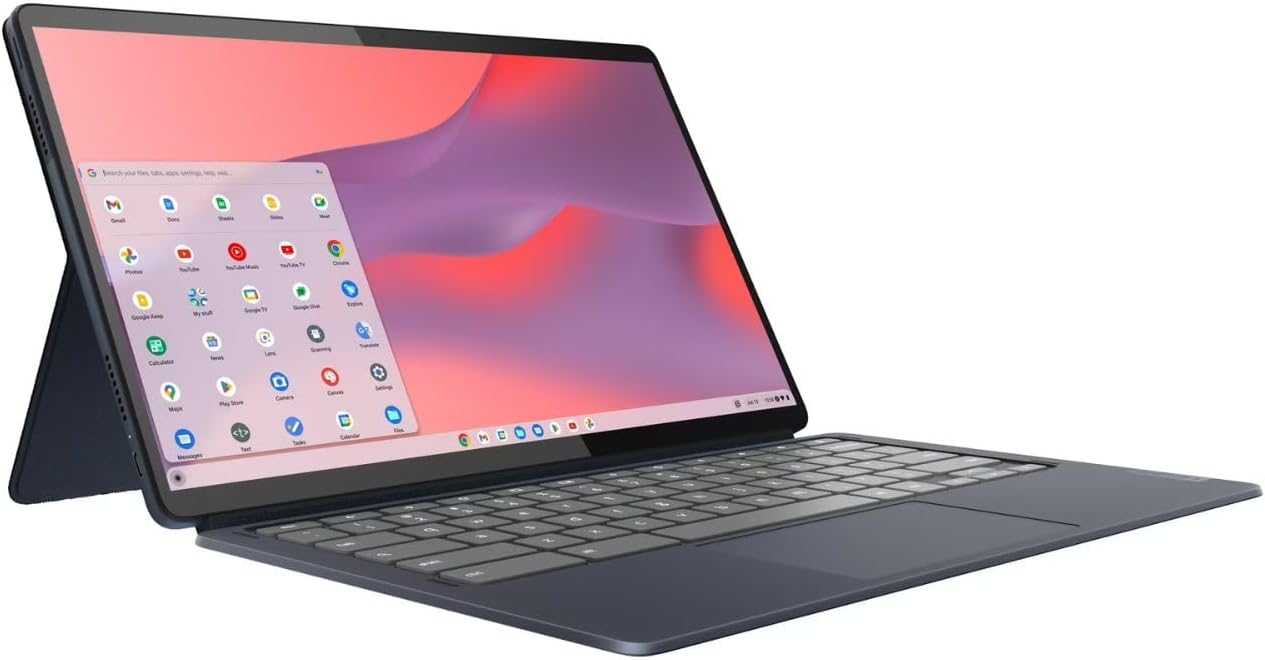
The Lenovo Chromebook Duet 5 is different from the traditional laptops on this list.
It’s a tablet-style Chromebook with a detachable keyboard and a 13.3-inch OLED display.
That OLED screen is the main reason to consider it. Movies and television shows look particularly good thanks to rich colors and deep blacks.
You can attach the keyboard when you need to type, then remove it when you want to relax and watch something.
RTINGS measured approximately eight hours of video playback in its testing. It also found the keyboard better suited to occasional typing than extended work sessions.
Key features
-
13.3-inch OLED display
-
ChromeOS
-
Detachable keyboard
-
Built-in kickstand
-
Touchscreen
-
USB-C connectivity
What we like: Excellent OLED screen, flexible tablet design, and good video playback endurance.
What could be better: Limited suitability for long typing sessions, modest performance, and no built-in headphone jack.
Who should buy it?
Travelers, casual users, and anyone who values watching movies and browsing over demanding productivity tasks.
Buying advice: Because this is an older model, check whether the Amazon listing is new, renewed, or used. Also confirm the keyboard is included.
Check Lenovo Chromebook Duet 5 price on Amazon
10. Lenovo Chromebook Duet Gen 9 – Best Compact 2-in-1 Laptop
Sometimes a full-size laptop is more than you need.
The Lenovo Chromebook Duet Gen 9 is a compact alternative that works as both a tablet and a small laptop.
Its 11-inch touchscreen makes it easy to carry in a backpack, and the detachable keyboard is useful when you need to write an email or complete a short assignment.
It’s particularly convenient for reading, browsing, watching videos, and working while traveling.
RTINGS found that it delivered approximately eight to nine hours of light-use battery life and around seven hours of video playback.
Key features
-
11-inch touchscreen
-
ChromeOS
-
Detachable keyboard
-
Built-in kickstand
-
Stylus support
-
Compact design
What we like: Small size, flexible design, and convenient touchscreen.
What could be better: The compact keyboard and screen aren’t ideal for extended office work. A stylus isn’t included with every configuration.
Who should buy it?
Travelers, younger students, and buyers looking for a lightweight secondary computer.
Buying advice: Check the included accessories carefully. Some listings may not include the same keyboard or pen bundle.
Check Lenovo Chromebook Duet Gen 9 price on Amazon
How to Choose the Best Laptop Under $500
Buying a budget laptop isn’t just about finding the lowest price. A cheap laptop with inadequate memory or a poor display can become frustrating surprisingly quickly.
Here’s what deserves your attention.
Processor: Don’t pay for more power than you need
For ordinary tasks, an AMD Ryzen 3 or Intel Core i3-class processor can be sufficient.
If you frequently multitask or run more demanding office applications, look for a Ryzen 5 or Core i5 configuration.
The exact processor generation matters, so don’t judge performance by the Ryzen or Core branding alone.
RAM: Aim for at least 8GB
For Windows laptops, 8GB should be your starting point.
If you can find a model with 16GB RAM under $500, it’s often worth the additional cost. The extra memory can make a noticeable difference when working with multiple applications.
Chromebooks can work comfortably with 8GB for ordinary tasks, while 4GB models are better reserved for light browsing.
Storage: 256GB SSD is a sensible minimum
A 128GB drive fills up quickly once you install applications and download files.
For a Windows laptop, 256GB SSD storage is a reasonable starting point, while 512GB provides more flexibility.
Avoid paying a premium for huge advertised storage capacities without checking whether the listing includes a small internal drive combined with external storage or cloud storage.
Display: Choose Full HD whenever possible
A 1920 × 1080 display is preferable to a basic 1366 × 768 panel on a 15.6-inch laptop.
An IPS screen is also generally a better choice than a low-quality TN panel because viewing angles are wider.
For frequent outdoor use, brightness matters just as much as resolution.
Battery life: Read independent test results
Manufacturer battery estimates don’t always reflect how people use their laptops.
Look for independent reviews that measure battery life under repeatable conditions. Around eight hours of real-world use is a reasonable target, while ten hours or more is especially useful for students and commuters.
Windows or Chromebook: Which should you buy?
| Choose Windows if you… | Choose Chromebook if you… |
|---|---|
| Need traditional desktop applications | Mainly use web applications |
| Work with specialized business software | Use Google Docs, Sheets, and Gmail |
| Want broader peripheral compatibility | Prefer a simpler operating system |
| Need greater offline software flexibility | Mainly browse, stream, and study online |
Frequently Asked Questions
What is the best laptop under $500 in 2026?
The Lenovo IdeaPad Slim 3x is our top overall recommendation when its 16GB Snapdragon X configuration is available for $500 or less. If you prefer a traditional AMD-powered Windows laptop, the Acer Aspire 3 A315-24P is a strong alternative.
Is a $500 laptop good enough for college?
Yes. A $500 laptop can comfortably handle research, assignments, presentations, video calls, and most everyday academic work. Students studying architecture, engineering, 3D design, or video production may need more powerful hardware.
Can I get a gaming laptop for under $500?
You can find laptops that handle lightweight games, older titles, and some esports games at reduced settings. However, new laptops under $500 generally aren’t designed for demanding modern games.
Is 8GB RAM enough in 2026?
For basic tasks, yes. But 16GB is a better choice for a Windows laptop you plan to keep for several years, particularly if you multitask frequently.
Are Chromebooks better than cheap Windows laptops?
They can be. Chromebooks often provide a good experience for browsing, streaming, and online schoolwork. Windows laptops are more versatile when you need specialized applications.
What laptop brands are most reliable under $500?
Acer, Lenovo, ASUS, HP, and Dell all sell budget laptops worth considering. Reliability depends on the specific model, configuration, build quality, and warranty rather than the brand name alone.
Which Laptop Under $500 Should You Buy?
For most buyers, the Lenovo IdeaPad Slim 3x is the first laptop worth checking. Its combination of memory, battery life, and everyday performance makes it appealing when discounted below $500.
If you want a more affordable Windows laptop, the Acer Aspire 3 A315-24P is an excellent starting point. It handles everyday tasks without unnecessary extras.
Students trying to keep costs down should consider the Acer Aspire Go 15, while buyers who primarily use Google applications may be happier with the ASUS Chromebook Plus CX34.
Whichever laptop you choose, don’t buy based on the model name alone. Check the processor, RAM, storage, screen resolution, and seller before placing your order. Two laptops with nearly identical names can perform very differently.
And remember, the best laptop under $500 isn’t necessarily the one with the most impressive specifications. It’s the one that handles what you do every day without making you spend more than necessary.