
Product Overview
TL;DR: The Lenovo Idea Tab positions itself as a versatile companion for college students who need a device that balances academic demands with entertainment. This 11-inch tablet features a 2.5K IPS touchscreen display and r…
Table of Contents
- Product Overview
- Key Features and Benefits
- Display Quality and Eye Comfort
- Performance and Processing Power
- AI-Powered Productivity Tools
- Battery Life and Charging
- Audio Experience
- Smart Connect Ecosystem
- Pros and Cons
- Advantages
- Limitations
- Who This Product Is Best For
- Who Should Avoid It
- Comparison Insight
- Frequently Asked Questions
- Does this tablet include the Lenovo Tab Pen?
- What operating system does the Lenovo Idea Tab run?
- How much internal storage does this tablet have?
- Can this tablet replace a laptop for college work?
- Is the display suitable for outdoor use?
- Does Smart Connect work with non-Lenovo devices?
- How does the 12-hour battery life translate to actual student use?
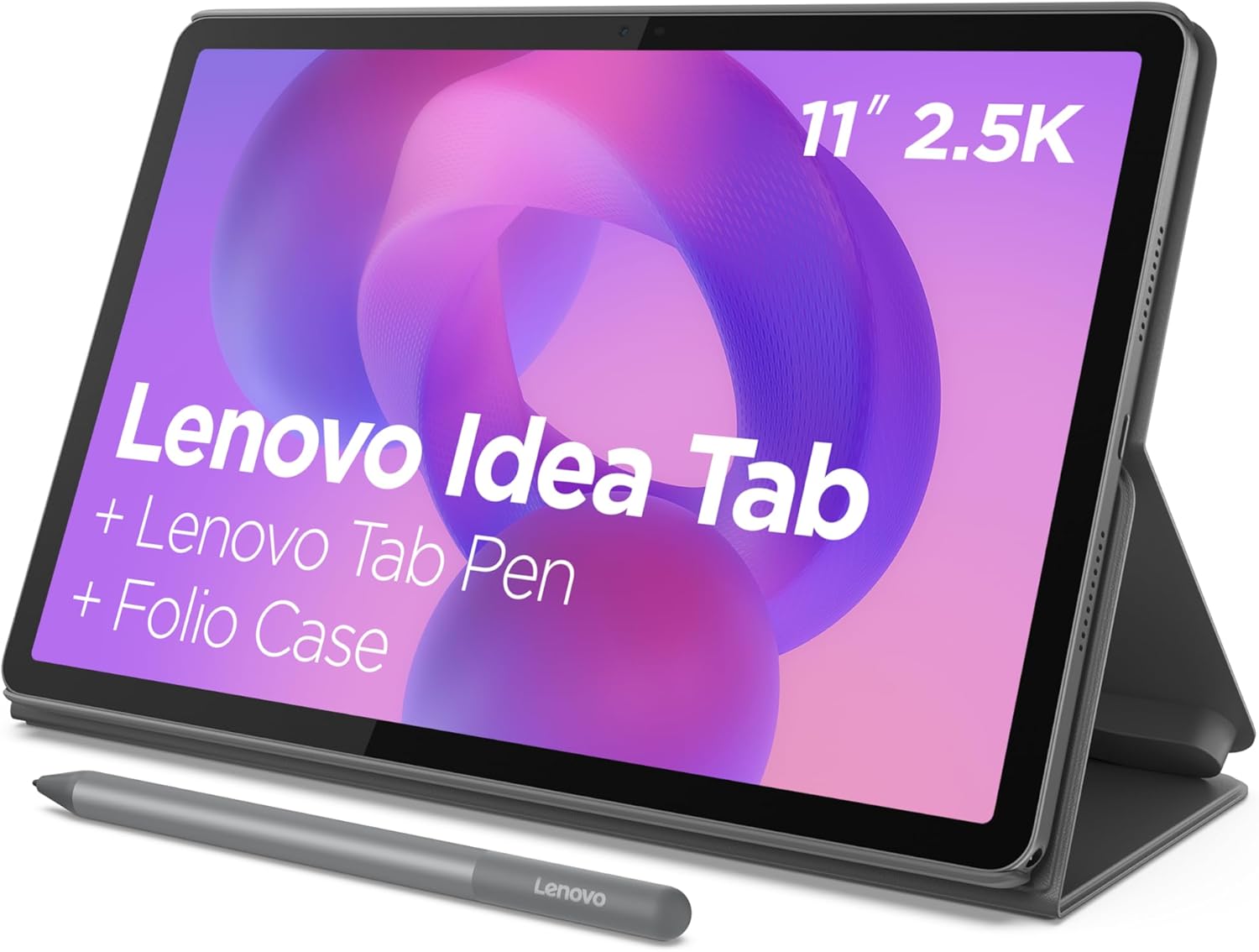
The Lenovo Idea Tab positions itself as a versatile companion for college students who need a device that balances academic demands with entertainment. This 11-inch tablet features a 2.5K IPS touchscreen display and runs on the MediaTek Dimensity 6300 processor, designed to handle everything from note-taking and research to streaming content during downtime.
What sets this tablet apart in the crowded student device market is its focus on AI-powered productivity tools and educational apps. Lenovo has bundled four learning-specific applications—AI Note, Squid, Nebo, and MyScript Calculator—that aim to streamline the study experience. Combined with features like Circle to Search with Google and Smart Connect for device synchronization, this tablet attempts to create an integrated digital ecosystem for modern students.
The device promises up to 12 hours of battery life for video playback, quad Dolby Atmos speakers, and TÜV Rheinland-certified low blue light technology to reduce eye strain during extended study sessions. Check current availability on Amazon.
Key Features and Benefits
Display Quality and Eye Comfort
The 11-inch 2.5K IPS touchscreen delivers a resolution that sits comfortably between standard HD and full 4K displays. With 72% NTSC color gamut coverage, the screen produces reasonably vibrant colors suitable for both document reading and video streaming. The display’s standout feature is the TÜV Rheinland Low Blue Light hardware certification, which actively filters harmful blue light wavelengths without requiring software filters that can distort color accuracy.
This hardware-level approach to blue light reduction is particularly beneficial for students who spend extended hours reading digital textbooks, writing papers, or attending online lectures. The touchscreen supports both finger input and the optional Lenovo Tab Pen, making it functional for note-taking and annotation.
Performance and Processing Power
The MediaTek Dimensity 6300 processor represents a mid-range chipset designed to balance performance with power efficiency. While this isn’t a flagship processor, it’s engineered to handle typical student workflows: multiple browser tabs, document editing, video conferencing, and media streaming. The AI-enhanced multitasking capabilities help optimize resource allocation when switching between applications.
For context, this processor should comfortably run productivity apps, handle video playback at high resolutions, and manage light multitasking. However, users shouldn’t expect performance comparable to premium tablets or laptops when running intensive applications like advanced video editing or high-end gaming.
AI-Powered Productivity Tools
Lenovo has integrated several educational and productivity applications specifically designed for student workflows:
- Lenovo AI Note: An intelligent note-taking application that uses AI to organize and categorize your notes automatically
- Squid: A digital notebook app that allows natural handwriting and drawing, ideal for students who prefer handwritten notes
- Nebo: Advanced note-taking software with handwriting recognition that converts written notes to typed text
- MyScript Calculator: A unique calculator that recognizes handwritten mathematical expressions and solves them in real-time
The Circle to Search with Google feature enables users to circle any on-screen content with their finger or stylus to instantly search for information or translate text without switching apps. This functionality streamlines research and language learning tasks considerably.
Battery Life and Charging
Lenovo claims up to 12 hours of YouTube playback on a single charge, which translates to a full day of moderate use for most students. Actual battery life will vary based on screen brightness, application usage, and connectivity settings. The included 20W fast charger provides quicker top-ups compared to standard 10W or 15W chargers, reducing downtime between classes or study sessions.
Audio Experience
The quad speaker system tuned with Dolby Atmos technology delivers spatial audio that enhances both entertainment and educational content. Four speakers positioned around the tablet create a more immersive soundstage compared to dual-speaker configurations, making group study sessions or casual movie watching more enjoyable without external speakers.
Smart Connect Ecosystem
The Smart Connect feature facilitates seamless integration with other Lenovo devices and compatible smartphones. This allows students to start a task on their tablet and continue on their laptop or phone without manually transferring files through email or cloud storage. Tasks, notifications, and clipboard content can sync across devices when connected to the same network.
Pros and Cons
Advantages
- Student-focused software bundle: Four pre-installed educational apps provide immediate productivity value without additional purchases
- Eye-friendly display: Hardware-level blue light filtering reduces eye strain during extended use
- All-day battery life: 12-hour video playback capability supports full-day usage on campus
- Quality audio system: Quad Dolby Atmos speakers deliver better sound than typical tablet configurations
- Circle to Search integration: Streamlines research and translation tasks without app switching
- 2.5K resolution: Sharp display quality suitable for reading text and viewing multimedia content
- Fast charging support: 20W charger reduces charging time compared to standard options
- Cross-device connectivity: Smart Connect simplifies workflow across multiple devices
Limitations
- Mid-range processor: The MediaTek Dimensity 6300 may struggle with demanding applications or heavy multitasking
- Stylus not included: The Lenovo Tab Pen appears to be sold separately, adding to the total cost for users who need stylus functionality
- Limited gaming capability: Not designed for graphics-intensive gaming beyond casual titles
- Storage specifications unclear: RAM and internal storage capacity are not specified in the provided information
- Android ecosystem limitations: Some professional desktop applications may not have full-featured Android equivalents
- Smart Connect compatibility: Full functionality likely requires other Lenovo devices in your ecosystem
Don’t Miss This
Who This Product Is Best For
The Lenovo Idea Tab is ideally suited for:
- College and university students who need a portable device for note-taking, research, reading digital textbooks, and attending online classes
- Budget-conscious learners seeking a capable tablet that includes educational software without requiring additional app purchases
- Visual learners who benefit from handwritten notes, sketches, and diagrams in their study process
- Students in the Lenovo ecosystem who already own Lenovo laptops or other devices and want seamless integration
- Casual content consumers who want a device that balances productivity with entertainment capabilities
- Users concerned about eye health who spend long hours reading digital content and want hardware-level blue light protection
Who Should Avoid It
This tablet may not be the right choice for:
- Professional creatives who need powerful processors for video editing, 3D rendering, or graphic design work
- Serious mobile gamers looking for high-performance gaming capabilities with the latest graphics processing
- Users requiring specific desktop software that doesn’t have adequate Android alternatives or mobile versions
- Apple ecosystem users who are deeply integrated with iPad-specific apps, iCloud services, and cross-device features like Handoff and Universal Control
- Those needing laptop replacement: While suitable for many tasks, this tablet cannot fully replace a laptop for all academic or professional workflows
- Budget shoppers expecting a stylus: If the pen is essential to your workflow and sold separately, factor that additional cost into your decision
Comparison Insight
In the student tablet market, the Lenovo Idea Tab competes with devices like the Samsung Galaxy Tab A series, Amazon Fire HD tablets, and entry-level iPads. Compared to Amazon Fire tablets, the Lenovo offers superior processing power and a more open Android ecosystem. Against Samsung’s offerings, the Lenovo distinguishes itself through its bundled educational software and AI-powered features.
When compared to Apple’s base iPad, the Lenovo likely comes in at a lower price point while offering comparable screen quality and battery life. However, iPads generally provide stronger long-term software support, more optimized apps, and better resale value. The choice between them often comes down to ecosystem preference and budget constraints.
The MediaTek Dimensity 6300 processor sits in the mid-range performance tier—more capable than entry-level Snapdragon 600 series chips but below flagship Snapdragon 8-series or Apple’s M-series processors. This positioning makes it suitable for educational tasks while keeping costs reasonable.
Frequently Asked Questions
Does this tablet include the Lenovo Tab Pen?
Based on the product information provided, the Lenovo Tab Pen is mentioned as compatible with the Circle to Search feature, but it’s not explicitly stated whether it’s included in the package. Potential buyers should verify whether the pen is bundled or sold separately before purchasing, as this affects the total investment required.
What operating system does the Lenovo Idea Tab run?
While not explicitly stated in the provided information, the mention of Google’s Circle to Search feature and the Android app ecosystem strongly indicates this tablet runs on Android OS. The specific Android version is not publicly available in the provided details.
How much internal storage does this tablet have?
The storage capacity is not specified in the provided product information. This is important information for potential buyers to verify, as storage needs vary significantly depending on whether you plan to download many apps, store videos, or keep large document libraries offline.
Can this tablet replace a laptop for college work?
For many students, this tablet can handle a significant portion of college work including note-taking, research, document editing, video conferencing, and content consumption. However, it may not fully replace a laptop for students who need to run specific desktop software, perform intensive multitasking, or complete tasks that require precise keyboard and mouse input. It works best as a complementary device or primary device for students with lighter computing needs.
Is the display suitable for outdoor use?
The product information doesn’t specify the maximum brightness level or outdoor visibility features. IPS displays generally perform better in bright conditions than OLED screens in terms of readability, but without specific nit ratings, it’s difficult to confirm outdoor performance. Users planning significant outdoor use should test this aspect if possible.
Does Smart Connect work with non-Lenovo devices?
While the Smart Connect feature is highlighted as a key benefit, the extent of compatibility with non-Lenovo devices is not clearly specified. Cross-device features typically work best within the same manufacturer’s ecosystem, so users with mixed-brand devices should research compatibility before relying on this feature as a deciding factor.
How does the 12-hour battery life translate to actual student use?
The 12-hour figure is based on YouTube video playback, which is a standardized but specific use case. Real-world battery life for students will