OneXPlayer X2 Review: The Ultimate 3-in-1 Handheld Gaming PC with Intel Arc G3 Extreme Processor

Product Overview
TL;DR: Product Overview The OneXPlayer X2 represents a bold attempt to bridge the gap between portable console Gaming and productivity computing. This 3-in-1 gaming handheld features Intel’s latest Arc G3 Extreme processor paired wi…
Table of Contents
- Product Overview
- Key Features and Benefits
- Processing Power That Adapts
- Display Quality for Gaming and Work
- AI Processing Capabilities
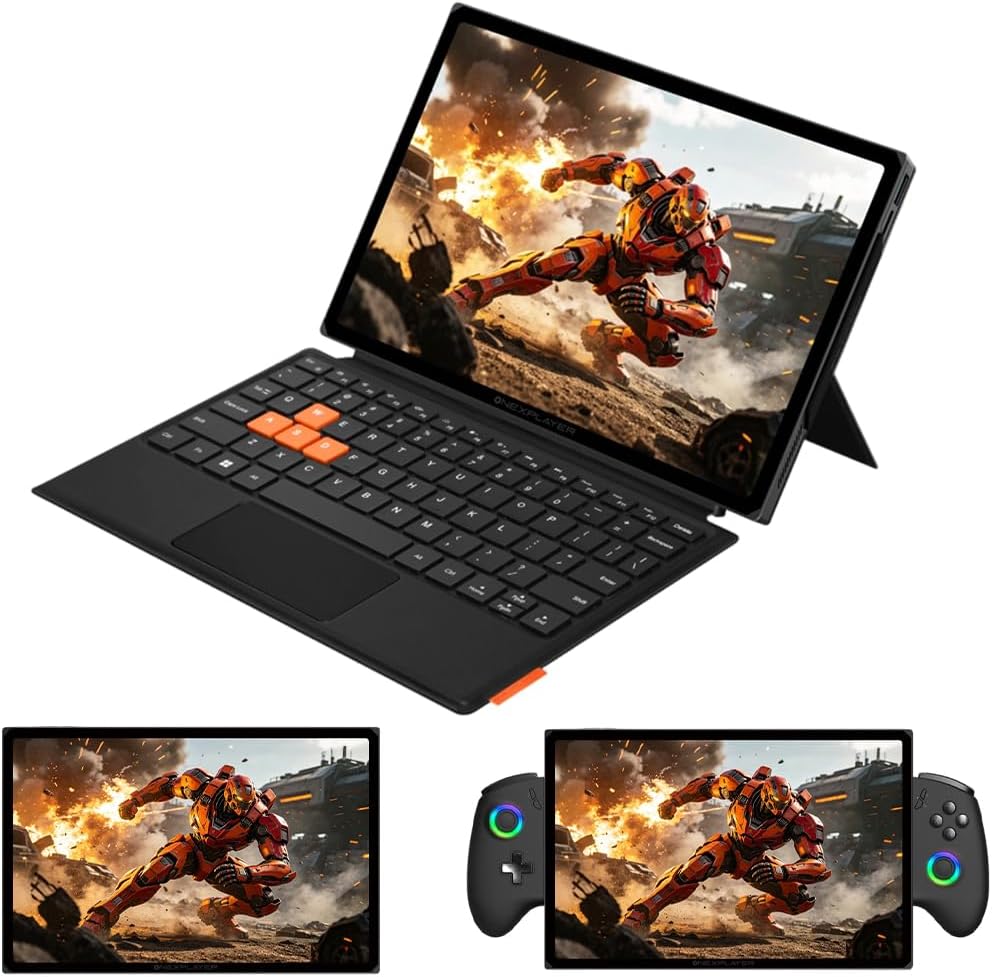
- Versatile Form Factor
- Thermal Management and Battery Life
- Pros and Cons
- Advantages
- Limitations
- Who This Product Is Best For
- Who Should Consider Alternatives
- Comparison Insights
- Frequently Asked Questions
- What games can the OneXPlayer X2 run?
- How long does the battery actually last?
- Is the magnetic keyboard included?
- Can I upgrade the RAM or storage?
- How does the cooling system perform under load?
- Does it work with external GPUs?
- What operating system does it run?
- How does XeSS 3.0 compare to DLSS or FSR?
- In Conclusion
The OneXPlayer X2 represents a bold attempt to bridge the gap between portable gaming and productivity computing. This 3-in-1 gaming handheld features Intel’s latest Arc G3 Extreme processor paired with B390 graphics, a generous 48GB of RAM, and a spacious 1TB SSD. What sets it apart from competitors is its detachable controller design and magnetic keyboard accessory, allowing it to transform from a handheld gaming device into a tablet or laptop-style workstation.
At its core, the X2 targets users who refuse to compromise between gaming performance and professional productivity. The 10.95-inch 2.5K display with 120Hz refresh rate provides the visual real estate and smoothness needed for both AAA gaming and content creation tasks. With 159 TOPS of local AI processing power and a robust cooling system, OneXPlayer positions this device as a premium all-in-one solution for mobile computing.
Key Features and Benefits
Processing Power That Adapts
The Intel Arc G3 Extreme processor brings a hybrid architecture with 14 cores distributed across 2 performance cores, 8 efficiency cores, and 4 low-power efficiency cores. This configuration allows the system to intelligently allocate resources based on your current task. When gaming, the performance cores boost up to 4.7GHz to deliver smooth frame rates. During lighter tasks like web browsing or document editing, the efficiency cores take over to preserve battery life.
The Arc B390 GPU with 12 Xe3 cores represents Intel’s latest graphics architecture. The inclusion of XeSS 3.0 upscaling technology is particularly noteworthy, as it can effectively double frame rates in supported games while maintaining visual quality. This makes demanding titles more playable on a portable device without requiring native rendering at the full 2.5K resolution.
Display Quality for Gaming and Work
The 10.95-inch LTPS display offers a resolution of 2560×1600 pixels, providing sharp text for productivity work and detailed visuals for gaming. The 120Hz refresh rate ensures smooth motion in fast-paced games and responsive scrolling during everyday use. With 138% sRGB color coverage and 540 nits of brightness, the screen performs well in various lighting conditions, though direct sunlight may still present challenges as with most portable devices.
DC dimming technology reduces flicker at lower brightness levels, which can help minimize eye strain during extended use. This feature proves especially valuable for users who game or work in dimly lit environments.
AI Processing Capabilities
The 159 TOPS (Tera Operations Per Second) of AI processing power comes from two sources: a 46 TOPS NPU (Neural Processing Unit) and 113 TOPS from GPU-accelerated AI tasks. This local AI capability allows the device to run machine learning models without relying on cloud services, which benefits privacy and reduces latency.
Practical applications include real-time image upscaling, background removal in video calls, voice-to-text transcription, and AI-assisted photo editing. By offloading these tasks to dedicated AI hardware, the CPU and GPU remain free for your primary applications, potentially extending battery life and maintaining performance.
Versatile Form Factor
The detachable controller design distinguishes the X2 from fixed-control handhelds. When you need maximum portability for gaming, attach the controllers for a traditional handheld experience. Remove them to use the device as a tablet for media consumption or light productivity. Add the Pogo Pin magnetic keyboard (availability and inclusion status not specified in provided information) to create a laptop-like setup for typing-intensive work.
The 173-degree free-stop kickstand provides flexible positioning whether you’re gaming at a desk, watching content on a plane, or presenting to colleagues. Dual biometric security through facial recognition and fingerprint scanning offers convenient yet secure access to your data.
Thermal Management and Battery Life
Portable gaming devices face a constant challenge: delivering performance without overheating or draining the battery too quickly. The X2 addresses this with a comprehensive cooling system featuring dual copper heat pipes, a large aluminum fin array, and a liquid-bearing fan capable of 5,400 RPM. This configuration aims to dissipate heat efficiently while managing noise levels.
The 65Wh battery capacity is substantial for a device of this size. Intelligent power management works alongside the hybrid CPU architecture to balance performance and endurance. Actual battery life will vary significantly based on your usage—expect shorter runtime during intensive gaming sessions and longer life during productivity tasks or media playback.
Hall effect joysticks and triggers use magnetic sensors instead of traditional potentiometers, which theoretically eliminates stick drift over time. This represents a significant quality-of-life improvement for a device you’ll likely use frequently.
Pros and Cons
Advantages
- Genuine versatility: The detachable controllers and kickstand enable multiple usage modes without feeling like compromises
- Generous specifications: 48GB RAM and 1TB storage exceed what most competitors offer at this form factor
- High-quality display: The 2.5K resolution and 120Hz refresh rate provide excellent visual quality for both gaming and productivity
- Future-proof AI capabilities: Local AI processing positions the device well for emerging applications
- Advanced cooling system: The comprehensive thermal solution should maintain performance during extended sessions
- Hall effect controls: Drift-resistant joysticks address a common complaint with handheld gaming devices
- Dual biometric security: Face and fingerprint recognition add convenience and protection for work-related data
Limitations
- Size and weight considerations: A 10.95-inch device with these specifications will likely be heavier than dedicated gaming handhelds, potentially causing fatigue during extended handheld sessions
- Intel Arc gaming ecosystem: While improving, Intel’s Arc graphics still have less mature driver support compared to AMD or NVIDIA solutions in some titles
- Premium pricing expected: These specifications typically command high prices, which may limit the target audience (specific pricing information not publicly available)
- Windows overhead: Running full Windows (operating system not explicitly confirmed but implied) consumes more resources than dedicated gaming operating systems
- Keyboard accessory details unclear: Whether the magnetic keyboard is included or sold separately impacts the overall value proposition
- Battery life variability: While the 65Wh capacity is good, intensive gaming will still drain it relatively quickly
- Learning curve: The multiple form factors and modes may require adjustment for users accustomed to simpler devices
Who This Product Is Best For
The OneXPlayer X2 targets a specific type of user who needs genuine flexibility in a portable device:
Digital nomads and traveling professionals who need to game during downtime but also handle work tasks without carrying multiple devices will appreciate the 3-in-1 design. The ability to detach controllers and use the kickstand with a keyboard creates a legitimate mobile workstation.
Content creators and developers benefit from the 48GB of RAM and local AI capabilities. Video editors can preview timelines smoothly, developers can run virtual machines, and AI enthusiasts can experiment with local models without cloud dependencies.
Gaming enthusiasts who value versatility over maximum performance will find the X2 compelling. If you want to play demanding titles portably but also enjoy indie games, retro emulation, and productivity tasks on the same device, this hybrid approach makes sense.
Users who travel frequently and want to minimize their tech carry will appreciate consolidating a gaming handheld, tablet, and lightweight laptop into one device. The biometric security features add peace of mind when traveling with work data.
Early adopters interested in AI applications will find the 159 TOPS of local processing power enables experimentation with emerging AI tools and workflows that would otherwise require cloud services or desktop workstations.
Don’t Miss This
Who Should Consider Alternatives
This device may not suit everyone’s needs or preferences:
Budget-conscious gamers should look at more affordable dedicated gaming handhelds. The premium specifications here come with a corresponding price tag, and you can play most games perfectly well on less expensive devices.
Users prioritizing maximum gaming performance would be better served by gaming laptops or desktop PCs. While the X2 offers impressive performance for its size, it cannot match the raw power of larger form factors with desktop-class components.
Those seeking the lightest possible portable gaming should consider smaller dedicated handhelds. The 10.95-inch display and productivity features add weight that may become uncomfortable during long handheld gaming sessions.
Console-style gamers who prefer simplicity might find the Windows environment and multiple form factors unnecessarily complex. Devices like the Steam Deck offer a more streamlined, console-like experience.
Users heavily invested in AMD or NVIDIA ecosystems may want to wait for more mature Intel Arc driver support. While Intel has made significant progress, some games still perform better or have fewer issues on competing GPU architectures.
Anyone requiring all-day battery life for intensive tasks should recognize that no current portable gaming device can deliver both high performance and 8+ hours of active use. You’ll need to manage expectations or carry a power bank.
Comparison Insights
The OneXPlayer X2 competes in a crowded space of premium gaming handhelds and 2-in-1 devices:
Compared to the Steam Deck OLED, the X2 offers significantly more RAM, storage, and a higher-resolution display. However, the Steam Deck provides a more polished gaming-focused experience with better software optimization and a lower price point. The Steam Deck’s fixed controls and gaming-centric interface trade versatility for simplicity.
Against the ASUS ROG Ally X, both devices target similar users, but the X2’s detachable controllers and larger display offer different advantages than the Ally X’s more traditional handheld form factor. The choice depends on whether you value the 3-in-1 flexibility or prefer a more conventional gaming handheld with excellent AMD performance.
Versus Microsoft Surface devices, the X2 brings gaming capabilities that Surface tablets lack while maintaining productivity features. However, Surface devices offer better keyboard accessories, more refined software experiences, and stronger business support. The X2 serves users who game first and work second, while Surface targets the opposite priority.
Compared to gaming laptops in general, the X2 sacrifices raw performance and upgrade potential for portability and versatility. A gaming laptop provides better cooling, more powerful components, and a full keyboard, but you cannot use it as a handheld gaming device or tablet.
Frequently Asked Questions
What games can the OneXPlayer X2 run?
The Intel Arc G3 Extreme processor with B390 graphics should handle most modern games, though performance varies by title. Well-optimized games and those supporting XeSS 3.0 upscaling will perform best. Expect good performance in esports titles, indie games, and many AAA games at medium to high settings. The most demanding recent releases may require settings adjustments to maintain smooth frame rates at the native 2.5K resolution.
How long does the battery actually last?
Battery life depends heavily on your activity. Intensive gaming might provide 2-3 hours, while productivity tasks like document editing or web browsing could extend to 5-7 hours. Video playback typically falls somewhere in between. The intelligent power management and hybrid CPU architecture help optimize runtime, but the 65Wh capacity has physical limits when powering high-performance components.
Is the magnetic keyboard included?
This information is not publicly available in the provided product details. Check with the seller or manufacturer to confirm whether the Pogo Pin magnetic keyboard ships with the device or requires separate purchase.
Can I upgrade the RAM or storage?
Specific upgrade capabilities are not detailed in the available information. Many compact devices use soldered RAM for space efficiency, which would prevent memory upgrades. The SSD may be replaceable depending on the internal design. Consult the manufacturer’s specifications or teardown guides before purchasing if upgradability is essential to your decision.
How does the cooling system perform under load?
The dual copper heat pipes, aluminum fin array, and 5,400 RPM fan represent a robust cooling solution for this form factor. These components should manage thermal throttling effectively during gaming sessions. However, the device will likely generate noticeable fan noise under heavy load, and the exterior may become warm to the touch. This is typical for high-performance portable devices.
Does it work with external GPUs?
The available specifications do not mention Thunderbolt 4 or external GPU support. This capability would require specific hardware and would be highlighted if available. For the most demanding gaming, the internal Arc B390 GPU represents the performance ceiling.
What operating system does it run?
While not explicitly stated, devices of this type typically run Windows 11, given the productivity features and Intel processor compatibility. This allows access to the full Windows gaming library and professional applications, though it also means dealing with Windows overhead and updates.
How does XeSS 3.0 compare to DLSS or FSR?
Intel’s XeSS 3.0 uses AI upscaling similar to NVIDIA’s DLSS and AMD’s FSR. It can significantly improve frame rates by rendering at a lower resolution and intelligently upscaling. XeSS works on Intel Arc GPUs and offers good quality, though game support is still growing compared to the more established DLSS and FSR. Performance gains vary by game and implementation.
In Conclusion
The OneXPlayer X2 represents an ambitious attempt to create a truly versatile portable computing device. Its greatest strength lies in its refusal to compromise—it doesn’t ask you to choose between gaming and productivity, or between handheld convenience and laptop functionality. The detachable controllers, substantial kickstand, and magnetic keyboard option create genuine flexibility rather than gimmicky features.
The specifications impress on paper: 48GB RAM, 1TB storage, and Intel’s latest Arc G3 Extreme processor with B390 graphics position this device as a premium offering. The 159 TOPS of local AI processing power future-proofs the device as AI applications become more prevalent in both gaming and productivity workflows. The 2.5K 120Hz display delivers visual quality that satisfies both gamers and content creators.
However, this versatility comes with trade-offs. The device will likely carry more weight than dedicated gaming handhelds, and the premium specifications suggest a price point that won’t appeal to casual users. Intel Arc graphics, while improving rapidly, still face occasional compatibility issues compared to more established GPU options. Battery life, while respectable for the specifications, cannot match lighter devices during intensive use.
The X2 succeeds best when you view it as a primary portable device rather than a specialized gaming handheld. If you travel frequently, work remotely, or simply want to minimize the number of devices you own, the 3-in-1 design delivers genuine value. The ability to game during a flight, then dock the device with a keyboard to finish a presentation, then detach everything to watch content before bed—all with one device—represents meaningful convenience.
For users seeking the absolute best gaming performance in a portable form factor, or those on a tight budget, alternatives exist that better serve those specific priorities. But for the right user—someone who values versatility, appreciates premium build quality, and needs both gaming and productivity capabilities in a portable package—the OneXPlayer X2 presents a compelling proposition.
Ready to experience 3-in-1 versatility? Check current availability and specifications for the OneXPlayer X2 on Amazon to see if this innovative gaming handheld fits your mobile computing needs.
Last Refreshed: August 13, 2026