Product Overview
TL;DR: The Virtusx Jethro AI Mouse represents an interesting convergence of traditional input devices and modern artificial intelligence. Rather than being just another wireless mouse, this device integrates voice recording,…
Table of Contents
- Product Overview
- Key Features and Benefits
- Integrated Voice and AI Capabilities
- Unified AI Software Platform
- Privacy-Focused Design
- Standard Mouse Functionality
- Pros and Cons
- Advantages
- Limitations
- Who This Product Is Best For
- Who Should Consider Alternatives
- Comparison Insight
- Frequently Asked Questions
- Do I need to pay subscription fees for the AI features?
- How accurate is the voice typing?
- Can I use this mouse without the AI software?
- What is the battery life?
- Does it work with tablets or smartphones?
- Is the microphone quality good enough for professional recordings?
- Can I customize the button functions?
- How does the local encryption work?
- In Conclusion
The Virtusx Jethro AI Mouse represents an interesting convergence of traditional input devices and modern artificial intelligence. Rather than being just another wireless mouse, this device integrates voice recording, transcription, and AI-powered productivity tools directly into hardware you’re already using daily.
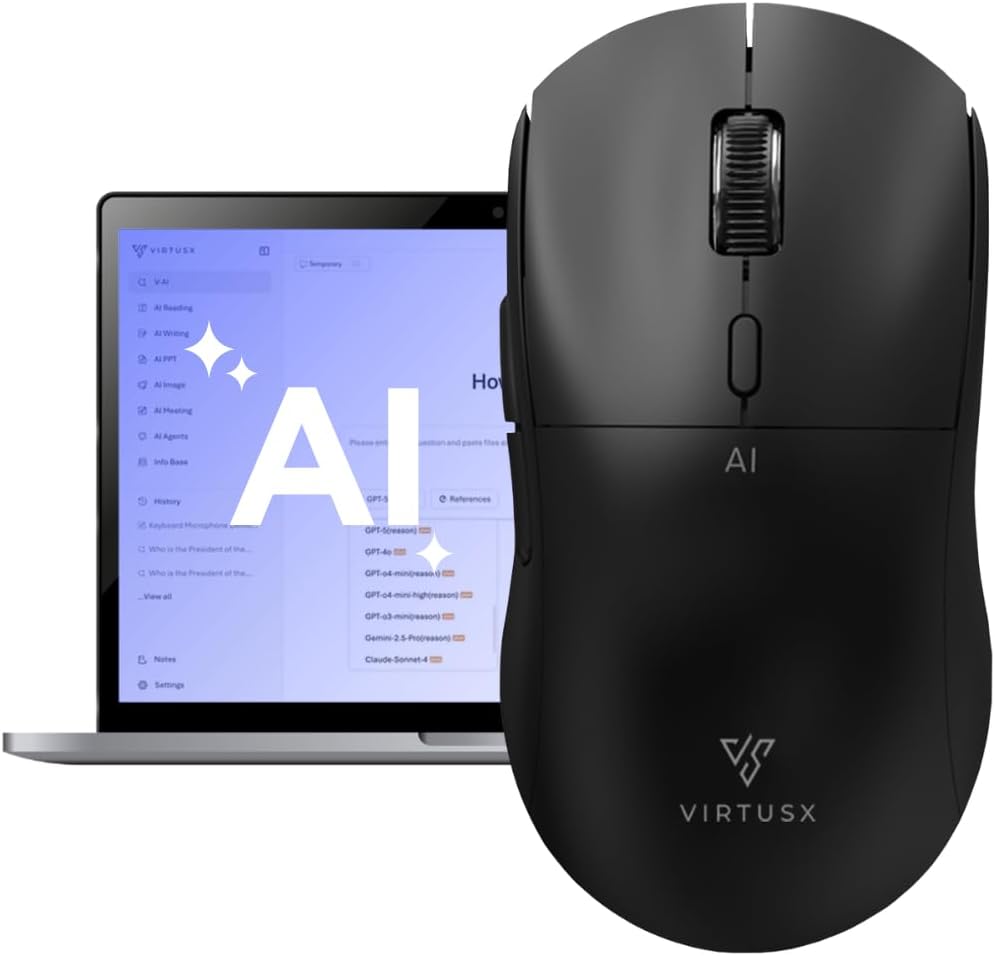
At its core, the Jethro V1 functions as a standard wireless mouse with ergonomic design and adjustable DPI settings. What sets it apart is the built-in high-precision microphone and dedicated buttons that connect to a centralized AI software platform. This platform, called V-AI, brings together multiple AI services including ChatGPT, Gemini, Claude, and Grok into one interface.
The concept is straightforward: instead of switching between your mouse, keyboard, and various AI applications, you can activate voice commands, transcribe speech to text, translate languages, and summarize content using dedicated buttons on the mouse itself. The V-AI software is included with purchase and requires no separate subscription for core features.
Compatible with both Windows and macOS, the Jethro V1 charges via USB-C and connects wirelessly to maintain a clean workspace. Setup involves downloading the V-AI software and following the included activation instructions.
Key Features and Benefits
Integrated Voice and AI Capabilities
The standout feature is the built-in microphone paired with an AI chip that enables voice typing without reaching for your keyboard. This can be particularly useful during long writing sessions, when drafting emails, or when you need to capture thoughts quickly. The transcription accuracy depends on clear speech and environmental noise levels, but the integration means you don’t need separate recording equipment for basic dictation tasks.
Three dedicated buttons provide quick access to:
- AI Access: Opens the V-AI platform interface
- Voice Activation: Triggers voice-to-text functionality
- Smart Toolbar: Launches writing enhancements, translation, and summarization tools
Unified AI Software Platform
The V-AI software consolidates multiple AI services into one dashboard. Instead of maintaining separate subscriptions or switching between browser tabs, you can access different AI models for various tasks. According to the manufacturer, this includes capabilities for:
- Voice typing and live transcription
- Real-time translation between languages
- Content summarization
- Document analysis (including PDF files)
- Image generation
- Article and presentation creation
The software is included with purchase, though it’s worth noting that while core features don’t require additional subscriptions, the underlying AI services (ChatGPT, Gemini, etc.) may have their own usage limits or premium tiers for advanced features.
Privacy-Focused Design
Data encryption happens locally on your computer rather than being sent immediately to cloud servers. You maintain visibility over file storage locations and control over what gets processed. This approach addresses common concerns about AI tools handling sensitive business or personal information.
Standard Mouse Functionality
Beyond the AI features, the Jethro V1 functions as a competent wireless mouse with:
- High-performance optical sensor
- Adjustable DPI settings for different sensitivity preferences
- Ergonomic contours designed for extended use
- Smooth gliding feet for fluid movement
- Rechargeable battery with USB-C charging
- Wireless connectivity for cable-free operation
Pros and Cons
Advantages
- Consolidated workflow: Reduces the need to switch between multiple applications for AI-assisted tasks
- Hardware integration: Dedicated buttons make AI features more accessible than keyboard shortcuts or menu navigation
- No ongoing subscription: Core V-AI software is included with purchase
- Multi-platform compatibility: Works with both Windows and macOS systems
- Privacy considerations: Local encryption and transparent file management
- Dual functionality: Serves as both a productivity tool and standard mouse
- USB-C charging: Modern charging standard that’s increasingly common
Limitations
- Learning curve: Requires familiarizing yourself with new buttons and software interface
- Software dependency: AI features only work when the V-AI software is running
- Microphone placement: Being on the mouse means audio quality may vary based on hand position and distance from mouth
- Battery life specifics: Exact battery duration is not publicly specified
- AI service limitations: While the software aggregates multiple AI platforms, you’re still subject to the capabilities and potential costs of those underlying services
- Ergonomics are personal: What works for some users may not suit others, and you can’t test the specific shape before purchase
- Newer product: Limited long-term user feedback available compared to established mouse brands
Don’t Miss This
Who This Product Is Best For
The Virtusx Jethro AI Mouse makes the most sense for specific user profiles:
Content creators and writers who frequently draft documents, articles, or emails and want faster input methods than typing. The voice-to-text feature can speed up initial drafts, while summarization and rewriting tools help with editing.
Professionals conducting virtual meetings or lectures who need to capture notes, transcribe discussions, or translate content in real time. The built-in microphone and recording capabilities serve this purpose without additional equipment.
Multilingual workers who regularly translate content between languages and want quick access to translation tools without opening separate applications.
Productivity enthusiasts who already use multiple AI tools and would benefit from having them accessible through a single interface with hardware shortcuts.
Users concerned about AI privacy who prefer local processing and transparent data handling over cloud-only solutions.
People with typing fatigue or accessibility needs who benefit from voice input alternatives, though this should not replace specialized accessibility tools.
Who Should Consider Alternatives
This product may not be ideal for:
Users satisfied with traditional mice who don’t regularly use AI tools or voice typing. The added features won’t provide value if you don’t intend to use them, and a standard ergonomic mouse might serve you better at a lower cost.
gaming-focused users who need specialized gaming mice with high polling rates, programmable buttons for macros, and RGB lighting. The Jethro V1 is designed for productivity, not gaming performance.
People in noisy environments where microphone-based features would struggle with background noise interference. Voice typing and transcription accuracy diminish significantly in loud settings.
Users who prefer minimal software and don’t want another application running in the background. The AI features require the V-AI software to be active.
Those seeking professional-grade audio recording for podcasts or high-quality transcription. While the built-in microphone serves general productivity needs, dedicated recording equipment delivers superior audio quality.
Budget-conscious buyers who primarily need a reliable wireless mouse without AI features. Traditional mice offer similar pointing and clicking functionality at significantly lower prices.
Comparison Insight
The AI mouse category is relatively new, with few direct competitors offering similar hardware-software integration. Most productivity AI tools exist as standalone applications or browser extensions, requiring you to use them separately from your input devices.
Compared to using a standard mouse plus separate AI subscriptions, the Jethro V1 offers convenience through integration and potentially lower costs by bundling the V-AI software. However, dedicated voice typing solutions like Dragon NaturallySpeaking or built-in OS features (Windows Speech Recognition, macOS Dictation) may offer more refined voice recognition for users who primarily need that single function.
For the transcription and AI writing features, standalone services like Otter.ai, Grammarly, or direct subscriptions to ChatGPT Plus offer more specialized capabilities but lack the hardware integration. The trade-off is between depth of features in specialized tools versus convenience of having multiple AI functions accessible through mouse buttons.
From a pure mouse perspective, established ergonomic options from Logitech, Microsoft, or other peripherals manufacturers may offer more refined pointing performance and build quality based on decades of hardware expertise. The Jethro V1’s value proposition centers on the AI integration rather than competing as the best traditional mouse.
Frequently Asked Questions
Do I need to pay subscription fees for the AI features?
The core V-AI software is included with purchase and does not require a separate subscription. However, the platform connects to third-party AI services (ChatGPT, Gemini, Claude, etc.) which may have their own usage limits or premium tiers. Basic functionality should work without additional costs, but advanced features from those AI providers might require their respective subscriptions.
How accurate is the voice typing?
Voice typing accuracy depends on several factors including speech clarity, accent, speaking pace, and environmental noise. The manufacturer claims exceptional accuracy, but real-world performance will vary by user and conditions. Quiet environments and clear enunciation produce the best results.
Can I use this mouse without the AI software?
Yes, the Jethro V1 should function as a standard wireless mouse for pointing and clicking even without the V-AI software running. However, the voice recording, transcription, and AI-powered features require the software to be installed and active.
What is the battery life?
Specific battery duration is not publicly available in the provided product information. The mouse uses a rechargeable battery with USB-C charging and is described as lasting “through the workday,” but exact hours will depend on usage patterns, particularly how often you use the microphone and AI features.
Does it work with tablets or smartphones?
The product information specifies compatibility with Windows and macOS computers and laptops. Compatibility with tablets or smartphones is not mentioned and would likely depend on those devices supporting standard mouse connections and the ability to run the V-AI software.
Is the microphone quality good enough for professional recordings?
The built-in microphone is designed for voice commands, transcription, and meeting notes rather than professional audio recording. While it should handle general productivity tasks, users requiring high-quality audio for podcasts, professional transcription services, or content creation would benefit from dedicated microphone equipment.
Can I customize the button functions?
The product description indicates three dedicated buttons for AI Access, Voice Activation, and Smart Toolbar functions. Whether these can be customized or remapped through the V-AI software is not specified in the available information.
How does the local encryption work?
According to the manufacturer, data is encrypted locally on your computer before processing. You maintain visibility over file storage locations and control over what gets processed. Specific technical details about the encryption method are not publicly available.
In Conclusion
The Virtusx Jethro AI Mouse presents an innovative approach to integrating artificial intelligence into daily computing tasks. By embedding AI access directly into a device you’re already using, it removes friction from productivity workflows and consolidates multiple tools into one platform.
The strongest case for this mouse comes from its convenience factor. If you regularly use voice typing, transcription, translation, or AI writing assistants, having dedicated hardware buttons and a unified software interface can genuinely streamline your work. The included V-AI software and local privacy protections add value beyond what you’d get from a basic mouse.
However, the product’s value depends heavily on how much you’ll actually use these AI features. The mouse needs to justify its cost not just as a pointing device, but as a productivity tool that saves you time and reduces app-switching. Users who rarely use voice commands or AI assistants would be paying for features they won’t utilize.
The execution appears thoughtful, with attention to privacy concerns and cross-platform compatibility. The integration of multiple AI services (ChatGPT, Gemini, Claude, Grok) into one interface addresses a real pain point for users who currently juggle multiple subscriptions and browser tabs.
Consider this mouse if you’re already invested in AI-assisted productivity and want more seamless access to those tools. It’s particularly relevant for writers, content creators, professionals who attend many meetings, and anyone who finds themselves frequently switching between their mouse and AI applications.
If you’re curious about whether this tool fits your workflow, think about your typical workday. How often do you use voice typing? Do you regularly transcribe meetings or lectures? Would having AI writing tools one click away actually change how you work? Your answers to these questions will determine whether the Jethro V1 is a worthwhile investment or an over-engineered solution to problems you don’t have.
Ready to experience AI-powered productivity at your fingertips? Check current availability and pricing on Amazon to see if the Virtusx Jethro AI Mouse is right for your workspace.