Product Overview
TL;DR: The REOLINK Home Hub Pro is a centralized network video recorder (NVR) designed to manage and store footage from multiple Reolink security cameras. This hub acts as the command center for your home security ecosystem,…
Table of Contents
- Product Overview
- Key Features & Benefits
- Centralized Camera Management
- Substantial Local Storage
- Privacy-Focused Design
- Intelligent Alert System
- High-Resolution Streaming Support
- Wi-Fi 6 Connectivity
- Pros and Cons
- Advantages
- Limitations
- Who This Product Is Best For
- Who Should Avoid It
- Comparison Insights
- Frequently Asked Questions
- Can I use cameras from other brands with this hub?
- Do I need internet connectivity for the hub to work?
- What happens if I fill up the storage capacity?
- Can I access recordings remotely when away from home?
- How many cameras can I view simultaneously?
- Is the 2TB hard drive removable or upgradeable?
- Does the siren work if the internet is down?
- What’s the difference between wired and wireless camera connections?
- In Conclusion
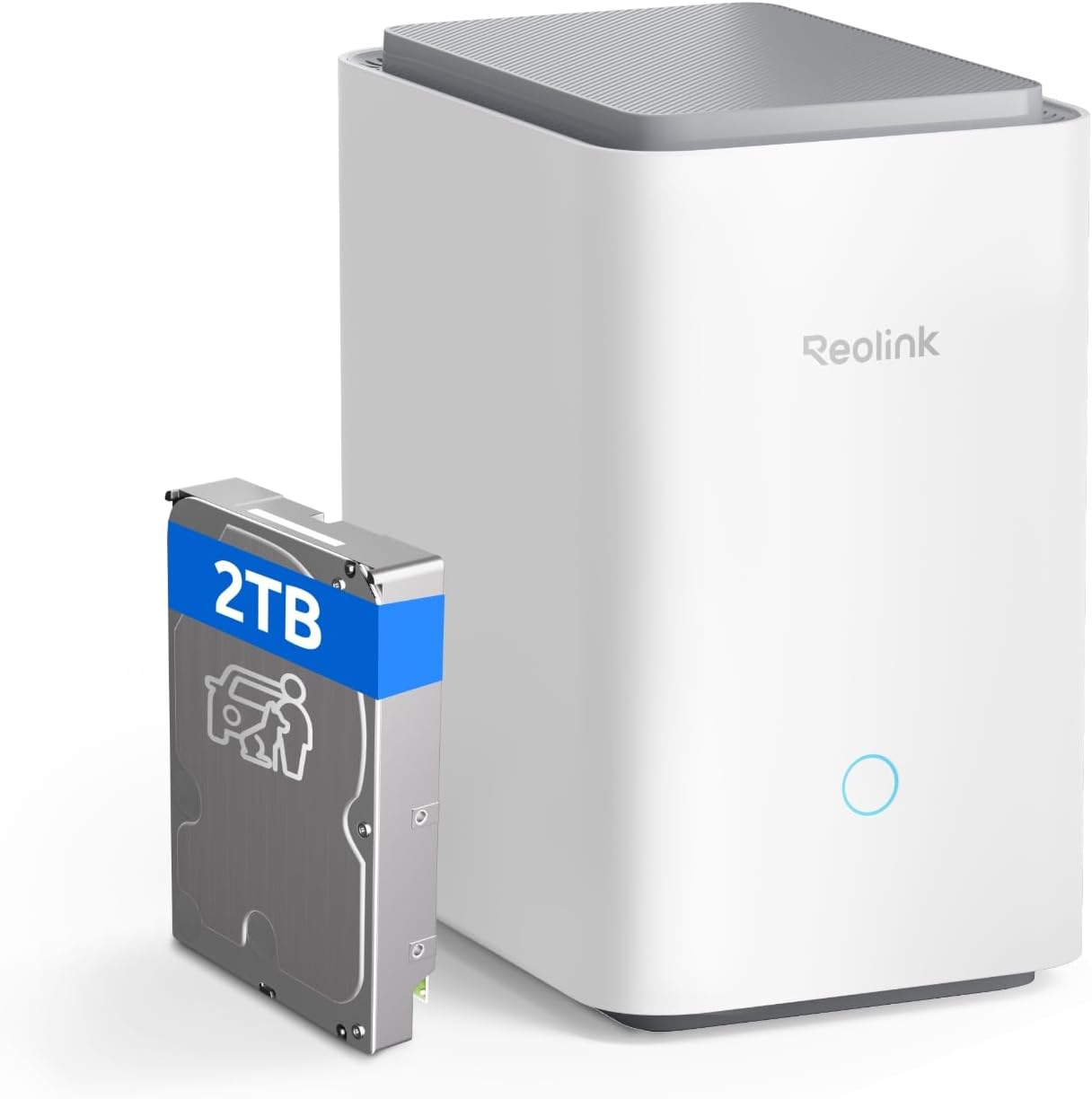
The REOLINK Home Hub Pro is a centralized network video recorder (NVR) designed to manage and store footage from multiple Reolink security cameras. This hub acts as the command center for your home security ecosystem, supporting up to 24 Reolink cameras simultaneously while providing local storage, encryption, and intelligent alert management.
What sets this hub apart is its combination of substantial storage capacity (2TB included, expandable to 16TB), Wi-Fi 6 connectivity, and a built-in 120dB siren for active deterrence. It’s positioned as a privacy-focused solution with no monthly subscription fees, appealing to users who prefer local storage over cloud-based alternatives.
This device is specifically engineered for the Reolink ecosystem and does not support third-party camera brands, making it an ideal choice for those already invested in or planning to build a Reolink security system.
Key Features & Benefits
Centralized Camera Management
The hub allows you to monitor and control up to 24 Reolink devices from a single interface through the Reolink mobile app. This includes wired cameras, wireless models, PoE (Power over Ethernet) cameras, and video doorbells. The system supports a maximum of 12 wired connections, with the remaining capacity available for wireless devices.
This centralized approach simplifies security management considerably. Instead of switching between multiple apps or interfaces, you can view all camera feeds, adjust settings, and review recordings from one location. For households or small businesses with extensive camera coverage, this consolidation saves time and reduces complexity.
Substantial Local Storage
The hub ships with a pre-installed 2TB hard drive, providing immediate storage capacity without additional purchases. More importantly, it supports HDD expansion up to 16TB, which is sufficient for weeks or even months of continuous recording depending on your camera count and resolution settings.
One technical note: when both an HDD and microSD card are inserted, the system prioritizes the HDD and does not save videos to the microSD card. This is an important consideration for users planning their storage strategy.
Privacy-Focused Design
The REOLINK Home Hub Pro employs AES-128 encryption to protect stored footage. All recordings remain on your local network, eliminating cloud storage vulnerabilities and subscription requirements. The system supports LAN-only operation, meaning it can function completely offline while still recording and storing footage.
If the hub is stolen or accessed without authorization, the encryption ensures that footage remains inaccessible without the correct password. This approach appeals to privacy-conscious users who prefer complete control over their security data.
Intelligent Alert System
The hub generates daily, weekly, and monthly detection summaries across all connected cameras, making it easier to identify patterns and review significant events without scrolling through hours of footage. The search and playback functions are designed for quick event location.
The integrated 120dB siren can be triggered automatically when AI-detected motion events occur on linked cameras. You can customize alerts with 11 pre-loaded sounds or record up to 5 custom audio messages. This active deterrence capability adds a proactive layer to your security setup beyond passive recording.
High-Resolution Streaming Support
The hub supports preview and playback at each camera’s maximum resolution, including up to 8K for compatible devices. This ensures you’re not losing image quality through compression or downscaling during live viewing or playback. For 4K and higher resolution cameras, this capability preserves the detail necessary for identifying faces, license plates, or other critical information.
Wi-Fi 6 Connectivity
Wi-Fi 6 support enables faster data transfer rates and better performance in environments with multiple connected devices. To fully utilize this feature, you’ll need a Wi-Fi 6 router and Wi-Fi 6-compatible cameras. The improved bandwidth handling reduces lag during multi-camera viewing and supports smoother streaming of high-resolution footage.
Pros and Cons
Advantages
- No monthly fees: All storage and features are included without recurring subscription costs
- Generous included storage: 2TB HDD comes pre-installed, ready to use out of the box
- Massive expansion potential: Up to 16TB total storage accommodates extensive camera networks
- Complete privacy control: Local storage with encryption keeps footage under your control
- Comprehensive camera support: Manages up to 24 Reolink devices from one interface
- Active deterrence: 120dB siren with customizable alerts adds proactive security
- Offline functionality: Continues recording even without internet connectivity
- Future-proof connectivity: Wi-Fi 6 support ensures compatibility with modern networks
- Intelligent reporting: Automated summaries simplify event review and pattern identification
Limitations
- Reolink ecosystem only: Does not support third-party camera brands, limiting flexibility
- Excludes 4G cameras: Cannot manage Reolink’s cellular-connected camera models
- Wired connection limit: Maximum 12 wired connections may restrict some installation scenarios
- MicroSD card limitation: Cannot use microSD for recording when HDD is installed
- Wi-Fi 6 requirements: Full performance benefits require Wi-Fi 6 router and compatible devices
- Initial investment: Requires purchasing Reolink cameras if not already owned
- Learning curve: Feature-rich interface may require time to master for new users
Don’t Miss This
Who This Product Is Best For
The REOLINK Home Hub Pro is ideal for several specific user groups:
Existing Reolink Users: If you already own multiple Reolink cameras, this hub consolidates management and eliminates the need for cloud subscriptions while providing substantial local storage.
Privacy-Conscious Homeowners: Those who prefer complete control over their security footage without relying on third-party cloud services will appreciate the local storage and encryption features.
Multi-Camera Installations: Homes or small businesses planning to deploy 8 or more cameras benefit significantly from centralized management and the large storage capacity.
Tech-Savvy Users: People comfortable with network configuration and who want to leverage Wi-Fi 6 and advanced features like custom siren sounds will maximize this hub’s capabilities.
Budget-Conscious Security Seekers: Those wanting to avoid monthly subscription fees while maintaining professional-grade security recording will find long-term value in this one-time purchase.
Who Should Avoid It
This hub may not suit everyone’s needs:
Mixed-Brand Camera Owners: If you use security cameras from multiple manufacturers, this hub won’t work for you. It exclusively supports Reolink devices.
Cloud-Preference Users: Those who prefer cloud storage for off-site backup redundancy or who want access without network configuration may find local-only storage limiting.
Simple Setup Seekers: Users wanting plug-and-play simplicity without network configuration or camera ecosystem planning might find this system more complex than needed.
Mobile-Only Surveillance: If you rely on Reolink’s 4G cellular cameras, this hub cannot manage them, making it unsuitable for remote locations without Wi-Fi.
Minimal Camera Users: Those with only 1-3 cameras may not need this level of centralized management and could use individual camera storage instead.
Comparison Insights
Compared to traditional NVR systems, the REOLINK Home Hub Pro offers modern connectivity with Wi-Fi 6 support, whereas many competing NVRs rely solely on wired connections. The included 2TB storage is generous compared to entry-level NVRs that often include no storage or smaller capacities.
Against cloud-based security systems like Ring or Nest, the REOLINK approach eliminates ongoing subscription costs but requires more upfront investment and technical setup. Cloud systems offer easier remote access and automatic off-site backup, while the REOLINK hub provides complete privacy control and unlimited local storage within the capacity limits.
Within the Reolink product line, this hub sits above basic NVR models by adding Wi-Fi connectivity, the loud siren, and support for wireless cameras alongside wired ones. It’s positioned as a premium option for users building comprehensive security systems.
Frequently Asked Questions
Can I use cameras from other brands with this hub?
No, the REOLINK Home Hub Pro exclusively supports Reolink-branded cameras. It does not work with third-party security camera brands.
Do I need internet connectivity for the hub to work?
No, the hub can function offline through your local network (LAN). It will continue recording and storing footage without internet access. However, remote viewing from outside your home network requires internet connectivity.
What happens if I fill up the storage capacity?
This information is not publicly available in the provided specifications. Typically, NVR systems either stop recording or overwrite the oldest footage when storage is full, but you should verify this behavior in the product manual or contact Reolink support.
Can I access recordings remotely when away from home?
Yes, through the Reolink mobile app, you can access live feeds and recordings remotely when the hub is connected to the internet. The connection is secured through your Reolink account credentials.
How many cameras can I view simultaneously?
While the hub supports up to 24 cameras, the number you can view simultaneously depends on your device’s screen size and processing power. The app typically offers multi-camera grid views with various layout options.
Is the 2TB hard drive removable or upgradeable?
The specifications indicate the hub supports up to 16TB HDD storage, suggesting the drive is user-accessible and replaceable, but specific installation procedures are not detailed in the provided information.
Does the siren work if the internet is down?
Yes, since the hub operates on your local network, the siren can be triggered by AI motion detection from connected cameras even without internet connectivity, as long as your local network remains functional.
What’s the difference between wired and wireless camera connections?
Wired connections (PoE or direct Ethernet) are limited to 12 devices and provide more stable, reliable connections. Wireless connections use your Wi-Fi network and can support up to 24 total devices when combined with wired connections, but may be subject to signal interference or bandwidth limitations.
In Conclusion
The REOLINK Home Hub Pro delivers a robust, privacy-focused solution for managing multiple security cameras without ongoing subscription costs. Its combination of substantial included storage, expansion capability, and centralized management makes it particularly valuable for users building comprehensive Reolink security systems.
The hub’s strengths lie in its local storage approach, strong encryption, and feature-rich management capabilities including intelligent summaries and customizable alerts. The 120dB siren adds active deterrence that passive recording systems lack, while Wi-Fi 6 support ensures the system remains relevant as network technology advances.
However, the exclusive compatibility with Reolink cameras is a significant constraint. If you’re considering this hub, you’re essentially committing to the Reolink ecosystem. For those already invested in Reolink products or planning a new installation, this limitation is less concerning and may actually simplify compatibility decisions.
The system requires more technical setup than plug-and-play cloud cameras but rewards that investment with complete privacy control and no recurring fees. For the right user—someone prioritizing privacy, managing multiple cameras, and comfortable with network configuration—this hub offers excellent long-term value.
If you’re building or expanding a Reolink security system and want centralized management with substantial local storage, the REOLINK Home Hub Pro deserves serious consideration. Check current availability and specifications on Amazon to determine if it fits your specific security needs and budget.