Product Overview
TL;DR: The Pastigio 10.1-inch Frameo Digital Picture Frame offers a modern solution for staying connected with loved ones through shared photos. This WiFi-enabled frame combines a high-definition touchscreen with versatile c…
Table of Contents
- Product Overview
- Key Features and Benefits
- Frameo App Integration
- Display Quality and Design
- Multiple Transfer Methods
- User-Friendly Setup
- Pros and Cons
- Advantages
- Limitations
- Who This Product Is Best For
- Who Should Consider Alternatives
- Comparison Insights
- Frequently Asked Questions
- How many people can send photos to the frame?
- Does the frame require constant WiFi connection?
- Can I control what photos appear on the frame?
- What video formats does the frame support?
- How does the auto-rotate feature work?
- Is the frame suitable for commercial use?
- What happens if my WiFi network changes?
- Real-World Performance Considerations
- Setup and Installation
The Pastigio 10.1-inch Frameo Digital Picture Frame offers a modern solution for staying connected with loved ones through shared photos. This WiFi-enabled frame combines a high-definition touchscreen with versatile connectivity options, making it accessible for both tech-savvy users and those who prefer simpler methods of photo sharing.
Built around the popular Frameo platform, this digital frame allows family members to send photos directly from their smartphones to the frame, regardless of distance. With 32GB of built-in storage and support for external memory, it provides substantial capacity for building a digital photo library that can be enjoyed daily.
What sets this frame apart is its flexibility in how photos are transferred. While it excels as a WiFi-connected device, it also accommodates users who prefer traditional methods like SD cards or USB connections, making it particularly suitable for elderly family members who may not be comfortable with app-based technology.
Key Features and Benefits
Frameo App Integration
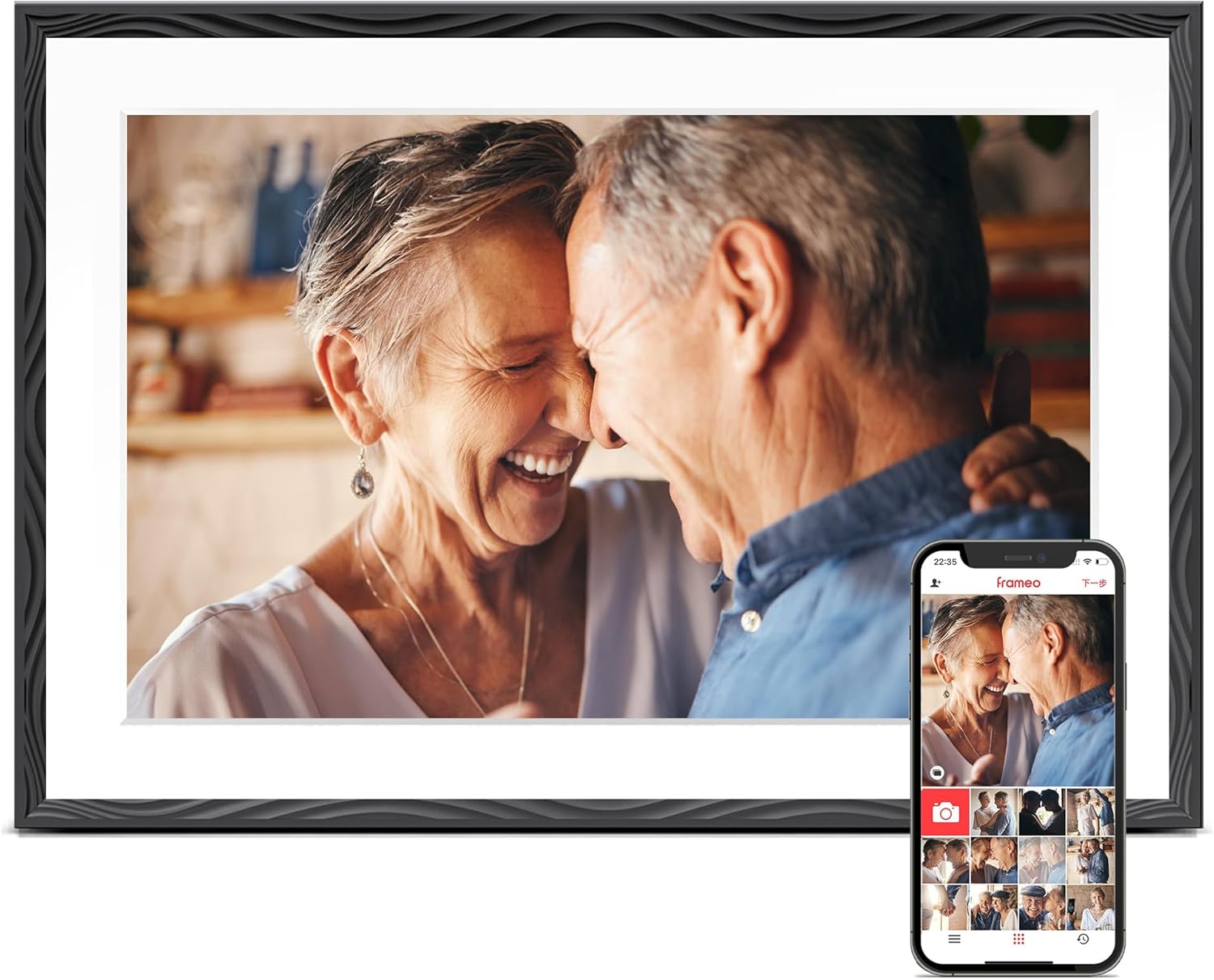
The frame operates through the Frameo app, a well-established platform in the digital frame market. Family members can download the free app on iOS or Android devices and send photos directly to the frame from anywhere in the world. This instant sharing capability eliminates the delay between capturing a moment and displaying it for loved ones to see.
The 32GB internal memory provides space for storing over 50,000 photos according to the manufacturer, though actual capacity will vary based on image resolution and file sizes. The frame also supports external storage expansion, allowing users to archive older photos or add additional content as needed.
Display Quality and Design
The 10.1-inch screen features a 1280×800 resolution, delivering clear and vibrant images. The HD touchscreen allows for intuitive navigation through photo collections, settings adjustments, and slideshow customization. The touch functionality makes it straightforward to organize photos, delete unwanted images, or pause on favorite memories.
The frame features an embossed design that adds visual interest beyond the standard flat-bezel approach common in budget digital frames. The magnetic support stand enables easy switching between landscape and portrait orientations, while wall-mounting options provide flexibility in placement throughout the home.
Multiple Transfer Methods
Beyond WiFi connectivity, the frame accepts photo transfers through several alternative methods. Users can insert a Micro SD card or USB-C drive containing photos in FAT32 format. Additionally, photos can be transferred directly from a computer using a USB-C cable. These options are particularly valuable for users who lack reliable WiFi connections or prefer not to use smartphone apps.
The auto-rotate feature automatically adjusts the display orientation when the frame is repositioned, ensuring photos always appear right-side-up without manual adjustment.
User-Friendly Setup
The frame comes with comprehensive instructions and troubleshooting guides. Pastigio, as the direct manufacturer, provides technical support and addresses quality concerns. The inclusion of detailed setup steps helps users who may be unfamiliar with smart home devices get the frame operational quickly.
Pros and Cons
Advantages
- Multiple connectivity options: WiFi, SD card, USB-C, and computer transfer methods accommodate different user preferences and technical comfort levels
- Generous storage capacity: 32GB built-in memory with expansion options provides substantial room for photo collections
- Established platform: Frameo is a widely-used app with regular updates and broad device compatibility
- Versatile display options: Wall-mountable design with magnetic stand offers flexible placement choices
- Touchscreen interface: Intuitive navigation makes photo management straightforward
- Direct manufacturer support: Access to technical assistance and quality assurance from Pastigio
- Auto-rotate function: Automatically adjusts display orientation when frame position changes
Limitations
- Accessories not included: SD cards, USB-C drives, and USB-C cables for computer transfer must be purchased separately
- Format restrictions: External storage must be in FAT32 format, which may require reformatting for some users
- WiFi dependency for remote sharing: The primary remote photo-sharing feature requires stable WiFi connectivity
- App learning curve: Family members sending photos need to download and learn the Frameo app
- Screen resolution: While adequate for a 10.1-inch display, the 1280×800 resolution is not Full HD, which may be noticeable with very high-resolution photos
- Power requirement: Like most digital frames, it requires constant power connection for operation
Who This Product Is Best For
This digital picture frame is particularly well-suited for:
- Long-distance families: Parents, grandparents, or relatives who live far from loved ones and want to stay connected through shared photos
- Gift-givers: Those seeking meaningful presents for occasions like birthdays, anniversaries, housewarmings, retirements, or holidays
- Tech-comfortable seniors: Older adults who appreciate technology but prefer devices with straightforward interfaces and multiple input options
- Busy families: Households that want an easy way to display rotating photo collections without printing and framing
- New parents: Families wanting to share baby photos with distant relatives in real-time
- Couples in long-distance relationships: Partners who want to share daily moments despite physical separation
The frame’s combination of app-based and traditional transfer methods makes it accessible to users across different age groups and technical skill levels.
Don’t Miss This
Who Should Consider Alternatives
This frame may not be the ideal choice for:
- Users requiring Full HD resolution: Photography enthusiasts or those prioritizing maximum image quality may want frames with 1920×1080 or higher resolution
- Battery-powered operation seekers: Those needing a frame that operates without constant power connection should look for battery-powered alternatives
- Budget-conscious buyers: While offering good features, this frame sits in the mid-range price category; simpler models are available at lower price points
- Users in areas with unreliable WiFi: While alternative transfer methods exist, the primary remote-sharing feature depends on stable internet connectivity
- Those wanting larger displays: Users desiring a more prominent display piece may prefer frames in the 13-inch to 15-inch range
Comparison Insights
The digital picture frame market offers numerous options, and understanding where this Pastigio frame fits helps inform purchasing decisions.
Compared to basic digital frames without WiFi connectivity, this model offers significantly more convenience for remote photo sharing. Traditional frames require physical access to update photos, while the Frameo platform enables instant updates from anywhere.
When compared to other Frameo-compatible frames, this model’s 32GB storage capacity is generous. Many competing frames offer 8GB or 16GB, requiring more frequent management of photo libraries or earlier adoption of external storage.
The 10.1-inch screen size represents a middle ground in the market. It’s large enough to display photos clearly from across a room but compact enough to fit on most shelves, mantels, or side tables without dominating the space.
The inclusion of multiple transfer methods beyond WiFi distinguishes this frame from some competitors that rely exclusively on app connectivity. This versatility makes it more accessible to users who may struggle with smartphone apps or lack consistent internet access.
Frequently Asked Questions
How many people can send photos to the frame?
The Frameo app allows multiple users to connect to a single frame. Family members simply need the frame’s unique connection code to begin sending photos. The specific number of users who can connect simultaneously depends on the Frameo platform’s capabilities rather than the frame itself.
Does the frame require constant WiFi connection?
WiFi is only required for receiving new photos through the Frameo app. Once photos are stored on the frame, they can be displayed in slideshows without active WiFi connectivity. However, for remote photo sharing to work, the frame needs to be connected to WiFi.
Can I control what photos appear on the frame?
Yes, the touchscreen interface allows frame owners to delete unwanted photos, organize albums, and customize slideshow settings. This gives recipients control over their display content while still accepting photos from family members.
What video formats does the frame support?
The product description focuses primarily on photo display capabilities. Information about video playback support is not publicly available in the provided specifications. Potential buyers interested in video playback should contact the manufacturer directly for clarification.
How does the auto-rotate feature work?
The frame includes sensors that detect its orientation. When you change the frame from landscape to portrait mode (or vice versa), the display automatically adjusts to show photos in the correct orientation. This eliminates the need to manually change settings when repositioning the frame.
Is the frame suitable for commercial use?
While the frame is designed primarily for personal and family use, its features could work in small business settings like reception areas or boutique shops. However, the manufacturer’s warranty and support terms are focused on consumer use, so commercial buyers should verify coverage before purchasing.
What happens if my WiFi network changes?
You can update the WiFi settings through the frame’s touchscreen interface. The process typically involves accessing the settings menu, selecting network options, and entering the new WiFi credentials. The included user manual provides step-by-step instructions for this process.
Real-World Performance Considerations
Understanding how this frame performs in everyday use helps set appropriate expectations.
The 1280×800 resolution delivers clear images for typical smartphone photos and digital camera images. Modern smartphone cameras capture photos at much higher resolutions, but the frame’s display will show them at its native resolution. For casual photo viewing at typical viewing distances, this resolution proves adequate and produces vibrant, enjoyable images.
The Frameo app’s reliability depends partly on factors beyond the frame itself, including WiFi network stability and the sender’s internet connection. Users in areas with inconsistent internet service may experience delays in photo delivery, though once received, photos display smoothly.
The touchscreen responsiveness facilitates easy navigation through photo collections. Users can swipe through images, adjust settings, and manage albums without needing to connect to a computer or smartphone for basic operations.
Storage capacity, while generous at 32GB, will fill over time depending on usage patterns. Families who send multiple high-resolution photos daily will accumulate content faster than those who share photos weekly. The ability to add external storage or periodically remove older photos helps manage capacity long-term.
Setup and Installation
Getting the frame operational involves several straightforward steps, though the process varies slightly depending on your chosen connection method.
For WiFi setup, users power on the frame, select their wireless network from the available options, and enter the password using the touchscreen keyboard. The frame then connects to the internet and provides a unique code that family members enter in their Frameo app to link their devices.
For non-WiFi methods, users can insert a loaded SD card or USB-C drive into the appropriate port, and the frame automatically detects and displays the photos. Transferring from a computer requires connecting via USB-C cable and moving image files to the frame’s storage directory.
Wall mounting requires measuring and marking appropriate locations for the mounting hardware. The frame’s weight and dimensions should be considered when selecting wall placement to ensure proper support. The magnetic stand attachment makes switching between mounted and tabletop display straightforward.
Last Refreshed: March 27, 2026