Product Overview
TL;DR: Product Overview The Logitech MX Ergo S Advanced Wireless Trackball Mouse represents a significant evolution in ergonomic input devices. Designed for professionals who spend extended hours at their computers, this tra…
Table of Contents
- Product Overview
- Key Features and Benefits
- Advanced Thumb-Controlled Trackball Technology
- Ergonomic 20-Degree Tilt Design
- Enhanced Quiet Click Technology
- Extensive Customization with Logi Options+ Software
- USB-C Fast Charging and Extended Battery Life
- Dual Wireless Connectivity Options
- Sustainability Considerations
- Pros and Cons
- Advantages
- Limitations
- Who This Product Is Best For
- Who Should Consider Alternatives
- Comparison Considerations
- Versus Traditional Ergonomic Mice
- Versus Standard Trackballs
- Versus Finger-Controlled Trackballs
- Versus the Original MX Ergo
- Frequently Asked Questions
- How long does it take to get comfortable using a trackball mouse?
- Can I use this trackball mouse for gaming?
- How do I clean the trackball?
- Does this work with iPads or tablets?
- What type of USB-C cable do I need for charging?
- Can I adjust the trackball sensitivity?
- Is the 20-degree angle adjustable?
- How does the Easy-Switch button work?
- Will this help with carpal tunnel syndrome?
- In Conclusion
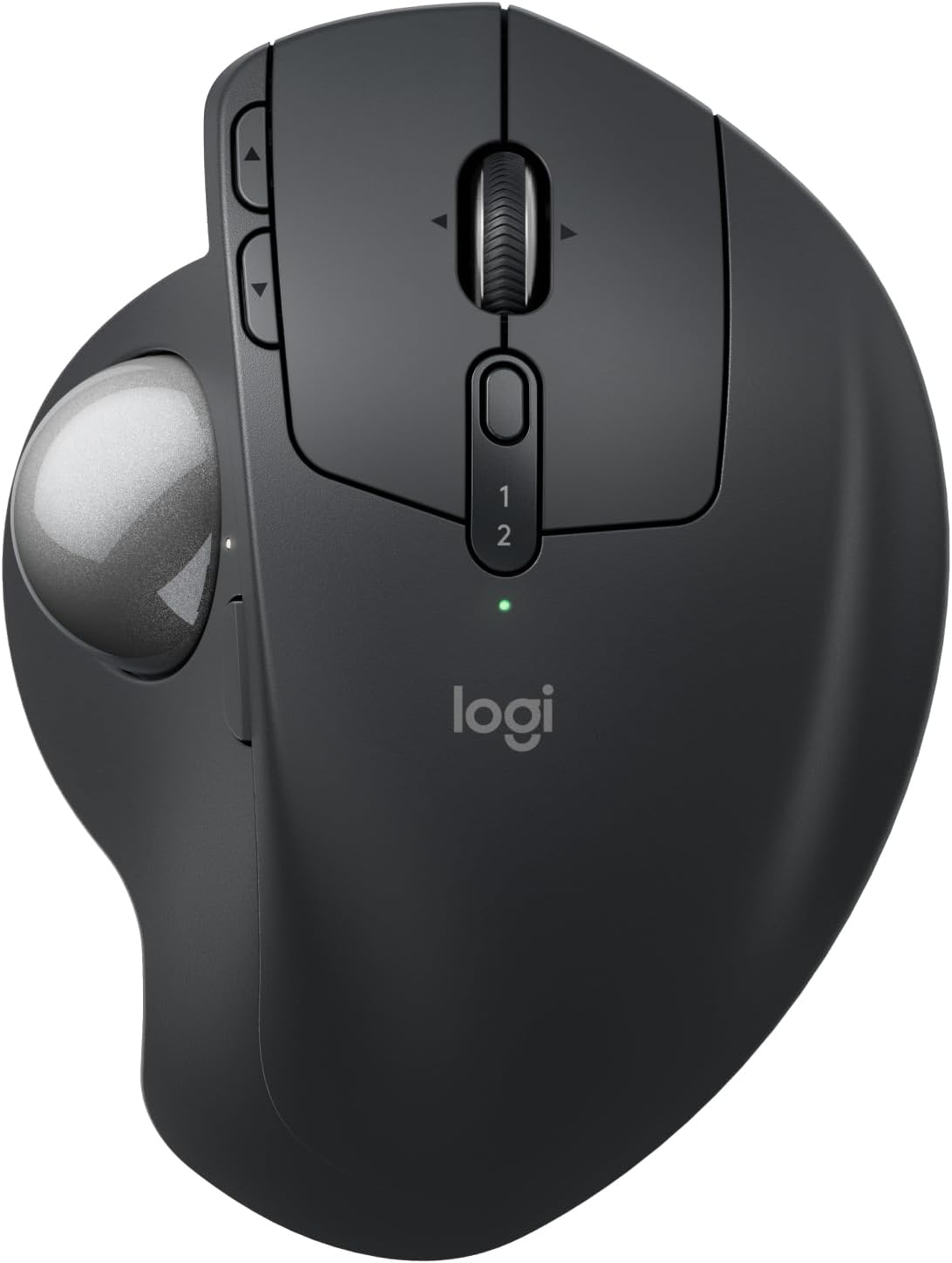
The Logitech MX Ergo S Advanced Wireless Trackball Mouse represents a significant evolution in ergonomic input devices. Designed for professionals who spend extended hours at their computers, this trackball mouse prioritizes comfort and precision without sacrificing productivity. Unlike traditional mice that require arm and wrist movement, the MX Ergo S uses thumb-controlled trackball technology, allowing you to navigate your screen while keeping your hand stationary.
This wireless ergonomic mouse features a scientifically designed 20-degree tilt angle that promotes natural forearm positioning. Logitech has engineered this device with ergonomist certification, incorporating a sculpted design with a soft rubber grip that conforms to medium and large-sized hands. The device connects via Bluetooth or the included Logi Bolt USB receiver, offering flexibility for different workspace setups.
With USB-C rechargeable functionality, six programmable buttons, and compatibility with Logitech’s Options+ software, the MX Ergo S aims to deliver both comfort and customization. The device also demonstrates Logitech’s commitment to sustainability, incorporating 20% certified post-consumer recycled plastic in its construction.
Key Features and Benefits
Advanced Thumb-Controlled Trackball Technology
The core of the MX Ergo S is its precision trackball, which you control with your thumb. This design philosophy reduces the need for repetitive arm and wrist movements that characterize traditional mouse usage. You can switch between standard speed mode and high-precision tracking with a single button press, making it suitable for both general navigation and detailed work like photo editing or CAD design.
The trackball mechanism allows for cursor control without lifting or repositioning the device, which can significantly reduce desk space requirements and eliminate the need for a large mouse pad.
Ergonomic 20-Degree Tilt Design
The adjustable tilt angle is one of the standout features of this trackball mouse. According to Logitech’s testing, the 20-degree angle can reduce muscle strain by 27% compared to a standard flat mouse position. This tilt promotes a more natural forearm posture, which may help reduce the risk of repetitive strain injuries during extended use.
The sculpted shape has been certified by ergonomists and features a soft rubber grip that provides tactile comfort during long work sessions. The design specifically accommodates medium to large-sized hands, though users with smaller hands may find the reach less comfortable.
Enhanced Quiet Click Technology
Logitech has incorporated quieter click mechanisms in the MX Ergo S, claiming 80% noise reduction compared to previous models. This feature is particularly valuable in shared workspaces, quiet offices, or home environments where clicking sounds might be disruptive during video calls or when others are working nearby.
Extensive Customization with Logi Options+ Software
The six programmable buttons can be customized through Logitech’s Options+ application, available for both Windows and Mac. This software allows you to:
- Assign specific functions to each button based on the application you’re using
- Create time-saving shortcuts for repetitive tasks
- Set up Smart Actions that combine multiple commands into single button presses
- Adjust cursor speed and acceleration curves to match your preferences
- Monitor battery status and receive low-battery notifications
This level of customization can substantially improve workflow efficiency, particularly for professionals working in specialized software environments.
USB-C Fast Charging and Extended Battery Life
The rechargeable battery system eliminates the need for disposable batteries. According to Logitech’s specifications:
- A one-minute quick charge provides up to 24 hours of use
- A full charge delivers up to 120 days of battery life
- Charging uses USB-C connectivity (cable not included)
These battery performance figures assume typical usage patterns and may vary based on individual use intensity and connectivity method.
Dual Wireless Connectivity Options
The MX Ergo S offers flexibility in how you connect to your devices:
- Bluetooth connectivity: Pairs directly with Bluetooth-enabled computers without requiring a USB port
- Logi Bolt USB receiver: Provides a secure, encrypted connection through the included dongle
- Easy-Switch button: Allows quick switching between connected devices, useful for multi-computer workflows
The encrypted connection through the Logi Bolt receiver adds a layer of security that may be important in corporate or sensitive work environments.
Sustainability Considerations
The plastic components of the MX Ergo S contain 20% certified post-consumer recycled plastic. While this represents a step toward more sustainable manufacturing, it’s worth noting that the majority of the device still consists of new plastic materials.
Pros and Cons
Advantages
- Reduced physical strain: The trackball design and tilted angle minimize repetitive wrist and arm movements, potentially reducing fatigue during extended use
- Precision control options: The ability to toggle between speed and precision modes accommodates both general navigation and detailed work
- Excellent battery performance: The quick-charge capability and extended battery life reduce charging interruptions
- Comprehensive customization: Six programmable buttons with application-specific profiles offer significant workflow optimization potential
- Dual connectivity: Bluetooth and USB receiver options provide setup flexibility
- Quieter operation: Reduced click noise makes it suitable for noise-sensitive environments
- Ergonomist certification: Professional validation of the ergonomic design adds credibility to comfort claims
- Multi-device switching: Easy-Switch functionality supports modern multi-computer workflows
Limitations
- Learning curve: Users accustomed to traditional mice will need time to adapt to trackball navigation, which can initially feel awkward or less precise
- Hand size specificity: Designed for medium to large hands, which may exclude users with smaller hands from optimal comfort
- No charging cable included: You’ll need to provide your own USB-C cable, which is an unexpected omission at this product tier
- Trackball maintenance: The trackball mechanism requires periodic cleaning to maintain smooth operation as dust and skin oils accumulate
- Software dependency: Full functionality requires installing Logitech Options+ software, which may not appeal to users who prefer minimal software installations
- Initial adjustment period: The ergonomic benefits may not be immediately apparent; some users experience temporary discomfort while their muscles adapt to the new positioning
- Limited gaming suitability: While functional for casual gaming, the trackball design is not optimized for fast-paced gaming requiring rapid, precise movements
Who This Product Is Best For
The Logitech MX Ergo S is particularly well-suited for:
- Office professionals: Those spending 6+ hours daily at a computer who experience or want to prevent wrist and forearm discomfort
- Designers and creative professionals: Users working in Photoshop, Illustrator, CAD, or video editing software who benefit from precision control and customizable buttons
- Developers and programmers: Individuals who value keyboard-centric workflows but need precise cursor control and programmable shortcuts
- Users with existing RSI concerns: People experiencing early symptoms of repetitive strain injury who need to modify their input method
- Limited desk space workers: Anyone working from compact desks or mobile setups where traditional mouse movement space is restricted
- Multi-device users: Professionals who regularly switch between multiple computers and value seamless device transitions
- Quiet environment workers: Those in shared offices, libraries, or home environments where quiet operation is valued
- Sustainability-conscious buyers: Users who prioritize products incorporating recycled materials
Don’t Miss This
Who Should Consider Alternatives
This trackball mouse may not be the right choice for:
- Competitive gamers: The trackball design doesn’t provide the rapid, precise movements required for FPS or competitive gaming
- Users with small hands: The device is specifically contoured for medium to large hands, and smaller-handed users may find it uncomfortable or difficult to reach all controls
- Budget-conscious buyers: Traditional mice and even some ergonomic alternatives are available at lower price points
- Those resistant to change: If you’re satisfied with your current mouse and not experiencing discomfort, the learning curve may not justify the transition
- Users preferring traditional navigation: Some people simply prefer the familiar feel and muscle memory of standard mouse movement
- Minimalist setup enthusiasts: If you prefer avoiding additional software installations, the full feature set requires the Options+ application
Comparison Considerations
When evaluating the MX Ergo S against other input devices, consider these factors:
Versus Traditional Ergonomic Mice
Traditional ergonomic mice (like vertical mice) still require arm and wrist movement across your desk surface. The trackball approach eliminates this movement entirely, which may provide greater strain reduction for some users. However, traditional mice typically have a shorter learning curve.
Versus Standard Trackballs
Compared to basic trackball mice, the MX Ergo S offers the 20-degree tilt angle, USB-C rechargeable battery, quieter clicks, and more extensive customization options. Basic trackballs are more affordable but lack these refinement features.
Versus Finger-Controlled Trackballs
Some trackballs use finger control rather than thumb control (like the Kensington Expert series). Finger-controlled trackballs can offer more precision for some users but require a different hand position. The choice between thumb and finger control is largely personal preference based on comfort and workflow.
Versus the Original MX Ergo
The MX Ergo S represents an updated version with quieter clicks, USB-C charging (versus micro-USB), and the Logi Bolt receiver with encryption. If you own the original MX Ergo, whether these improvements justify an upgrade depends on how much the quieter operation and modern charging standard matter to your workflow.
Frequently Asked Questions
How long does it take to get comfortable using a trackball mouse?
The adaptation period varies by individual. Most users report basic proficiency within 3-7 days of regular use, with full comfort developing over 2-4 weeks. During this period, you may experience temporary awkwardness or even minor discomfort as your hand and thumb muscles adapt to the new movement patterns. Starting with shorter sessions and gradually increasing usage time can ease this transition.
Can I use this trackball mouse for gaming?
The MX Ergo S can be used for casual and strategy gaming, but it’s not optimized for fast-paced competitive gaming. The trackball design excels at precise, controlled movements but doesn’t support the rapid flick movements common in FPS games. Turn-based strategy games, simulation games, and casual titles work well with this device.
How do I clean the trackball?
The trackball can be removed from its housing by applying pressure from the bottom opening. Once removed, clean both the ball and the socket with a lint-free cloth. For stubborn residue, slightly dampen the cloth with water or isopropyl alcohol. Regular cleaning every few weeks maintains smooth operation.
Does this work with iPads or tablets?
The MX Ergo S can connect to iPads and tablets that support Bluetooth mouse connectivity. However, the Logi Options+ software for customizing buttons and settings is only available for Windows and Mac computers. Basic mouse functions will work on tablets, but advanced customization features require a computer.
What type of USB-C cable do I need for charging?
You can use either a USB-C to USB-C cable or a USB-A to USB-C cable, depending on your available charging ports. The cable is not included with the mouse. Any standard USB cable with the appropriate connectors will work for charging.
Can I adjust the trackball sensitivity?
Yes, through the Logi Options+ software, you can adjust cursor speed, acceleration, and scrolling behavior. Additionally, the physical button on the mouse allows you to toggle between standard speed and precision mode on the fly.
Is the 20-degree angle adjustable?
The tilt angle is not continuously adjustable. The mouse comes with a removable magnetic plate that provides the 20-degree angle when attached. You can use the mouse flat (0 degrees) by removing this plate or at 20 degrees with it attached. These are the only two angle options.
How does the Easy-Switch button work?
The Easy-Switch button allows you to pair the mouse with up to two devices and toggle between them with a button press. You might connect to your work laptop via the USB receiver and your personal computer via Bluetooth, then switch between them as needed without re-pairing.
Will this help with carpal tunnel syndrome?
While the ergonomic design may reduce strain that contributes to repetitive stress injuries, this is not a medical device. If you have diagnosed carpal tunnel syndrome or other medical conditions, consult with a healthcare professional about appropriate ergonomic interventions. Many users report reduced discomfort when switching to trackball mice, but individual results vary.
In Conclusion
The Logitech MX Ergo S Advanced Wireless Trackball Mouse represents a thoughtfully designed solution for users seeking to reduce physical strain while maintaining productivity. The combination of thumb-controlled trackball technology, scientifically validated tilt angle, and extensive customization options creates a compelling package for the right user.
The device’s strengths lie in its ergonomic design, which genuinely addresses the repetitive strain issues associated with traditional mice. The 20-degree tilt angle, ergonomist certification, and stationary operation model offer tangible benefits for users spending extended periods at their computers. The quiet clicks, excellent battery life, and dual connectivity options demonstrate attention to modern workspace needs.
However, this is not a universal solution. The learning curve is real, and the hand size requirements may exclude some potential users. The omission of a charging cable and the need for periodic trackball cleaning represent minor but notable inconveniences.
For office professionals, designers, developers, and anyone experiencing discomfort from traditional mouse use, the MX Ergo S deserves serious consideration. The initial investment in both cost and adaptation time may pay dividends in reduced strain and improved comfort over months and years of use.
If you’re curious about whether a trackball mouse could improve your computing experience, the MX Ergo S offers a well-executed entry point with professional-grade features. The combination of Logitech’s build quality, comprehensive software support, and thoughtful ergonomic design makes this a solid choice for users ready to explore alternatives to traditional mouse navigation.
Check current availability and specifications on Amazon to see if the Logitech MX Ergo S fits your ergonomic computing needs.