Here’s a conversation that happens way too often: a student walks into a laptop store, sees a $1,200 price tag, and either pulls out a credit card they can’t afford to use or walks home empty-handed.
Neither outcome is necessary.
Because the truth is, for most of what students actually do, writing papers, attending Zoom lectures, building presentations, browsing research databases, running Canva or basic editing tools, you don’t need a premium machine. You need the right machine. And in 2026, the right machine can cost well under $500.
Budget laptops have come a long way. Today’s sub-$500 options offer fast SSD storage, capable processors, solid battery life, and enough RAM to handle real multitasking. The key is knowing which ones are actually worth buying and which ones look good on paper but frustrate you after two weeks.
This guide covers the 10 best laptops under $500 for students, what to look for before you buy, and which model is the right fit for your specific situation. All options are available on Amazon with easy shipping across the US and internationally.
Let’s start with what actually matters.
What Students Should Look for in a Budget Laptop
Under $500, every spec decision involves a trade-off. Here’s how to make smart ones.
Processor (CPU)
The processor is the engine of your laptop; it determines how fast everything feels, especially when you have multiple tabs open alongside a document and a video call running in the background.
For students, a safe baseline is an Intel Core i3 (12th Gen or newer), AMD Ryzen 3 or Ryzen 5, or an older Intel Core i5 if you find it at a good price. If you can land a refurbished MacBook Air with Apple’s M1 chip under $500, that’s a serious find. What you want to avoid is anything powered by an Intel Celeron or Pentium processor, these chips struggle with modern multitasking and will feel sluggish fast.
RAM
8GB is your minimum, not your target. With 4GB of RAM, you’ll feel the squeeze the moment you open more than a few browser tabs alongside a Google Doc or Zoom call. Look for 8GB as a starting point, and if you can find a laptop with upgradeable RAM slots, that’s a long-term advantage, you can add more down the road without buying a new machine.
Storage – SSD Only
This one is non-negotiable. An SSD (Solid State Drive) makes a laptop feel dramatically faster than an HDD; we’re talking boot times that take seconds instead of minutes, and apps that open almost instantly. Aim for 256GB SSD at minimum. If you store videos, large design files, or course material locally, 512GB is worth the extra spend. Avoid HDD-only options regardless of the price.
Battery Life
Students move. You’re going from class to library to coffee shop, and you can’t always guarantee a seat next to an outlet. Look for real-world battery estimates of at least 8 hours, with 10–12 hours being the sweet spot. USB-C charging is a bonus, it means you can top up from a power bank if needed.
Don’t Miss This >> 10 Budget Phones Every Content Creator Should Consider
Display Quality
A full HD (1920 x 1080) display is the baseline. If a laptop ships with a 1366 x 768 screen in 2026, skip it, that resolution feels cramped for everything from reading PDFs to watching lecture recordings. A 14-inch or 15.6-inch screen size hits the right balance between usability and portability.
Build Quality & Ports
Check that the laptop has what you actually need before buying: USB-A ports for your drives and peripherals, HDMI for connecting to projectors or monitors, a headphone jack, and a working webcam for online classes. A laptop without these basics will cost you more in adapters than you saved on the device.
The 10 Best Laptops Under $500 for Students
1. Acer Aspire 5
Best For: Overall Performance & Daily Multitasking
👉 Check latest price on Amazon
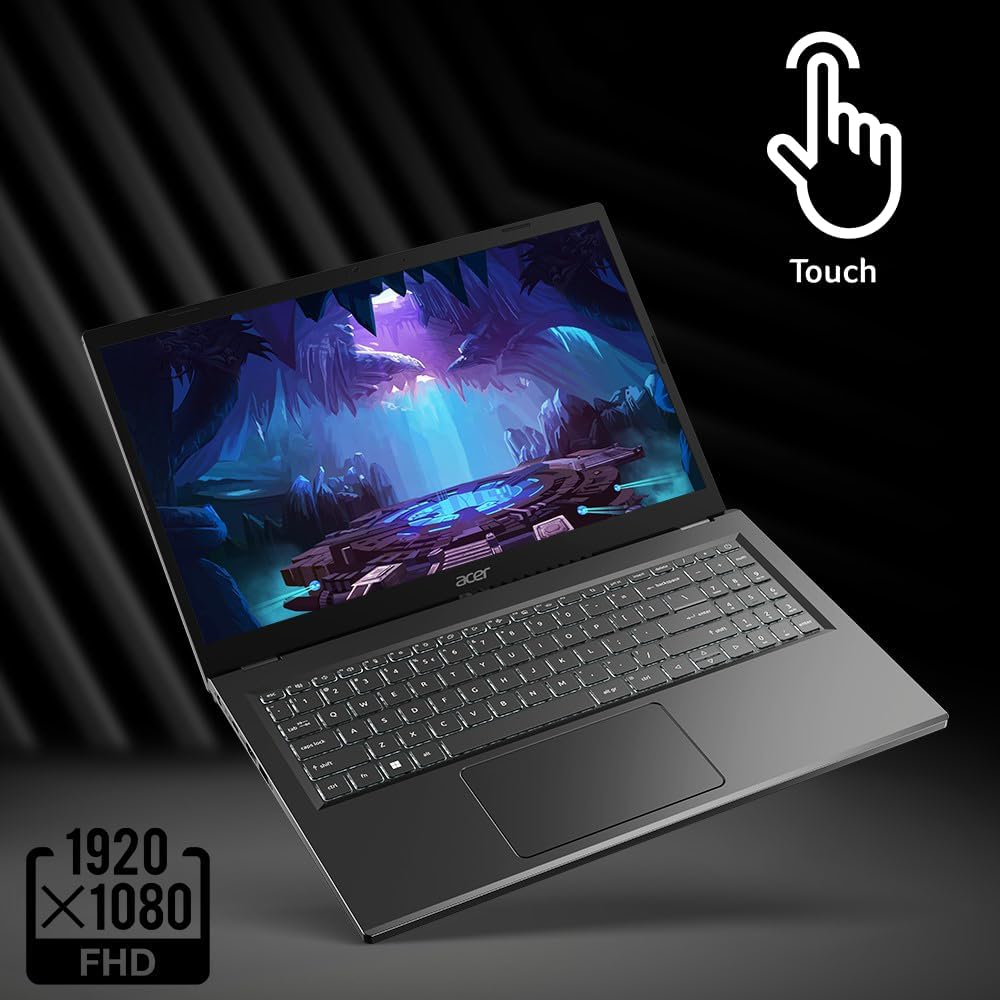
The Acer Aspire 5 has been the go-to recommendation in this price range for years, and it keeps earning that reputation. Most configurations include an AMD Ryzen 5 processor, 8GB of RAM, a 256GB SSD, and a 15.6-inch Full HD display. That’s a genuinely capable setup for under $500.
In day-to-day use, it handles research, Microsoft Office, light photo editing, Canva, and multitasking without complaint. The keyboard is comfortable for long typing sessions, RAM is upgradeable, and the build is solid enough to handle the daily commute in a backpack.
Pros: Strong Ryzen 5 performance, upgradeable RAM, Full HD display, good keyboard feel
Cons: Speakers are basic, design is functional but not exciting
Ideal Student Type: Business, IT, and content creation students who need reliable daily multitasking without splurging on a premium brand.
2. HP 15 Laptop
Best For: Everyday College Tasks
👉 Check latest price on Amazon
HP’s 15-inch budget lineup is one of the most dependable options in this category. You typically get an Intel Core i3, 8GB RAM, 256GB SSD, and a Full HD display, everything a student needs for word processing, online classes, streaming lectures, and staying on top of emails.
It’s not a performance powerhouse, but that’s not the point. The HP 15 is lightweight, the keyboard is comfortable, and HP’s customer support is far better than most budget laptop brands. For students who just need something that works every day, reliably, this is a safe pick.
Pros: Lightweight, reliable brand, comfortable keyboard, well-suited for core student tasks
Cons: Not designed for heavy editing or intensive multitasking, plastic build
Ideal Student Type: Liberal arts, education, law, and social sciences students who primarily work with documents, slides, and browser-based tools.
3. Lenovo IdeaPad 3
Best For: Value, Storage & Upgrade Flexibility
👉 Check latest price on Amazon
One of the most underrated picks in this guide. The Lenovo IdeaPad 3 frequently comes with an AMD Ryzen 5 processor, 8GB RAM, and – notably, a 512GB SSD in many configurations under $500. That extra storage is a real advantage if you’re storing project files, media, or large downloads locally.
Lenovo also designs IdeaPad laptops with upgrade paths in mind, so adding more RAM later is straightforward. Thermals are well-managed too, meaning this laptop stays cool under extended use, something cheap laptops often fail at.
Pros: 512GB storage in many configs, strong Ryzen 5 performance, good thermals, upgradeable
Cons: Display brightness could be higher, especially in bright rooms
Ideal Student Type: Students who store large files, work on creative projects, or know they’ll want to upgrade the hardware down the line.
4. ASUS VivoBook 15
Best For: Stylish Design + Comfortable Typing
👉 Check latest price on Amazon
ASUS built the VivoBook 15 for students who don’t want their laptop to look like it came from a clearance bin. It’s noticeably thinner and lighter than most budget options, and the design holds up well in a classroom or coffee shop setting.
Specs-wise, you’re looking at Intel Core i3, 8GB RAM, and 256GB SSD, a solid baseline. But what sets it apart is the keyboard. ASUS keyboards have a reputation for comfortable key travel, and for students who type for hours daily, that matters more than people realize.
Pros: Slim, lightweight design, excellent keyboard for extended typing, decent battery life
Cons: Speakers are average, not the strongest option for heavy creative work
Ideal Student Type: Writers, bloggers, journalism students, and anyone whose workflow is mostly document and presentation-heavy.
5. Dell Inspiron 15
Best For: Build Reliability & Brand Trust
👉 Check latest price on Amazon
Dell has been making dependable laptops for decades, and the Inspiron 15 carries that reputation into the budget tier. Depending on the configuration you find, you’ll get either an Intel Core i3 or AMD Ryzen 5, paired with 8GB RAM and 256GB SSD storage. The build quality feels more substantial than many similarly priced competitors.
If you’ve ever dealt with a flimsy laptop that developed a creak after three months or a screen hinge that went loose, you’ll appreciate Dell’s attention to durability. Their customer support and warranty programs are also among the best in the industry.
Pros: Durable construction, clean design, reliable performance, strong after-sales support
Cons: Slightly heavier than some competitors, nothing that stands out as exceptional
Ideal Student Type: Engineering, business, and STEM students who want something that survives four years of heavy use without falling apart.
6. Acer Chromebook Plus 515
Best For: Cloud-Based Students in the Google Ecosystem
👉 Check latest price on Amazon
If your entire academic life runs through Google Docs, Sheets, Slides, Meet, and Classroom, then a Chromebook isn’t a compromise, it’s the right tool for the job. The Chromebook Plus 515 is a significant step up from older Chromebooks, with an Intel Core i3, 8GB RAM, and performance that handles multiple browser tabs and video calls without stuttering.
Boot time is nearly instant, battery life routinely exceeds 10 hours, and the price is very competitive. The trade-off is offline capability, if you regularly work without internet access or need Windows-specific software, this isn’t the pick for you.
Pros: Fast boot, excellent battery life, lightweight, very affordable, seamless Google integration
Cons: Limited offline functionality, not suitable for students who need Windows applications
Ideal Student Type: Students who live in Google Workspace and prefer a fast, light, no-fuss machine for campus and remote learning.
7. Lenovo Flex 5
Best For: 2-in-1 Flexibility & Digital Note-Taking
👉 Check latest price on Amazon
Not every student works the same way. If you take handwritten notes, sketch diagrams, or switch between reading mode and typing mode throughout your day, a traditional clamshell laptop creates unnecessary friction. The Lenovo Flex 5 solves that.
It’s a true 2-in-1, fold it flat for tablet mode, prop it in tent mode for presentations, or use it as a standard laptop. Powered by an AMD Ryzen 5, it has the performance to back up the versatility. The touchscreen is responsive, and the build feels solid despite the hinge mechanism.
Pros: Versatile 2-in-1 form factor, Ryzen 5 performance, touchscreen, strong build quality
Cons: Slightly heavier than a standard thin-and-light, touchscreen adds cost
Ideal Student Type: Design students, digital note-takers, medical or architecture students who diagram frequently, and anyone who wants one device that adapts to different working styles.
8. HP Pavilion 14
Best For: Commuter Students Who Prioritize Portability
👉 Check latest price on Amazon
The difference between a 14-inch and 15.6-inch laptop might sound minor until you’re carrying it across campus five days a week. The HP Pavilion 14 shaves meaningful weight off your bag without sacrificing usability, and it does it with a screen that still feels comfortable for full days of work.
Configurations typically include Intel Core i3 or i5, 8GB RAM, and 256GB SSD. The display is bright and clear, HP’s build quality is solid, and the overall package is one of the better compact budget laptops available right now.
Pros: More portable than 15-inch models, good display, reliable HP quality, suitable for daily commuting
Cons: Smaller screen may feel limiting for split-screen workflows
Ideal Student Type: Students who commute daily, attend multiple campuses, or prioritize carrying a lighter bag over having the largest possible screen.
9. Gateway 15.6 Ultra Slim
Best For: Tightest Budgets
👉 Check latest price on Amazon
Gateway isn’t a brand that gets talked about much anymore, but their Ultra Slim lineup has quietly become one of the best options for students who need to stretch every dollar. You can often find configurations with an Intel Core i5, 8GB RAM, and 256GB SSD for under $400, which is a strong spec sheet at that price.
Build quality is basic; this is clearly where cost was cut, but the internals perform above expectations. For a secondary laptop, a backup device, or a student working on an extremely tight budget, it’s hard to argue with the value.
Pros: Aggressive pricing, larger 15.6-inch display, capable specs for the cost
Cons: Basic build quality, shorter expected lifespan than premium brands
Ideal Student Type: Students on very tight budgets, those who need a secondary or backup laptop, and first-year students testing the waters before investing in a more premium device.
10. Apple MacBook Air M1 (Refurbished)
Best For: Best Performance Deal Available, If You Find It Under $500
👉 Check latest price on Amazon
This one comes with a condition: it’s only worth considering if you can find it at or under $500, which is increasingly possible through certified refurbished listings. If you can, it’s arguably the best laptop deal in any price category.
Apple’s M1 chip, even a few years after its release, outperforms the vast majority of Windows processors you’d find in this price range. Battery life consistently hits 12–15 hours of real-world use. The display is sharp, the keyboard is excellent, and the build quality is in a completely different league from budget Windows machines.
The limitations are real: you get only two USB-C ports, and you’ll need adapters for anything else. But for content creators, programmers, or business students who can work within that ecosystem, the performance-per-dollar ratio is unmatched.
Pros: Exceptional performance, 12–15 hour battery, premium build and display, strong long-term value
Cons: Limited ports, only worth it at or under $500, macOS may require adjustment for Windows users
Ideal Student Type: Content creators, developers, business and design students who want premium performance and can find a certified refurbished unit within budget.
Don’t Miss This >>
- SSD vs HDD for Laptops: Which Storage Drive Should You Actually Buy?
- Integrated vs Dedicated Graphics: Real-World Test
Quick Comparison: All 10 Laptops at a Glance
| Laptop | Processor | RAM | Storage | Battery | Best For |
|---|---|---|---|---|---|
| Acer Aspire 5 | Ryzen 5 | 8GB | 256GB SSD | 8–10 hrs | Overall Value |
| HP 15 | Intel Core i3 | 8GB | 256GB SSD | 7–9 hrs | Everyday Tasks |
| Lenovo IdeaPad 3 | Ryzen 5 | 8GB | 512GB SSD | 8–10 hrs | Storage & Upgrades |
| ASUS VivoBook 15 | Intel Core i3 | 8GB | 256GB SSD | 8 hrs | Typing & Design |
| Dell Inspiron 15 | i3 / Ryzen 5 | 8GB | 256GB SSD | 7–9 hrs | Durability |
| Chromebook Plus 515 | Intel Core i3 | 8GB | 128GB | 10+ hrs | Cloud-Based Work |
| Lenovo Flex 5 | Ryzen 5 | 8GB | 256GB SSD | 9 hrs | 2-in-1 Versatility |
| HP Pavilion 14 | i3 / i5 | 8GB | 256GB SSD | 8–10 hrs | Portability |
| Gateway 15.6 Ultra Slim | Intel Core i5 | 8GB | 256GB SSD | 6–8 hrs | Tight Budget |
| MacBook Air M1 | Apple M1 | 8GB | 256GB SSD | 12–15 hrs | Premium Performance |
So Which One Should You Actually Buy?
Still deciding? Here’s the short version.
Best overall value: Acer Aspire 5, a consistently strong performer with upgradeable RAM and a Full HD display that won’t let you down.
Best for portability: HP Pavilion 14, lighter, compact, and built for students who are always on the move.
Best storage deal: Lenovo IdeaPad 3, 512GB SSD for under $500 is genuinely rare and worth prioritizing if you store large files.
Best 2-in-1: Lenovo Flex 5, the most versatile option on the list, with Ryzen 5 power behind the touchscreen flexibility.
Best performance deal: MacBook Air M1 (refurbished), if the price is right, nothing on this list touches it for raw performance and battery life.
Best under $400: Gateway 15.6 Ultra Slim, not glamorous, but the specs are real and the price is hard to beat.
Final Thoughts
A laptop is one of the most important tools you’ll own as a student. But important doesn’t have to mean expensive.
What you actually need is pretty simple: 8GB of RAM, SSD storage, a reliable processor, a Full HD display, and enough battery to get through a full day. Every laptop on this list delivers that. The differences come down to priorities, do you want the best camera? Maximum portability? The flexibility of a 2-in-1? Premium performance at a discount?
Answer that question, and the right choice becomes obvious.
One more thing worth knowing: laptop prices fluctuate more than most people realize. A model that’s $479 today might be $419 next week, or $529 next month. Before you buy, check the current pricing on Amazon, and if something you like is close to your budget, it’s worth setting a price alert.
👉 Check the latest prices on Amazon and compare before you commit.
The right laptop won’t make you a better student, but the wrong one will definitely slow you down. Choose wisely, and get back to what actually matters.
Disclosure: Some links in this article are affiliate links. If you purchase through them, we may earn a small commission at no extra cost to you. This helps us keep creating free, honest buying guides – thank you.