The Rise of Local AI and Large Language Models
Large Language Models (LLMs) have fundamentally changed the way humans interact with software. From OpenAI’s ChatGPT to Meta’s open-source Llama series, Google’s Gemma, and Mistral AI’s powerful open-weight models, LLMs have gone from research curiosities to production-grade tools in just a few years. These models power conversational AI, code generation, document summarization, creative writing, customer support automation, and much more – and they are increasingly accessible to individual developers and small teams.
LLMs Requirements
For most of their brief history, running LLMs required cloud infrastructure: expensive GPU instances on AWS, Azure, or Google Cloud, billed by the minute and subject to rate limits, latency, and API costs that quickly add up for serious development work. Running even a modest 7B parameter model required a cloud GPU to achieve practical inference speeds. But that has changed dramatically.
The combination of Apple Silicon’s unified memory architecture, AMD’s Ryzen AI MAX platform, and NVIDIA’s RTX 4000 and 5000 series laptop GPUs has created a new generation of laptops capable of running medium and large language models entirely locally – no internet connection required, no cloud bill, and complete control over the model and its outputs. For developers, AI researchers, and machine learning engineers, this represents a significant shift in how AI development workflows can be structured.
Why Running LLMs Locally Matters
Running LLMs locally offers several compelling advantages. Privacy is paramount: sensitive documents, code, proprietary data, and personal information never leave your device or get sent to third-party API endpoints. Offline capability means you can work in air-gapped environments, on planes, or in locations without reliable internet. Cost control is dramatically improved – once you have the hardware, inference is essentially free, compared to paying $0.01–$0.10+ per thousand tokens for cloud APIs at scale. And experimentation speed improves when you can quickly swap models, adjust parameters, and test prompts without waiting for API responses or worrying about rate limits.
The key question for anyone looking to set up a local LLM workflow in 2026 is: which laptop should you buy? The answer depends on your budget, preferred operating system, the size of models you want to run, and whether you need CUDA support for training or fine-tuning. This guide covers the 10 best AI laptops for running large language models locally in 2026, with detailed specs, AI performance analysis, pros and cons, and buying recommendations for every use case and budget.
Key Hardware Requirements for Running LLMs on a Laptop
Understanding what makes a laptop suitable for local LLM inference requires a basic understanding of how these models consume hardware resources. Unlike traditional applications, LLMs are memory-bandwidth-bound workloads – the bottleneck is almost always how fast you can move model weights from memory to the compute units, not the raw compute capacity itself.
GPU and VRAM
The GPU is the most important component for LLM inference. VRAM (Video RAM) determines what size model you can load: a 7B model at 4-bit quantization needs roughly 4–5GB of VRAM; a 13B model needs 7–10GB; a 70B model needs 40–48GB. NVIDIA’s CUDA platform is the gold standard for compatibility with training frameworks like PyTorch, and the RTX 4090 (16GB) and RTX 5090 (24GB) laptop GPUs are the best CUDA options available in 2026. Apple Silicon’s unified memory acts as a large GPU memory pool, which is why a MacBook Pro with 128GB can run models that a 24GB VRAM laptop cannot.
CPU Performance
The CPU handles model inference when the GPU VRAM is insufficient (CPU offloading), and it manages tokenization, prompt processing, and system orchestration. High core-count CPUs like Intel Core Ultra 9 275HX (24 cores) and AMD Ryzen AI MAX+ 395 (16 Zen 5 cores) are preferable. For pure Apple Silicon devices, the CPU and GPU share the same silicon die and memory, so the CPU performance is less critical as a separate consideration.
System RAM
For Apple Silicon and AMD Ryzen AI MAX laptops, unified memory is the key spec – aim for 96GB or 128GB minimum for running 70B models. For Windows laptops with discrete NVIDIA GPUs, system RAM enables CPU offloading: 64GB allows loading parts of large models into CPU memory when they don’t fit in VRAM. 32GB is the bare minimum for meaningful CPU offloading; 64GB or more is recommended for 30B+ model inference on Windows.
Storage (SSD and NVMe)
LLM weight files are large: a 7B model is 4–8GB, a 13B model is 8–15GB, and a 70B model can be 40–80GB depending on quantization. Fast NVMe PCIe Gen 4 or Gen 5 SSDs are important for quickly loading model weights into memory. Plan for at least 2TB of storage, with 4TB preferred if you intend to maintain a library of multiple models locally. The Alienware M18 R2’s four M.2 slots (up to 10TB) make it uniquely suited for this use case.
Cooling and Thermal Management
Local LLM inference runs your GPU and CPU at sustained high loads for minutes or hours at a time – very different from the burst workloads of gaming. Thermal throttling will reduce your token generation speed dramatically if the laptop cannot sustain high clock speeds under load. Look for vapor chamber cooling, multiple large fans, and thick chassis designs for best sustained performance. The HP OMEN MAX 16’s Tempest Cooling Pro and ASUS ROG Strix SCAR 18’s ROG Intelligent Cooling are among the best implementations.
Battery and Portability
Under LLM inference load, most high-performance laptops will drain their battery in 2–3 hours. Apple Silicon is the notable exception: the MacBook Pro M4 Max can run 13B models for 6–8 hours on battery. If portability and battery life during inference are priorities, Apple Silicon is significantly ahead of Windows-based systems.
Don’t Miss This
- 10 Most Expensive Gaming Laptops in the World and What Makes Them Worth It
- 16GB vs 32GB RAM: Do You Really Need It?
- 10 Most Expensive Gaming Keyboards and Their Premium Features
Now 10 Best AI Laptops for Running Large Language Models Locally in 2026
1. Apple MacBook Pro 16″ – M4 Max, 128GB Unified Memory
⭐ Best Overall
Overview
The MacBook Pro M4 Max is the undisputed king of local LLM inference in laptop form. Apple’s Unified Memory Architecture (UMA) allows the CPU, GPU, and Neural Engine to share the same high-bandwidth memory pool, meaning a 128GB configuration gives you a staggering memory bandwidth of 400 GB/s – more than most desktop workstation GPUs. This enables running 70B parameter models like Llama 3.1 70B with full context windows at practical speeds.
Key Specifications
- Chip: Apple M4 Max (16-core CPU, 40-core GPU)
- Memory: 128GB Unified Memory
- Memory Bandwidth: 400 GB/s
- Storage: Up to 4TB NVMe SSD
- Display: 16.2″ Liquid Retina XDR (3456×2234)
- Battery: Up to 22 hours
- Weight: 2.14 kg (4.7 lbs)
AI Performance
Capable of running 70B models at 10–20 tokens/sec. 13B models run at 60+ tokens/sec. Supports Llama 3.1 70B, Mistral 8x7B, DeepSeek 67B, Qwen 72B, and most quantized 70B models via llama.cpp and Ollama. The M4 Max’s GPU cores handle mixed-precision inference with hardware-accelerated matrix operations.
Pros
- Best memory bandwidth of any laptop
- Silent and power-efficient – runs 70B models on battery
- Excellent build quality and display
- MLX framework offers native Apple Silicon AI acceleration
- 22-hour battery life
Cons
- Most expensive option on this list
- macOS ecosystem limits some CUDA-dependent workflows
- GPU is not upgradeable
Best Use Cases
Best for: AI researchers, ML engineers, and developers who want the best single-device local LLM experience without compromise.
2. Apple MacBook Pro 16″ – M4 Max, 128GB (Nano-Texture Display)
⭐ Premium Pick
Overview
Functionally identical to the standard M4 Max model but equipped with Apple’s nano-texture glass display – a matte coating that dramatically reduces glare and reflections. This makes it ideal for long development sessions in bright environments, offices, or outdoor coding. Performance is the same flagship experience, with the same 128GB unified memory and 400 GB/s bandwidth.
Key Specifications
- Chip: Apple M4 Max (16-core CPU, 40-core GPU)
- Memory: 128GB Unified Memory
- Memory Bandwidth: 400 GB/s
- Storage: 2TB NVMe SSD
- Display: 16.2″ Liquid Retina XDR with Nano-Texture Glass
- Battery: Up to 22 hours
- Weight: 2.14 kg (4.7 lbs)
AI Performance
Identical AI performance to the standard M4 Max. Runs 70B models comfortably, 13B at 60+ tok/s. The nano-texture upgrade is a display-only enhancement – the silicon is unchanged.
Pros
- Industry-leading AI performance
- Nano-texture display reduces eye strain in bright environments
- Same 400 GB/s bandwidth as standard M4 Max
- Premium finish and aesthetics
Cons
- Higher price premium over standard glass model
- Nano-texture can be harder to clean
- Same macOS CUDA limitations as all Apple Silicon laptops
Best Use Cases
Best for: AI professionals who spend long hours reviewing model outputs and need reduced eye strain, or work in brightly lit environments.
3. Apple MacBook Pro 16″ – M3 Max, 96GB Unified Memory
⭐ Best Previous-Gen Mac
Overview
The M3 Max generation MacBook Pro remains an exceptional choice for local LLM work in 2026, particularly as prices have dropped significantly since the M4 launch. With 96GB of unified memory and 300 GB/s bandwidth, it can comfortably handle 70B models and serve as a primary AI development machine. The difference versus M4 Max is real but not dramatic for most inference workloads.
Key Specifications
- Chip: Apple M3 Max (16-core CPU, 40-core GPU)
- Memory: 96GB Unified Memory
- Memory Bandwidth: 300 GB/s
- Storage: 2TB NVMe SSD
- Display: 16.2″ Liquid Retina XDR
- Battery: Up to 22 hours
- Weight: 2.14 kg (4.7 lbs)
AI Performance
Runs 70B models at 7–14 tokens/sec. 13B models at 45–55 tokens/sec. Handles Llama 3 70B, Mixtral 8x7B, and Qwen 72B via Ollama and LM Studio. Slightly slower than M4 Max but nearly identical for most practical tasks.
Pros
- Significantly lower price than M4 generation
- Still capable of running 70B models
- Excellent battery life and build quality
- Mature software ecosystem with MLX support
Cons
- Lower memory bandwidth than M4 Max (300 vs 400 GB/s)
- 96GB ceiling may limit future larger models
- Older generation – less future-proof
Best Use Cases
Best for: Developers and AI enthusiasts who want top-tier Mac performance at a lower price point, especially post-M4 launch discounts.
4. ASUS ROG Strix SCAR 18 (2025) – RTX 5090, 32GB DDR5
⭐ Best Windows Desktop Replacement
Overview
The ASUS ROG Strix SCAR 18 AI is the most powerful Windows gaming laptop available in 2025–2026, and its RTX 5090 Laptop GPU with 24GB of GDDR7 VRAM makes it a serious contender for local AI workloads. It’s the first consumer laptop to offer 24GB dedicated VRAM, allowing full in-GPU inference for models up to 13B parameters and quantized versions of larger models. CUDA acceleration gives it a significant edge in PyTorch-based training tasks.
Key Specifications
- CPU: Intel Core Ultra 9 275HX (24-core)
- GPU: NVIDIA GeForce RTX 5090 Laptop GPU (24GB GDDR7)
- RAM: 32GB DDR5-6400 (upgradeable to 64GB)
- Storage: 2TB NVMe PCIe Gen 5 SSD
- Display: 18″ QHD+ 240Hz Nebula HDR
- Battery: 90Wh
- Weight: 3.1 kg (6.8 lbs)
AI Performance
Blazing fast for models that fit in VRAM (up to 13B at full precision, or 30B+ quantized). CUDA acceleration makes it king for PyTorch fine-tuning and training. RTX 5090’s 24GB VRAM is currently the most on any consumer laptop GPU.
Pros
- Highest VRAM (24GB) of any laptop GPU
- CUDA support for training and fine-tuning workflows
- Excellent for multi-GPU inference setups when docked
- QHD+ 240Hz display for development work
Cons
- Heavy and bulky – not ideal for travel
- Short battery life under AI load (2–3 hours)
- Expensive
- VRAM still limits 70B model inference vs Apple unified memory
Best Use Cases
Best for: Windows-based ML engineers who need CUDA for training, fine-tuning, or running quantized models in pure GPU mode.
5. ASUS ROG Flow Z13 (2025) – Ryzen AI MAX+ 395, 128GB
⭐ Most Portable Powerhouse
Overview
The ROG Flow Z13 is arguably the most impressive piece of hardware on this list in terms of form factor innovation. It packs AMD’s Ryzen AI MAX+ 395 – a chip with 40 RDNA 4 GPU compute units and up to 128GB of unified LPDDR5X memory – into a 13-inch convertible tablet form factor. Like Apple Silicon, the CPU and GPU share the same memory pool, allowing it to run 70B models in a device you can hold with one hand.
Key Specifications
- CPU/APU: AMD Ryzen AI MAX+ 395 (16-core Zen 5)
- GPU: AMD Radeon 890M (40 RDNA 4 CUs) – shared memory
- Memory: 128GB Unified LPDDR5X
- Storage: 1TB NVMe PCIe Gen 5 SSD
- Display: 13.4″ QHD+ 165Hz touch display
- Battery: 70Wh
- Weight: 1.2 kg (2.65 lbs)
AI Performance
Despite its size, runs 70B quantized models at acceptable speeds. The unified memory architecture means the GPU has access to the full 128GB pool – a fundamental advantage over traditional VRAM-limited laptops. ROCm support enables PyTorch on AMD GPU acceleration.
Pros
- Extraordinary portability for a 128GB AI machine
- Unified memory architecture comparable to Apple Silicon
- Versatile tablet/laptop hybrid design
- Great for travel while maintaining serious AI capability
Cons
- AMD ROCm ecosystem is less mature than CUDA
- Smaller display limits productivity
- Battery drains fast under heavy inference loads
- Cooling is constrained by thin chassis
Best Use Cases
Best for: Mobile AI developers, field researchers, and engineers who need to run large models on-the-go.
Don’t Miss This
- 10 Most Expensive Gaming Laptops in the World and What Makes Them Worth It
- 16GB vs 32GB RAM: Do You Really Need It?
- 10 Most Expensive Gaming Keyboards and Their Premium Features
6. Lenovo Legion Pro 7i Gen 10 (2025) – RTX 5090, 64GB DDR5
⭐ Best Windows Value
Overview
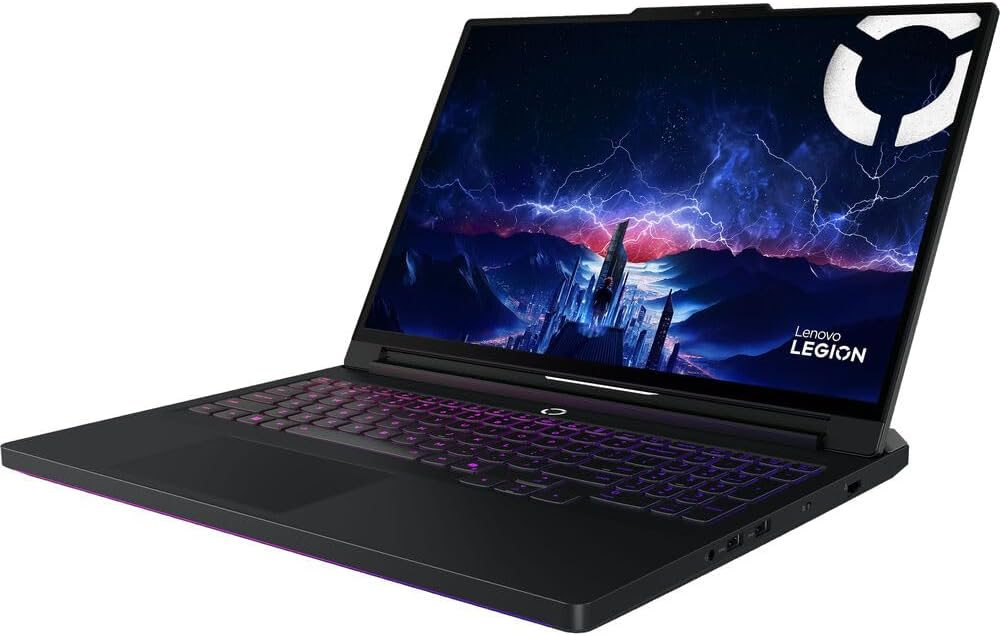
Lenovo’s Legion Pro 7i Gen 10 offers the best balance of price, performance, and build quality among Windows RTX 5090 laptops. With 64GB of DDR5 RAM and the RTX 5090’s 24GB VRAM, it can leverage CPU offloading for models larger than 24B, running inference split across GPU and system RAM. The Legion Coldfront 5.0 cooling system keeps thermals stable during extended AI workloads.
Key Specifications
- CPU: Intel Core Ultra 9 275HX (24-core)
- GPU: NVIDIA GeForce RTX 5090 Laptop GPU (24GB GDDR7)
- RAM: 64GB DDR5-6400
- Storage: 2TB NVMe PCIe Gen 5 SSD
- Display: 16″ QHD+ 240Hz IPS
- Battery: 99.9Wh
- Weight: 2.8 kg (6.2 lbs)
AI Performance
Handles models up to 13B in pure VRAM. With 64GB system RAM for CPU offloading, runs 30B and 70B quantized models at reduced speeds. Excellent for CUDA-based training workflows. A strong all-rounder for developers who prefer Windows.
Pros
- Best price-to-performance among RTX 5090 laptops
- 64GB RAM enables CPU-offloaded inference
- Excellent build quality for a gaming/AI laptop
- Larger 99.9Wh battery than competing models
Cons
- Heavier than ultrabooks
- Not as fast as Mac for large model inference due to VRAM bottleneck
- Fan noise under load
Best Use Cases
Best for: Windows developers who want RTX 5090 power at a more accessible price point than premium competitors.
7. Acer Predator Helios 18 AI (2025) – RTX 5090, 192GB DDR5
⭐ Best for AI Workloads
Overview
The Acer Predator Helios 18 AI is a uniquely configured laptop that blurs the line between portable workstation and gaming laptop. Its headline specification is a staggering 192GB of ECC DDR5 RAM – far more than any other consumer laptop. ECC (Error Correcting Code) memory actively detects and corrects bit errors, making it ideal for sensitive AI development, research, and production workloads where data integrity matters.
Key Specifications
- CPU: Intel Core Ultra 9 285HX (24-core)
- GPU: NVIDIA GeForce RTX 5090 Laptop GPU (24GB GDDR7)
- RAM: Up to 192GB ECC DDR5
- Storage: Up to 6TB NVMe SSD
- Display: 18″ QHD+ 250Hz IPS
- Battery: 99Wh
- Weight: 3.5 kg (7.7 lbs)
AI Performance
With 192GB system RAM, this is the best Windows laptop for CPU-offloaded inference of very large models. Runs 70B models via llama.cpp with CPU offloading at moderate speed. The RTX 5090’s 24GB VRAM handles the GPU-accelerated portion of mixed inference.
Pros
- Industry-leading 192GB ECC RAM for AI workloads
- ECC memory ideal for production and research
- Massive storage capacity up to 6TB
- Handles the largest quantized models available
Cons
- Very heavy – essentially a desktop replacement
- Extremely expensive
- ECC adds memory latency vs standard DDR5
- Battery life is poor under load
Best Use Cases
Best for: ML researchers and data scientists running very large models or who require data integrity guarantees in production inference environments.
8. MSI Raider GE78HX – RTX 4090, 64GB DDR5
⭐ Best Previous-Gen Windows Pick
Overview
With the RTX 5000 generation driving up prices, the MSI Raider GE78HX with RTX 4090 represents outstanding value in 2026’s secondary market. Its 16GB GDDR6X VRAM handles 7B and 13B models in full GPU mode at impressive speeds, and 64GB of DDR5 system RAM allows effective CPU offloading for 30B models. The Raider GE78HX also supports NVIDIA’s MIG (Multi-Instance GPU) for partitioned inference workflows.
Key Specifications
- CPU: Intel Core i9-14900HX (24-core)
- GPU: NVIDIA GeForce RTX 4090 Laptop GPU (16GB GDDR6X)
- RAM: 64GB DDR5-5200
- Storage: 2TB NVMe PCIe Gen 4 SSD
- Display: 17″ QHD+ 240Hz IPS
- Battery: 99.9Wh
- Weight: 2.9 kg (6.4 lbs)
AI Performance
Strong performer for 7B and 13B models in VRAM. With CPU offloading via llama.cpp, handles 30B quantized models. Memory bandwidth of 896 GB/s on the RTX 4090 makes token generation fast for models that fit in VRAM.
Pros
- Excellent value – significantly cheaper than RTX 5090 laptops
- Fast 16GB VRAM for smaller model inference
- Mature CUDA ecosystem
- Large 17″ display with 240Hz for development work
Cons
- 16GB VRAM is the main limitation for large models
- Previous-gen hardware – less future-proof
- Heavy at nearly 3kg
Best Use Cases
Best for: Budget-conscious developers who primarily work with 7B–13B models and want solid CUDA performance.
9. HP OMEN MAX 16 (2025) – RTX 5090, 64GB DDR5
⭐ Best HP Option
Overview
HP’s OMEN MAX 16 brings the RTX 5090 to HP’s flagship gaming line with an emphasis on thermal management and build quality. The OMEN Tempest Cooling Pro architecture uses a vapor chamber and three fans to sustain GPU clock speeds under extended AI inference loads – a critical advantage since local LLM runs can be hours long. Its 16-inch form factor strikes a balance between portability and screen real estate.
Key Specifications
- CPU: Intel Core Ultra 9 275HX (24-core)
- GPU: NVIDIA GeForce RTX 5090 Laptop GPU (24GB GDDR7)
- RAM: 64GB DDR5-6400 (2x upgradeable slots)
- Storage: 2TB NVMe PCIe Gen 5 SSD
- Display: 16″ QHD+ 240Hz IPS
- Battery: 99Wh
- Weight: 2.6 kg (5.7 lbs)
AI Performance
RTX 5090 delivers excellent performance for CUDA-based workflows and models up to 13B in VRAM. Upgradeable RAM slots allow expansion to support heavier CPU-offloaded inference. Thermal performance under sustained load is among the best in the RTX 5090 laptop segment.
Pros
- Best sustained performance due to Tempest Cooling Pro
- User-upgradeable RAM slots (up to 128GB)
- Slightly lighter than most RTX 5090 laptops
- HP’s build quality and support ecosystem
Cons
- Pricier than some RTX 5090 competitors
- OMEN software suite can be intrusive
- Battery life limited to 2–3 hours under inference load
Best Use Cases
Best for: Windows developers who value thermals, sustained performance under long inference sessions, and HP’s ecosystem.
10. Dell Alienware M18 R2 – RTX 4090, 64GB DDR5
⭐ Best for Upgradability
Overview
The Alienware M18 R2 is essentially a desktop in laptop clothing – and that’s exactly its appeal for AI developers. Four user-replaceable M.2 SSD slots support up to 10TB of total storage, critical for storing multiple large model weights locally. The DDR5 memory is user-upgradeable, and Alienware’s Command Center allows fine-grained power management for balancing inference performance vs noise and thermal output.
Key Specifications
- CPU: Intel Core i9-14900HX (24-core)
- GPU: NVIDIA GeForce RTX 4090 Laptop GPU (16GB GDDR6X)
- RAM: 64GB DDR5-5600 (upgradeable)
- Storage: 4x M.2 slots (up to 10TB total)
- Display: 18″ QHD+ 165Hz IPS
- Battery: 99.9Wh
- Weight: 4.4 kg (9.7 lbs)
AI Performance
Solid CUDA performance for 7B–13B models in VRAM. The massive storage capacity allows housing dozens of model weight files locally. The 270W TDP enables sustained GPU performance during long inference sessions without throttling.
Pros
- 4 M.2 slots – store entire model libraries locally
- User-upgradeable RAM
- 270W sustained TDP without throttling
- Alienware’s build quality and customer support
Cons
- Heaviest laptop on this list at 4.4kg
- RTX 4090’s 16GB VRAM is a ceiling for large models
- Previous-gen GPU
- Not practical for travel
Best Use Cases
Best for: Developers who need maximum local storage, upgradability, and sustained performance – best used as a portable desktop.
What LLMs Can You Run Locally on These Laptops?
The size of model you can run depends primarily on your available GPU VRAM (for NVIDIA laptops) or unified memory (for Apple Silicon and Ryzen AI MAX laptops). Here’s a breakdown of the most popular open-source models and their hardware requirements:
7B Parameter Models (e.g., Llama 3.1 8B, Mistral 7B, Gemma 7B)
Minimum hardware: 8GB VRAM or 16GB unified memory. Recommended: 16GB VRAM or 32GB unified memory. These models run on most modern laptops and are fast enough for real-time chat. Mistral 7B, Llama 3.1 8B, Gemma 7B, and Phi-3 Mini all fall in this category. At 4-bit quantization (Q4_K_M), a 7B model needs roughly 4–5GB of VRAM and generates 50–100+ tokens per second on RTX 4090 and Apple M-series chips.
13B Parameter Models (e.g., Llama 2 13B, Code Llama 13B, Mistral-Nemo)
Minimum hardware: 16GB VRAM or 32GB unified memory. Recommended: 24GB VRAM or 64GB unified memory. These models offer a significant capability improvement over 7B while remaining manageable. At Q4_K_M quantization, 13B models need ~8GB VRAM and run at 30–60 tokens/sec on RTX 4090/5090 laptops, and 40–70+ tokens/sec on M4 Max MacBooks with 96GB+.
70B Parameter Models (e.g., Llama 3.1 70B, Qwen 72B, DeepSeek 67B)
Minimum hardware: 48GB unified memory (Apple Silicon) or 24GB VRAM + 64GB RAM for CPU offloading. Recommended: 96–128GB unified memory or 24GB VRAM + 128GB RAM. These are the most capable open-weight models available and produce near-GPT-4-level outputs on many benchmarks. Running them at full speed requires Apple Silicon with 96GB+ or the Acer Predator Helios with 192GB RAM. On RTX 5090 laptops with 64GB system RAM, they run via CPU offloading at slower speeds (3–8 tokens/sec).
Mixture of Experts Models (e.g., Mixtral 8x7B, Mixtral 8x22B)
Mixtral 8x7B has ~46B total parameters but only activates ~12B per token, making it more efficient than its parameter count suggests. It requires approximately 26GB of memory, making it runnable on MacBooks with 32GB+ or Windows laptops with 24GB VRAM. Mixtral 8x22B requires 87GB+ and is best suited for the MacBook Pro M4 Max 128GB or the Acer Predator Helios 192GB.
Tools for Running LLMs Locally
Choosing the right software stack is as important as the hardware. Here are the most popular and reliable tools for local LLM inference in 2026:
Ollama
Ollama is the simplest way to get started with local LLMs. It provides a Docker-like CLI experience for pulling, managing, and running models. A single command – ‘ollama run llama3.1’ – downloads and starts a model with an interactive chat interface. Ollama supports Apple Silicon (via Metal acceleration), NVIDIA GPUs (CUDA), and AMD GPUs (ROCm). It exposes a local REST API compatible with the OpenAI API format, making it a drop-in replacement for cloud API calls in development. Best for: beginners and developers who want quick setup.
LM Studio
LM Studio is a graphical desktop application that makes running LLMs as simple as using any consumer app. It features a built-in model browser connected to Hugging Face, one-click model downloads, a ChatGPT-like chat interface, and a local server that exposes an OpenAI-compatible API. LM Studio supports Windows (NVIDIA/AMD), macOS (Apple Silicon), and Linux. It’s the best choice for non-technical users and developers who prefer a GUI workflow. Best for: developers who want a full GUI experience and easy model management.
KoboldCpp
KoboldCpp is a high-performance single-file inference engine based on llama.cpp with extensive features for creative writing and roleplay use cases. It supports Vulkan, CUDA, ROCm, and Metal acceleration and includes advanced sampling parameters (temperature, top-k, top-p, repetition penalty) that give users fine-grained control over output style. KoboldCpp is particularly popular in the creative AI community. Best for: creative writing, storytelling, and users who need advanced sampling control.
Text Generation WebUI (Oobabooga)
Text Generation WebUI (often called ‘oobabooga’ after its creator) is a powerful browser-based interface for running LLMs. It supports transformers, llama.cpp, ExLlamaV2, and other backends, and includes extensions for character cards, long-term memory, voice synthesis, and more. It’s the most feature-rich option but requires more technical knowledge to configure. Best for: power users, researchers, and developers who need maximum flexibility and extensibility.
llama.cpp
llama.cpp is the underlying inference engine that powers many of the tools above. Running it directly from the command line offers the best performance and lowest overhead. It supports GGUF quantized models, Metal (Apple), CUDA (NVIDIA), ROCm (AMD), Vulkan, and CPU-only inference. For performance benchmarking and production inference scripts, llama.cpp directly is the go-to choice. Best for: experienced developers who want maximum performance and scripting flexibility.
Laptop Comparison Table
| Laptop | GPU / Memory | RAM | AI Performance | Best For |
| MacBook Pro M4 Max 128GB | M4 Max (GPU shared) | 128GB Unified | ⭐⭐⭐⭐⭐ Excellent | All AI developers |
| MacBook Pro M4 Max Nano | M4 Max (GPU shared) | 128GB Unified | ⭐⭐⭐⭐⭐ Excellent | Bright environments |
| MacBook Pro M3 Max 96GB | M3 Max (GPU shared) | 96GB Unified | ⭐⭐⭐⭐½ Great | Budget Mac users |
| ASUS ROG Strix SCAR 18 | RTX 5090 / 24GB VRAM | 32GB DDR5 | ⭐⭐⭐⭐ Great (CUDA) | ML engineers / CUDA |
| ASUS ROG Flow Z13 | Ryzen AI MAX+ / shared | 128GB Unified | ⭐⭐⭐⭐ Great | Mobile AI developers |
| Lenovo Legion Pro 7i | RTX 5090 / 24GB VRAM | 64GB DDR5 | ⭐⭐⭐⭐ Great | Windows developers |
| Acer Predator Helios 18 | RTX 5090 / 24GB VRAM | 192GB ECC DDR5 | ⭐⭐⭐⭐ Excellent (CPU) | Researchers |
| MSI Raider GE78HX | RTX 4090 / 16GB VRAM | 64GB DDR5 | ⭐⭐⭐ Good | Budget Windows users |
| HP OMEN MAX 16 | RTX 5090 / 24GB VRAM | 64GB DDR5 | ⭐⭐⭐⭐ Great | Sustained workloads |
| Dell Alienware M18 R2 | RTX 4090 / 16GB VRAM | 64GB DDR5 | ⭐⭐⭐ Good | Upgradability / storage |
Don’t Miss This
- 10 Most Expensive Gaming Laptops in the World and What Makes Them Worth It
- 16GB vs 32GB RAM: Do You Really Need It?
- 10 Most Expensive Gaming Keyboards and Their Premium Features
Buyer’s Guide: How to Choose the Right AI Laptop
Minimum Specs for Running LLMs Locally
The absolute minimum configuration for meaningful local LLM work in 2026 is 16GB of RAM (for Apple Silicon) or 8GB VRAM (for NVIDIA). This allows running 7B models at acceptable speeds. However, for a future-proof setup that can handle models available 1–2 years from now, aim higher.
Best GPU VRAM Size
- 8GB VRAM: Runs 7B models at 4-bit quantization only. Not recommended for serious work.
- 16GB VRAM (RTX 4090 Laptop): Handles 7B–13B models well; 30B with CPU offloading.
- 24GB VRAM (RTX 5090 Laptop): Best discrete VRAM on consumer laptops; runs 13B models in full VRAM.
- 64–128GB Unified (Apple/AMD): The best option for large models; treats all memory as GPU memory.
RAM Recommendations
- 16GB (minimum): 7B models only on Windows laptops.
- 32GB: Entry-level for 13B models via CPU offloading.
- 64GB: Solid for CPU-offloaded 30B inference; recommended for Windows.
- 96–128GB Unified: Required for comfortable 70B model inference on Mac/AMD platforms.
- 192GB (Acer Helios): Overkill for most users, but excellent for research environments.
Budget vs High-End AI Laptops
Budget tier (under $2,500): MSI Raider GE78HX or MacBook Pro M3 Max 96GB (used/refurbished). Handles models up to 13B comfortably. Mid-range ($2,500–$4,000): MacBook Pro M4 Max 128GB, Lenovo Legion Pro 7i RTX 5090. Handles 70B models on Mac; 13–30B on Windows. High-end ($4,000+): ASUS ROG Strix SCAR 18, Acer Predator Helios 18 192GB. For professionals who need the absolute best inference speeds or research-grade configurations.
Conclusion: Best AI Laptop for Every Use Case
The local LLM laptop market in 2026 has matured significantly, and there is now a strong option at every price point and platform preference. Here is a summary of the top recommendations by user type:
- For beginners and casual AI enthusiasts: MacBook Pro M3 Max 96GB or Lenovo Legion Pro 7i. Both offer excellent performance with a gentler learning curve for getting Ollama or LM Studio running.
- For professional AI developers and ML engineers: MacBook Pro M4 Max 128GB is the single best all-around laptop for local inference in 2026. Its combination of memory capacity, bandwidth, battery life, and software ecosystem is unmatched.
- For heavy local LLM workloads and research: Acer Predator Helios 18 AI (192GB ECC) for Windows-based research requiring data integrity, or the MacBook Pro M4 Max 128GB for Apple Silicon. Both can handle the largest quantized models available today and for the foreseeable future.
- For CUDA-specific workflows (training and fine-tuning): ASUS ROG Strix SCAR 18 or Lenovo Legion Pro 7i, both with RTX 5090 and 24GB VRAM. These are the best options for PyTorch training and fine-tuning workflows that require CUDA acceleration.
- For maximum portability: ASUS ROG Flow Z13 with Ryzen AI MAX+ 395 and 128GB unified memory. Unprecedented capability in a 13-inch form factor.
Whatever your budget or platform preference, the laptops on this list represent the best available hardware for running large language models locally in 2026. The era of cloud-only AI is over – your next breakthrough might happen entirely on a device you carry in your bag.
Frequently Asked Questions (FAQs)
Q1: What is the minimum amount of RAM needed to run LLMs locally?
For Apple Silicon MacBooks, 16GB of unified memory is the bare minimum – enough to run 7B models. 32GB is recommended for 13B models, and 96GB+ for 70B models. For Windows laptops with discrete NVIDIA GPUs, 8GB of VRAM is the minimum, though 16GB or 24GB is strongly preferred for practical use.
Q2: Can I run ChatGPT-level AI models on a laptop?
You cannot run GPT-4 itself (it’s closed-source and runs on large server clusters), but open-weight models like Llama 3.1 70B, Qwen 72B, and Mistral Large achieve comparable or better performance on many benchmarks and can be run locally on high-end laptops like the MacBook Pro M4 Max 128GB.
Q3: Is Apple Silicon better than NVIDIA for local LLM inference?
For pure inference of large models (30B–70B), Apple Silicon’s unified memory architecture is currently superior to consumer NVIDIA laptop GPUs because it can hold more model weights in memory. Fine-tuning, and workflows for training, requiring CUDA libraries, NVIDIA RTX laptops have the advantage. For most developers doing inference-only work, Apple Silicon is the recommended choice.
Q4: What quantization format should I use for local LLMs?
Q4_K_M (4-bit quantization with K-means) is the recommended default for most users – it offers the best balance of model quality and memory efficiency. Q5_K_M offers slightly better quality at the cost of more memory. Q8_0 is near full-precision quality but requires approximately 2x the VRAM of Q4. For very large models on memory-constrained systems, Q3_K_M or Q2_K can be used but with noticeable quality degradation.
Q5: Can I fine-tune LLMs on a laptop GPU?
Yes, but with limitations. Using parameter-efficient techniques like LoRA (Low-Rank Adaptation) and QLoRA, you can fine-tune 7B and 13B models on RTX 4090/5090 Laptop GPUs with 16–24GB of VRAM. Fine-tuning 70B models requires either a MacBook Pro M4 Max 128GB (using MLX) or multiple GPUs. For serious fine-tuning work at scale, cloud A100s or H100s are still preferable for speed.