Product Overview
TL;DR: Product Overview The ANVIZ FacePass 7 Pro is a cloud-based biometric time clock designed for small to medium-sized businesses seeking to modernize their employee attendance tracking. This system combines facial recogn…
Table of Contents
- Product Overview
- Key Features & Benefits
- Facial Recognition Technology
- Cloud-Based Management System
- Multiple Authentication Methods
- Offline Functionality
- Door Access Integration
- Flexible Scheduling Support
- Multilingual Interface
- Pros and Cons
- Advantages
- Limitations
- Who This Product Is Best For
- Who Should Consider Alternatives
- Comparison Considerations
- Frequently Asked Questions
- Does this system work with existing payroll software?
- How accurate is the facial recognition?
- Can employees clock in from their phones?
- What happens if an employee’s face isn’t recognized?
- How difficult is the initial setup?
- Are there ongoing costs beyond the hardware?
- Can this track employee locations or GPS data?
- What internet speed is required?
- In Conclusion
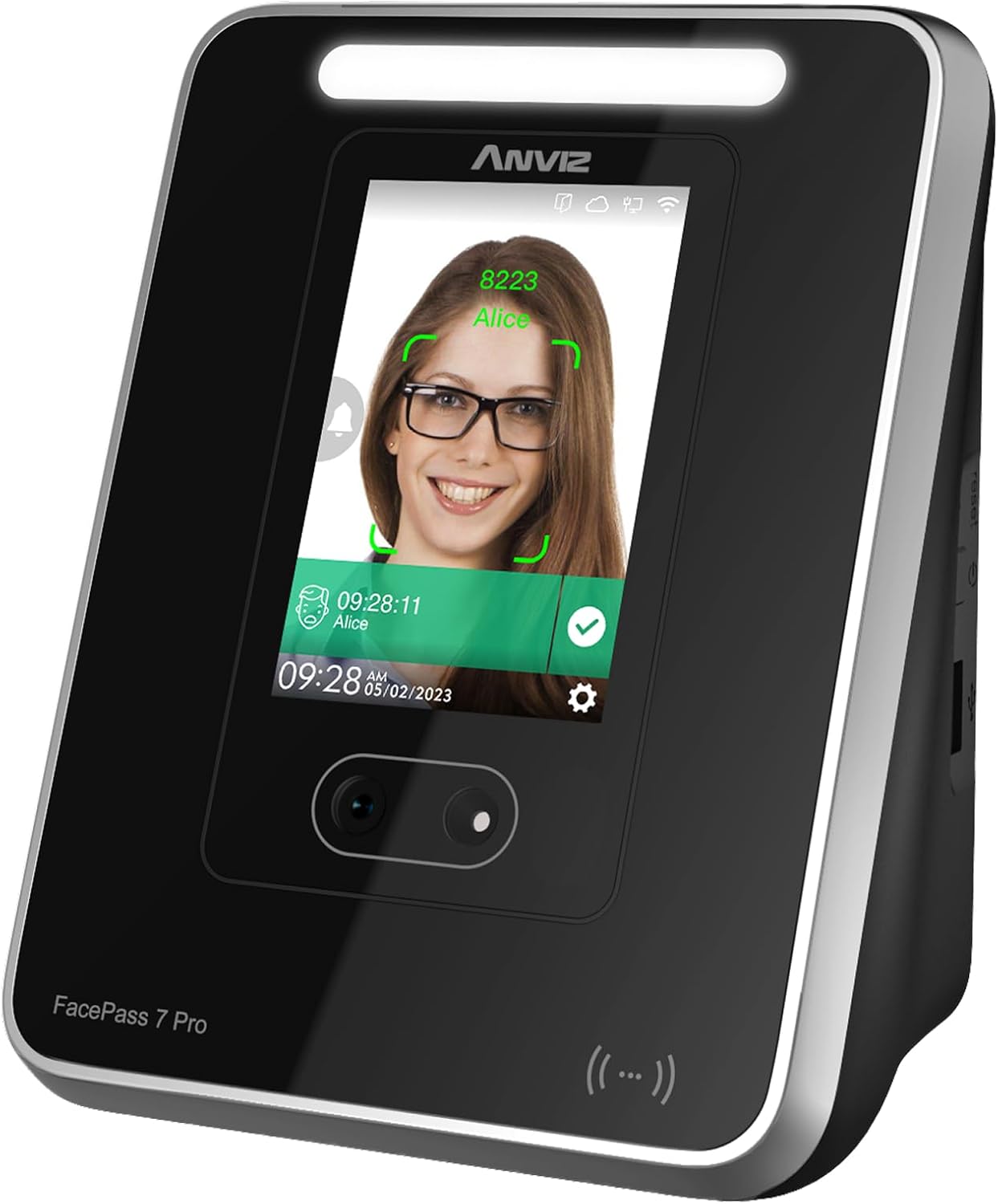
The ANVIZ FacePass 7 Pro is a cloud-based biometric time clock designed for small to medium-sized businesses seeking to modernize their employee attendance tracking. This system combines facial recognition technology with traditional RFID card and PIN options, offering flexibility for various workplace environments.
What sets this device apart is its integration with CrossChex Cloud software, which the manufacturer offers free for small businesses with one admin and one device. The system supports up to 1,500 users and can store 100,000 punch logs, making it suitable for growing companies that need scalable time management solutions.
The device features a 3.5-inch TFT touchscreen interface and connects via either LAN or 2.4GHz WiFi. Beyond time tracking, it includes door access control functionality through a relay output and exit button interface, potentially eliminating the need for separate access control systems.
Key Features & Benefits
Facial Recognition Technology
The FacePass 7 Pro uses rapid facial recognition that reportedly works even when employees wear masks. This touchless clocking method reduces physical contact points in the workplace, which has become particularly relevant during health-conscious periods. The technology aims to prevent buddy punching, where one employee clocks in for another, a common issue that can cost businesses significantly over time.
Cloud-Based Management System
The CrossChex Cloud software allows managers to access attendance data from any web browser, regardless of location. This remote accessibility means you can review reports, manage schedules, and monitor employee punches without being physically present at your business location. The cloud-based approach also eliminates the need for on-site server infrastructure or complex IT setups.
For qualifying small businesses, the basic cloud software remains free indefinitely, which can represent substantial savings compared to subscription-based alternatives.
Multiple Authentication Methods
Employees can clock in using:
– Facial recognition (primary method)
– RFID cards or fobs
– PIN codes
This versatility accommodates different preferences and situations. If facial recognition fails temporarily, employees have backup options. The package includes 2 RFID cards, though additional cards must be purchased separately if needed for your workforce.
Offline Functionality
The system continues capturing punch data even when internet connectivity drops. Once the connection restores, the stored punches sync automatically to the cloud. This offline capability ensures you won’t lose attendance records due to network issues, a critical feature for businesses in areas with unreliable internet.
Door Access Integration
The built-in relay output and exit button interface enable the FacePass 7 Pro to control electronic door locks. When an employee successfully clocks in, the door can unlock automatically. This dual functionality may reduce equipment costs and simplify your security infrastructure.
Flexible Scheduling Support
The system accommodates various scheduling configurations including:
– Three-shift displays (including overnight shifts)
– Weekly, bi-weekly, semi-monthly, or monthly pay periods
– Customizable shift parameters
This flexibility helps businesses with non-standard schedules or multiple shift patterns manage their workforce more effectively.
Multilingual Interface
The device supports English, Spanish, French, German, Italian, and additional languages, making it suitable for diverse workplaces or international business locations.
Pros and Cons
Advantages
– Free cloud software for small businesses: Eliminates ongoing subscription costs for qualifying users
– Mask-compatible facial recognition: Maintains functionality during health protocols
– Substantial storage capacity: 1,500 users and 100,000 logs accommodate growth
– Multiple clocking methods: Provides backup options if one method fails
– Offline data capture: Prevents data loss during internet outages
– Integrated door access: Combines time tracking and security functions
– Remote management: Access data from anywhere via web browser
– 3-year hardware warranty: Longer coverage than many competitors
– Easy installation: Wall or countertop mounting with straightforward setup
Limitations
– 2.4GHz WiFi only: Does not support 5GHz networks directly, requiring ethernet cable or WiFi bridge for 5GHz routers
– Limited RFID cards included: Only 2 cards provided; additional cards must be purchased separately
– Paid premium features: Advanced functionality requires $99/year subscription beyond basic free tier
– Technical support schedule: Monday-Friday support only; no weekend assistance
– Learning curve: Cloud software may require time to master all features
– Internet dependency for cloud features: While offline punching works, reporting and remote access require connectivity
– Single device limitation on free plan: Businesses with multiple locations need paid plans
Don’t Miss This
Who This Product Is Best For
The ANVIZ FacePass 7 Pro works particularly well for:
Small businesses with 1-50 employees who want professional time tracking without recurring software costs. The free cloud tier covers most small business needs effectively.
Companies concerned about time theft where buddy punching has been problematic. The facial recognition technology makes fraudulent clock-ins significantly more difficult.
Businesses needing door access control can consolidate their time tracking and security systems into one device, potentially reducing overall equipment costs.
Multi-shift operations including restaurants, healthcare facilities, or 24-hour businesses benefit from the flexible scheduling and overnight shift support.
Growing companies will appreciate the 1,500-user capacity, which allows scaling without replacing hardware as the workforce expands.
Businesses with diverse workforces can utilize the multilingual interface to accommodate employees who prefer different languages.
Remote managers or multi-location owners who need to monitor attendance from various locations will find the cloud-based access valuable.
Who Should Consider Alternatives
This system may not be ideal for:
Businesses with only 5GHz WiFi infrastructure who cannot easily add ethernet cabling or WiFi bridges may face connectivity challenges.
Companies requiring weekend technical support should note that assistance is only available Monday through Friday.
Organizations needing multiple devices on the free tier will need to budget for paid subscriptions, as the free plan covers only one device.
Businesses in areas with extremely unreliable internet might prefer fully offline systems, though the offline punch capture does mitigate this concern.
Companies with very specific compliance requirements should verify that the system meets their particular industry regulations before purchasing.
Extremely budget-conscious startups should remember that while the basic software is free, additional RFID cards and premium features require additional investment.
Comparison Considerations
When evaluating the FacePass 7 Pro against alternatives, consider these factors:
Software costs: Many competitors charge monthly or annual fees from the start. The free tier for small businesses represents a genuine advantage if you qualify.
Recognition technology: Some budget time clocks use less sophisticated facial recognition that struggles with masks or varying lighting conditions. The FacePass 7 Pro’s mask-compatible technology addresses this limitation.
Storage capacity: Entry-level systems often support fewer users (300-500 range). The 1,500-user capacity provides more headroom for growth.
Door access integration: Not all time clocks include access control hardware. If you need both functions, having them in one device simplifies your setup.
WiFi limitations: The 2.4GHz-only support is becoming less common as more devices support dual-band connectivity. This is a genuine limitation compared to some newer competitors.
Warranty coverage: The 3-year hardware warranty exceeds the 1-year coverage typical of many competing products.
Frequently Asked Questions
Does this system work with existing payroll software?
The CrossChex Cloud software can export attendance data in various formats. Whether it integrates directly with your specific payroll system depends on that software’s import capabilities. Many businesses export reports and import them into their payroll systems manually or through CSV files.
How accurate is the facial recognition?
While the manufacturer describes it as “advanced rapid facial recognition,” specific accuracy percentages are not publicly available. User experiences vary based on lighting conditions, camera positioning, and individual facial features. The system includes backup PIN and RFID options for situations where facial recognition encounters difficulties.
Can employees clock in from their phones?
This information is not specified in the available product documentation. The system appears designed for fixed-location clocking at the physical device. For mobile clocking capabilities, you would need to contact the manufacturer or check the cloud software documentation.
What happens if an employee’s face isn’t recognized?
Employees can use their assigned RFID card or PIN code as alternative clocking methods. This ensures they can still record their attendance even if facial recognition temporarily fails.
How difficult is the initial setup?
The manufacturer describes installation as “quite easy” with wall or countertop mounting options. The bulk user registration feature allows administrators to add multiple employees simultaneously rather than one at a time. However, initial configuration of the cloud software and WiFi connection will require some technical comfort.
Are there ongoing costs beyond the hardware?
For small businesses with one admin and one device, the basic cloud software remains free. However, premium features cost $99/year and include 1-on-1 support plus lifetime hardware warranty extensions. Additional RFID cards also require separate purchase.
Can this track employee locations or GPS data?
This is a fixed-location time clock designed for clocking in at a specific physical device. GPS tracking or mobile location features are not mentioned in the product specifications.
What internet speed is required?
Specific bandwidth requirements are not publicly available. Since the system primarily transmits punch timestamps and user data rather than large files, most standard business internet connections should suffice.
In Conclusion
The ANVIZ FacePass 7 Pro represents a solid mid-range option for small to medium businesses seeking to modernize their time tracking systems. Its strongest selling points are the free cloud software for qualifying small businesses, mask-compatible facial recognition, and integrated door access functionality.
The 3-year warranty and substantial storage capacity (1,500 users, 100,000 logs) suggest the manufacturer stands behind the product’s durability and designed it with growth in mind. The offline punch capture feature addresses a common concern about cloud-based systems losing data during internet outages.
However, the 2.4GHz WiFi limitation feels dated in 2024, when most modern devices support dual-band connectivity. Businesses with 5GHz-only infrastructure will need workarounds. Additionally, while the free software tier is generous, companies should understand that advanced features and multiple devices require paid subscriptions.
For small businesses currently using paper timesheets or basic punch cards, this system offers significant improvements in accuracy, reporting, and remote accessibility. The facial recognition technology effectively addresses buddy punching, which can save businesses hundreds or thousands of dollars annually depending on workforce size.
The combination of time tracking and door access in one device may justify the investment for businesses that would otherwise purchase these systems separately. However, companies only needing basic time tracking without access control might find simpler, less expensive alternatives adequate for their needs.
If you’re a small business owner ready to eliminate time theft and streamline your attendance tracking, check the current availability and specifications of the ANVIZ FacePass 7 Pro on Amazon.
Before purchasing, verify that your WiFi infrastructure is compatible (2.4GHz support), confirm the free tier meets your needs, and consider whether you’ll require additional RFID cards for your workforce. For businesses that fit the ideal use case, this system offers professional-grade time tracking at a reasonable entry point.