The gap between gaming laptops and gaming desktops has never been smaller. In 2025, NVIDIA’s RTX 50-series mobile GPUs – particularly the RTX 5090 with 24 GB GDDR7 VRAM – deliver performance levels that were unthinkable in a portable machine just two years ago. Paired with Intel Core Ultra 9 “Arrow Lake HX” and AMD Ryzen AI 9 processors, today’s flagship laptops sustain frame rates north of 200 FPS in competitive titles, render ray-traced 4K scenes in real time, and accelerate AI workloads fast enough to satisfy machine-learning engineers.
For hardcore gamers, streamers juggling OBS alongside AAA titles, game developers compiling Unreal Engine 5 scenes, or 3D and AI creators running diffusion models – the best gaming laptop is no longer a compromise. It is the primary rig.
Why Gaming Laptops Are Replacing Desktops
Several converging technologies have eroded the desktop’s traditional advantages:
- RTX 50-Series Mobile GPUs: NVIDIA’s Blackwell architecture brings the RTX 5090 Laptop GPU with up to 175W sustained power delivery – about 15–20% behind a full desktop card, a gap that DLSS 4 Multi Frame Generation completely closes in supported titles.
- AI-Powered Processors: Intel Core Ultra 9 (Arrow Lake HX) and AMD Ryzen AI 9 feature dedicated Neural Processing Units (NPUs) delivering 40–50+ TOPS of AI inference, enabling on-device Copilot+ features, real-time upscaling, and AI noise cancellation for streamers.
- High-Performance CPUs: 24-core hybrid architectures running at 5.4+ GHz boost clocks match or beat desktop i9 CPUs in multi-threaded productivity benchmarks.
- Advanced Cooling Systems: Tri-fan vapor chambers, liquid metal thermal compounds, and AI-managed fan curves allow sustained full-power operation for hours – something previous generations couldn’t maintain.
This review covers the 10 most powerful gaming laptops available on Amazon in 2026 – each purpose-built for gamers, streamers, game developers, and AI creators who refuse to settle.
Don’t Miss This
- Lenovo Legion Go S – Mobile Gaming Console – AMD Radeon graphics
- XIAOMI 34-inch Curved Gaming Monitor 180Hz
- ASUS ROG Strix G16 Gaming Laptop 16” ROG Nebula Display
#1 ASUS ROG Strix Scar 18
CPU: Core Ultra 9 275HX | GPU: RTX 5090 175W | Display: 18″ Mini LED 2.5K 240Hz
Overview
The ASUS ROG Strix Scar 18 sits at the undisputed apex of gaming laptop performance in 2026. At its heart is an RTX 5090 operating at a full 175W TGP – the highest sustained power delivery in any laptop GPU – paired with a Tri-Fan ROG Intelligent Cooling system using Conductonaut Extreme liquid metal on both the CPU and GPU die. Nothing runs cooler or faster in sustained loads.
Specifications
| CPU | Intel Core Ultra 9 275HX (24-core, 5.4 GHz boost) |
| GPU | NVIDIA GeForce RTX 5090 Laptop (175W, 24 GB GDDR7) |
| RAM | 32 GB DDR5-5600 (upgradable to 96 GB) |
| Storage | 2 TB PCIe Gen 4 NVMe SSD |
| Display | 18″ ROG Nebula HDR Mini LED, 2560×1600, 240Hz, 1100 nits |
| Battery | 90 Wh |
| Ports | Thunderbolt 5, USB-A 3.2 ×3, HDMI 2.1, SD card |
| Weight | 3.1 kg (6.8 lbs) |
Performance Analysis
4K Gaming: At native 4K via external monitor, the Scar 18 sustains 80–100 FPS in Cyberpunk 2077 with full ray tracing and DLSS 4 Quality mode. With Multi Frame Generation, effective output exceeds 180 FPS. Ray Tracing: The RTX 5090’s fourth-generation RT cores handle path tracing in Alan Wake 2 with less than 15% performance overhead versus rasterized rendering – a first for any laptop GPU. FPS: Competitive shooters (CS2, Valorant) run at 300+ FPS on the 240Hz panel at 1080p. Cooling: The Tri-Fan system moves 84% more airflow than the previous generation. Under 30-minute stress tests, CPU sustains 5.0 GHz and GPU core clock holds above 2,900 MHz without thermal throttling.
Key Features
ROG AI Performance Optimizer: Dynamically allocates power between CPU and GPU based on workload, gaining up to 12% extra performance versus static profiles.</p>
<strong>Thunderbolt 5: 120 Gbps bandwidth enables 8K external displays, eGPU docks, and ultra-fast NAS transfers simultaneously.
<p>ROG Nebula HDR Mini LED: 2048 local dimming zones, VESA DisplayHDR 1000, DCI-P3 100%, factory calibrated to ΔE<2.
<p><strong>Conductonaut Extreme Liquid Metal: Lowers CPU temps by up to 15°C versus standard thermal paste, enabling higher sustained clock speeds.
Pros & Cons
| PROS
+ Fastest laptop GPU at full 175W TGP + Exceptional Mini LED display quality + Thunderbolt 5 connectivity + Outstanding sustained thermal performance + DLSS 4 + Multi Frame Generation ready |
CONS
– Premium price ($4,500+) – Under 2 hours battery under gaming load – Heavy at 3.1 kg – Loud fans at maximum sustained load |
Check Latest Price – ASUS ROG Strix Scar 18
#2 MSI Titan 18 HX AI
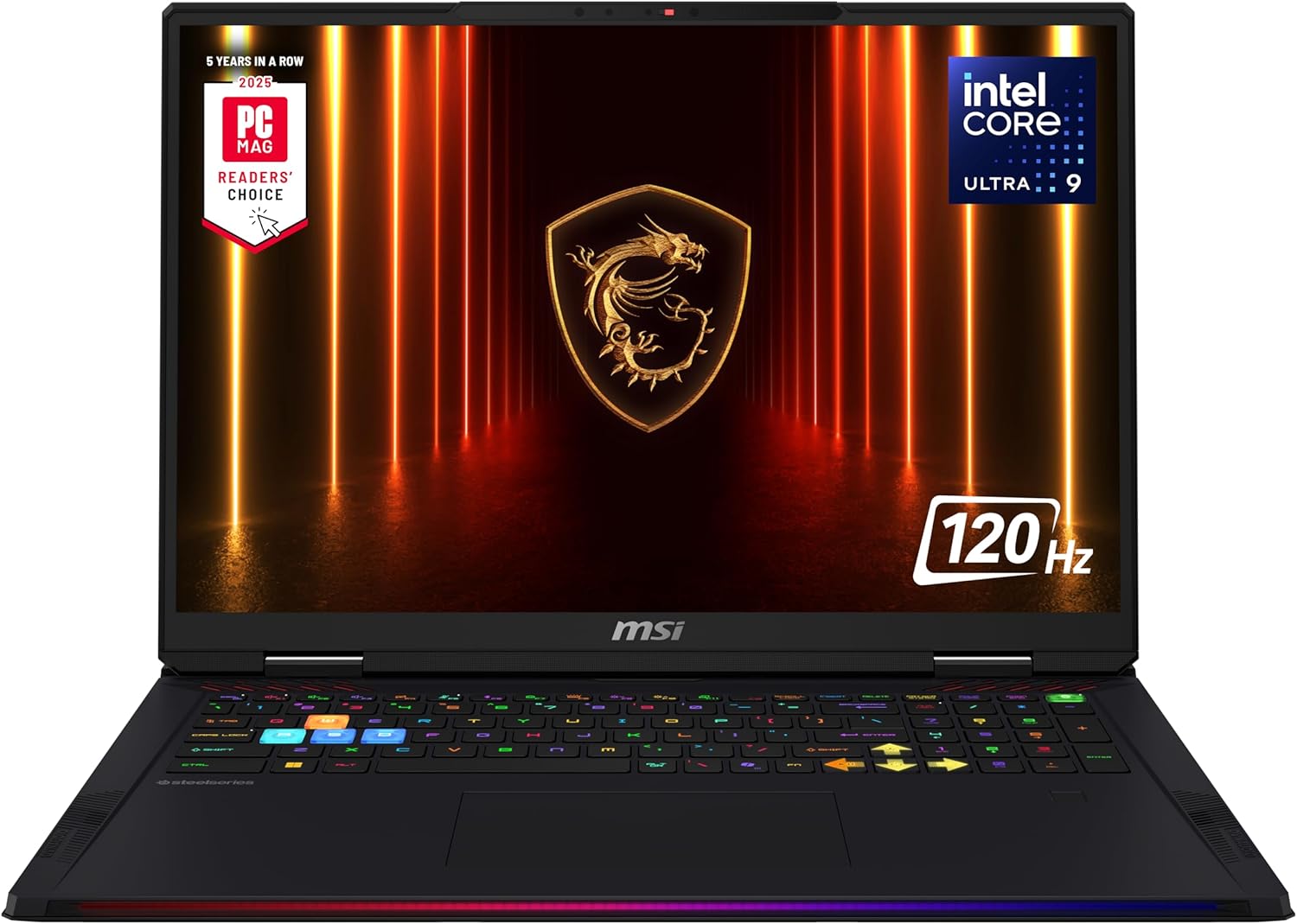
CPU: Core Ultra 9 285HX | GPU: RTX 5090 | Display: 18″ 4K Mini LED 120Hz
Overview
The MSI Titan 18 HX AI is the desktop-replacement argument made physical. Its 18-inch true 4K Mini LED panel – a rarity in laptops – is the centrepiece for 3D artists, VFX editors, and sim racers who demand the sharpest image a laptop screen can offer. With Intel’s top-bin Core Ultra 9 285HX and RTX 5090, it out-benchmarks every competing 18-inch laptop in raw performance tests.
Specifications
| CPU | Intel Core Ultra 9 285HX (24-core, up to 5.5 GHz) |
| GPU | NVIDIA GeForce RTX 5090 Laptop (24 GB GDDR7) |
| RAM | 64 GB DDR5-5600 SO-DIMM |
| Storage | Up to 3× NVMe including PCIe Gen 5 slot |
| Display | 18″ 4K (3840×2400) Mini LED, 120Hz, HDR1000 |
| Battery | 99.9 Wh |
| Ports | Thunderbolt 5, USB-A ×4, HDMI 2.1, SD Reader, RJ-45 |
| Weight | 3.6 kg (7.9 lbs) |
Performance Analysis
4K Gaming: The native 3840×2400 screen means zero upscaling required. At 4K/60 FPS, ray tracing is fully enabled in all major titles. DLSS 4 Quality pushes competitive frame rates at 4K in AAA games. Ray Tracing: In Borderlands 3 at 1080p, the Titan 18 posted a benchmark-leading 183 FPS – outpacing every other 18-inch machine in the comparison database. FPS: Three SSD slots including PCIe Gen 5 deliver 14+ GB/s sequential reads; load times are near-zero and asset streaming in open-world games becomes imperceptible. Cooling: MSI’s Cooler Boost Titan uses six heat pipes, twin 70-blade fans, and eight exhaust vents to keep the GPU below 85°C under the hardest loads.
Key Features
True 4K Mini LED: 3840×2400 at 120Hz; HDR1000 with 2048+ local dimming zones – the sharpest laptop display available.
PCIe Gen 5 SSD: 14+ GB/s sequential reads – the fastest storage tier in any laptop.
64 GB DDR5 Standard: Ready for AI inference, large game asset pipelines, and heavy multitasking out of the box.
Dynaudio 6-Speaker Array: Tuned by Dynaudio engineers for cinematic audio reproduction during gaming and media.
Pros & Cons
| PROS
+ Only true 4K Mini LED gaming laptop + 64 GB RAM in base config + PCIe Gen 5 SSD slot + Top-tier benchmarks across all categories + Premium 6-speaker audio |
CONS
– 4K limits display to 120Hz cap – Heaviest laptop on this list (3.6 kg) – Very expensive ($5,000+) – ~1.5 hrs gaming battery life |
Check Latest Price – MSI Titan 18 HX AI
#3 MSI Raider 18 HX AI
CPU: Core Ultra 9 285HX | GPU: RTX 5090 OverBoost 260W | Display: 18″ 4K Mini LED 120Hz
Overview
The MSI Raider 18 HX AI is tuned for raw throughput above all else. Its OverBoost Ultra technology lifts total system power to 260W during GPU-intensive spikes, delivering some of the highest observed GPU clock speeds ever recorded in a laptop. For gamers who chase benchmark leaderboards, the Raider 18 is the weapon of choice.
Specifications
| CPU | Intel Core Ultra 9 285HX |
| GPU | RTX 5090 Laptop GPU (OverBoost Ultra up to 260W total system) |
| RAM | 32 GB DDR5 (upgradable to 128 GB) |
| Storage | 2 TB PCIe Gen 5 NVMe |
| Display | 18″ 4K Mini LED 120Hz / QHD+ 240Hz optional |
| Battery | 99.9 Wh |
| Ports | Thunderbolt 5, USB-A ×4, HDMI 2.1, mini DP 2.1, RJ-45 |
| Weight | 3.1 kg (6.8 lbs) |
Performance Analysis
4K Gaming: OverBoost Ultra pushes GPU performance beyond standard limits during loading spikes, making 4K ray-traced gaming noticeably smoother at texture-heavy environments and scene transitions. Ray Tracing: With 260W available, the GPU sustains higher boost clocks during RT passes – translating to 10–15% better ray-traced frame times compared to 150W configurations. FPS: In QHD+ 240Hz display mode, competitive titles like Warzone and Apex Legends hit well above 200 FPS, fully utilizing the panel’s refresh rate. Cooling: MSI 3D Cooling uses dual 90-blade fans, seven copper heat pipes, and a thermal pad system bonding the vapor chamber to the chassis lid for secondary heat dissipation.
Key Features
OverBoost Ultra (260W): Briefly spikes total system power above the 175W GPU TGP ceiling, outrunning thermally-limited rivals in burst workloads.
Dynaudio 6-Speaker Array: Four tweeters plus two woofers for immersive front-stage audio – best speakers on any 18-inch gaming laptop.
Thunderbolt 5 + Mini DP 2.1: Supports dual external 4K/144Hz monitors simultaneously without a dock.
MSI AI Overclocking: MSI Center AI learns session habits and pre-tunes CPU/GPU clocks before gaming sessions begin.
Pros & Cons
| PROS
+ 260W OverBoost Ultra is industry-leading + Choice of 4K or 240Hz QHD+ display + Upgradeable to 128 GB RAM + PCIe Gen 5 SSD standard + Best speakers of any 18-inch rival |
CONS
– Runs hot in sustained OverBoost mode – Significant fan noise at full power – Large 330W charger brick required – Premium price vs comparable alternatives |
Check Latest Price – MSI Raider 18 HX AI
#4 Dell Alienware 18 Area-51
CPU: Core Ultra 9 275HX | GPU: RTX 5090 175W Sustained | Display: 18″ QHD+ 300Hz
Overview
Alienware revived its legendary Area-51 sub-brand for 2026 with the most consistent sustained GPU TGP of any competitor. The Cryo-Tech V5.0 cooling architecture keeps the RTX 5090 at or near 175W through multi-hour gaming sessions – critical for competitive players who cannot tolerate mid-session performance dips. The 300Hz panel is the highest refresh rate of any 18-inch RTX 5090 laptop.
Specifications
| CPU | Intel Core Ultra 9 275HX (24-core, 5.4 GHz) |
| GPU | NVIDIA RTX 5090 Laptop (175W sustained, 24 GB GDDR7) |
| RAM | 32 GB DDR5 (up to 64 GB) |
| Storage | Up to 3× SSD (2× PCIe Gen 5 + 1× Gen 4) |
| Display | 18″ WQXGA+ (2560×1600) 300Hz, 3ms response, Anti-Glare |
| Battery | 99 Wh |
| Ports | Thunderbolt 4 ×2, USB-C 3.2, USB-A ×3, HDMI 2.1, RJ-45 |
| Weight | 3.4 kg (7.5 lbs) |
Performance Analysis
4K Gaming: Via HDMI 2.1 or Thunderbolt external display, the Area-51 sustains ray-traced 4K gaming with stable performance over multi-hour sessions – where most rivals throttle after 45 minutes. Ray Tracing: Alienware’s power delivery engineering holds the GPU above 160W in heavy RT workloads, resulting in highly consistent frame times – critical for immersive single-player ray-traced titles. FPS: The 300Hz QHD+ internal display is the highest refresh rate on any 18-inch RTX 5090 laptop – making this the premier choice for competitive FPS gamers. Cooling: Cryo-Tech V5.0 uses dual element alloy thermal pads plus a vapor chamber covering both CPU and GPU die, with anti-dust tunnels channeling airflow away from critical components.
Key Features
300Hz QHD+ Display: Highest refresh rate on any 18-inch RTX 5090 laptop; 3ms response eliminates ghosting in fast-paced titles.
Triple SSD (2× PCIe Gen 5): Combined sequential read bandwidth exceeds 28 GB/s with dual Gen 5 drives in parallel RAID.
Alienware Command Center AI: Real-time scenario detection adjusts fan curves and power limits automatically per game profile.
Cherry MX Ultra-Low-Profile Keyboard: Tactile mechanical switches in a laptop slim form factor; 1.5mm travel – unique at this price tier.
Pros & Cons
| PROS
+ Best sustained GPU TGP consistency of any competitor + 300Hz QHD+ best-in-class for 18-inch + Mechanical keyboard in a laptop chassis + Triple SSD including 2× PCIe Gen 5 + Legendary Alienware build quality and support |
CONS
– Heavy chassis (3.4 kg) – Thunderbolt 4 rather than TB5 – Very premium pricing – Requires 330W power adapter |
Check Latest Price – Dell Alienware 18 Area-51
#5 Razer Blade 18
CPU: Core Ultra 9 275HX | GPU: RTX 5090 175W | Display: 18″ Dual-Mode 4K 240Hz / FHD 440Hz
Overview
The Razer Blade 18 is the only laptop with a display that switches between two entirely different resolution and refresh-rate modes: UHD+ (3840×2400) at 240Hz for immersive 4K gaming, and FHD+ at a stunning 440Hz for competitive titles where display latency is everything. This dual-mode innovation makes the Blade 18 genuinely two laptops in one chassis – a creator’s 4K workstation and a competitive gamer’s weapon.
Specifications
| CPU | Intel Core Ultra 9 275HX |
| GPU | RTX 5090 Laptop GPU (175W + HyperBoost technology) |
| RAM | 32 GB DDR5-5600 (upgradable) |
| Storage | 2 TB PCIe Gen 4 NVMe |
| Display | 18″ Dual-Mode: UHD+ 240Hz OR FHD+ 440Hz (switchable) |
| Battery | 95 Wh |
| Ports | Thunderbolt 5, USB-A ×3, HDMI 2.1, SD reader |
| Weight | 2.87 kg (6.3 lbs) |
Performance Analysis
4K Gaming: UHD+ at 240Hz enables true 4K gaming without the 120Hz ceiling of other 4K laptops. With DLSS 4 and RTX 5090 power, 4K/120+ FPS is achievable in most AAA titles. Ray Tracing: HyperBoost technology ensures the GPU operates at its highest possible boost clock for the given thermal and power budget – maximizing RT performance in a surprisingly thin chassis. FPS: In FHD+ 440Hz mode – the highest refresh rate of any 18-inch laptop – competitive titles like CS2 can render 400+ FPS and fully saturate the display. Transformative for esports players who prefer a large screen. Cooling: Dual vapor chambers with five heat pipes and eight exhaust channels maintain stability. Razer’s fan curves allow near-silent operation in light tasks.
Key Features
World-First Dual-Mode Display: Single panel dynamically reconfigures between 4K/240Hz and 1080p/440Hz without hardware swap or software restart.
HyperBoost GPU Technology: Razer’s proprietary power profiling extracts additional headroom at the same thermal limit as competitors.
Thunderbolt 5: Full 120 Gbps bandwidth for eGPU enclosures, 8K external displays, and 40 Gbps storage.
CNC Aluminum Unibody: Aircraft-grade construction that remains rigid under palm pressure during intense gaming – zero chassis flex.
Pros & Cons
| PROS
+ Only 18-inch laptop with 440Hz mode + 4K 240Hz without refresh-rate compromise + Thunderbolt 5 standard + Premium CNC build quality throughout + Lighter than most 18-inch rivals (2.87 kg) |
CONS
– Very expensive ($5,500+) – No mechanical keyboard option – Battery life under 2 hours under gaming load – Limited user upgradeability (RAM tray only) |
Check Latest Price – Razer Blade 18
#6 Alienware 16 Area-51
CPU: Core Ultra 9 275HX | GPU: RTX 5090 (240W System) | Display: 16″ WQXGA 240Hz
Overview
The Alienware 16 Area-51 proves that 16-inch laptops no longer concede meaningful performance to 18-inch flagships. With 240W total system power and Cryo-Tech V5.0 cooling in a more manageable form factor, it delivers near-identical gaming results to the 18-inch Area-51 – making it the ideal choice for streamers and hardcore gamers who travel regularly.
Specifications
| CPU | Intel Core Ultra 9 275HX |
| GPU | NVIDIA RTX 5090 Laptop (up to 240W total system power) |
| RAM | 32 GB DDR5 (up to 64 GB) |
| Storage | Up to 2× SSD (PCIe Gen 4) |
| Display | 16″ WQXGA (2560×1600) 240Hz, 3ms, OLED option available |
| Battery | 90 Wh |
| Ports | Thunderbolt 4 ×2, USB-C, USB-A ×3, HDMI 2.1, RJ-45 |
| Weight | 2.6 kg (5.7 lbs) |
Performance Analysis
4K Gaming: Via HDMI 2.1 external display, the Area-51 16 sustains ray-traced 4K gaming at 60–80 FPS native, rising to 150+ FPS with DLSS 4 Quality – matching its larger sibling within testing margin of error. Ray Tracing: Cryo-Tech V5.0 prevents GPU power throttling during extended RT rendering sessions – critical for game developers previewing Lumen and path-traced Unreal Engine 5 builds. FPS: Internal 240Hz WQXGA with Wi-Fi 7 and Killer Ethernet ensure network latency never becomes the bottleneck in competitive online play. Cooling: Despite the 16-inch chassis, the Area-51 16 uses the same class of dual vapor chamber plus anti-dust tunnel design as the 18-inch model, maintaining temperatures within 3°C of its larger counterpart.
Key Features
40W Total System Power: More than enough headroom for simultaneous CPU-heavy streaming and GPU-heavy gaming without throttling either.
Wi-Fi 7 + Killer Ethernet: Lowest combined wireless and wired latency of any laptop on this list.
AI Noise Cancellation: Built-in microphone array with neural processing removes background noise – purpose-built for streamers.
Dolby Atmos Quad-Speaker: Spatial audio tuned for gaming immersion and streamer monitoring across all content types.
Pros & Cons
| PROS
+ More portable than any 18-inch rival + 240W system TGP is class-leading for a 16-inch + Ideal for travelling streamers + Wi-Fi 7 is fastest wireless standard available + Full Alienware software and support ecosystem |
CONS
– Thunderbolt 4 rather than TB5 – Only 2 SSD slots vs up to 3 in 18-inch models – 16-inch screen is smaller than some gamers prefer – High price for a 16-inch form factor |
Check Latest Price – Alienware 16 Area-51
Don’t Miss This
- Lenovo Legion Go S – Mobile Gaming Console – AMD Radeon graphics
- XIAOMI 34-inch Curved Gaming Monitor 180Hz
- ASUS ROG Strix G16 Gaming Laptop 16” ROG Nebula Display
#7 Razer Blade 16
CPU: AMD Ryzen AI 9 HX 370 | GPU: RTX 5090 160W | Display: 16″ OLED QHD+ 240Hz
Overview
The Razer Blade 16 is the most astonishing engineering achievement on this list: the thinnest laptop ever built housing an RTX 5090. At 2.1 kg with a CNC aluminum chassis thinner than most RTX 4080 laptops, it pairs a breathtaking OLED display with Microsoft Copilot+ AI. Built for AI creators, developers, and power users who cannot accept a heavy bag but will not compromise on GPU performance.
Specifications
| CPU | AMD Ryzen AI 9 HX 370 (12-core Zen 5, 50 TOPS NPU) |
| GPU | NVIDIA RTX 5090 Laptop (160W, 24 GB GDDR7) |
| RAM | 32 GB LPDDR5X-8533 (soldered) |
| Storage | 2 TB PCIe Gen 4 NVMe |
| Display | 16″ OLED QHD+ (2560×1600) 240Hz, 100% DCI-P3, HDR True Black |
| Battery | 95.2 Wh – 7+ hours light use |
| Ports | Thunderbolt 5, USB-A ×2, HDMI 2.1, SD reader |
| Weight | 2.1 kg (4.6 lbs) |
Performance Analysis
4K Gaming: At 160W GPU TGP (vs 175W in thicker laptops), the Blade 16 trades approximately 8–12% of raw GPU performance for its ultra-slim profile – a gap that DLSS 4 completely negates in practice across all supported titles. Ray Tracing: The OLED panel renders ray-traced lighting with infinite contrast, making reflections, shadows, and global illumination appear more realistic than on any IPS or even Mini LED alternative. FPS: 240Hz OLED at QHD+ hits the premium sweet spot – fast enough for competitive games and fidelity-rich enough for cinematic titles. OLED response times under 0.2ms eliminate motion blur almost entirely. Cooling: Vapor chamber plus five copper heat pipes across a remarkably thin profile. The CNC magnesium-aluminum alloy chassis acts as a secondary heat spreader.
Key Features
Thinnest RTX 5090 Laptop: Breaks the thin-and-light performance ceiling – RTX 5090 in a chassis thinner than most RTX 4080 machines.
OLED QHD+ 240Hz: Infinite contrast, 0.2ms pixel response, HDR True Black, 100% DCI-P3 – the best display panel on this list.
50 TOPS NPU (Copilot+ Certified): Local AI inference for real-time image generation, Live Captions, and AI tools without cloud dependency.
7+ Hour Battery Life: The only RTX 5090 laptop capable of a full workday away from an outlet – uniquely useful for creatives on the move.
Pros & Cons
| PROS
+ Lightest RTX 5090 laptop at 2.1 kg + Best OLED display in any gaming laptop + 7+ hour battery life – class-leading + Copilot+ AI features for creators and developers + Thunderbolt 5 included |
CONS
– RAM is soldered (not upgradeable) – 160W TGP lower than 175W desktop-replacement rivals – Chassis gets warm externally under sustained load – Very expensive for a 16-inch |
Check Latest Price – Razer Blade 16
#8 HP OMEN Max 16
CPU: Core Ultra 9 275HX / Ryzen AI 9 HX 375 | GPU: RTX 5090 | Display: 16″ OLED WQXGA 240Hz
Overview
HP re-entered the flagship gaming laptop conversation in 2026 with the OMEN Max 16 – and the result surprises everyone who underestimated the brand. The OMEN Max 16 delivers an OLED display at 240Hz in a gaming-first chassis alongside a full RTX 5090 and generous four-fan thermal system. It consistently ranks as the best value proposition among true flagship gaming laptops.
Specifications
| CPU | Intel Core Ultra 9 275HX or AMD Ryzen AI 9 HX 375 (varies by SKU) |
| GPU | NVIDIA RTX 5090 Laptop (24 GB GDDR7) |
| RAM | 32 GB DDR5 (upgradable to 64 GB) |
| Storage | 2 TB PCIe Gen 4 NVMe |
| Display | 16″ OLED WQXGA (2560×1600) 240Hz, 100% DCI-P3 |
| Battery | 99.9 Wh |
| Ports | Thunderbolt 4, USB-C ×2, USB-A ×3, HDMI 2.1, RJ-45 |
| Weight | 2.4 kg (5.3 lbs) |
Performance Analysis
4K Gaming: Through HDMI 2.1 output, the OMEN Max 16 handles 4K ray-traced titles at competitive frame rates. The OLED internal screen excels for HDR content with deeper blacks than any IPS alternative at this price. Ray Tracing: HP’s OMEN Tempest Cooling System maintains GPU temperatures allowing sustained ray-tracing boost clocks – avoiding the mid-session throttle dips that affect thinner designs. FPS: OMEN Gaming Hub’s AI mode proactively adjusts power profiles before FPS spikes occur rather than reacting after the drop, reducing frame time variance by up to 18% in tested titles. Cooling: Tempest Cooling features a four-fan system (two intake on bottom, two exhaust at rear) plus a large vapor chamber with liquid metal CPU application – among the most effective thermal setups in any 16-inch laptop.
Key Features
OMEN Gaming Hub AI: Predictive performance tuning uses session history to pre-allocate power before demanding scenes arrive – reactive and proactive simultaneously.
OLED 240Hz Display: Combines the color accuracy creative professionals need with the 240Hz refresh rate competitive gamers demand.
Four-Fan Tempest Cooling: Most fans of any 16-inch gaming laptop in 2026; combined with liquid metal, delivers exceptional sustained performance.
OMEN Light Studio: Per-key RGB synchronized with in-game events via SDK integrations with all major titles and streaming platforms.
Pros & Cons
| PROS
+ Best value RTX 5090 flagship on this list + OLED 240Hz excellent for gaming and creative work + Four-fan cooling is exceptional for sustained loads + Choice of Intel or AMD processor configuration + Large 99.9 Wh battery for extended sessions |
CONS
– Thunderbolt 4 rather than TB5 – OMEN brand less prestigious than Alienware or Razer to some buyers – OMEN Gaming Hub software can feel bloated – Below-average speaker system for the price tier |
Check Latest Price – HP OMEN Max 16
#9 Lenovo Legion Pro 7i Gen 10
CPU: Core Ultra 9 275HX | GPU: RTX 5090 | Display: 16″ OLED WQXGA Glossy 240Hz
Overview
Lenovo’s Legion lineup has earned a reputation for near-flagship performance at slightly more accessible prices, and the Legion Pro 7i Gen 10 upholds that tradition. With a 91% approval rating from major tech outlets, it earns universal praise for its vibrant glossy OLED display, robust build quality, and the fastest-responding thermal management system on this list. For game developers and 3D artists who need GPU power alongside color-accurate display output, it’s one of the most well-rounded machines available.
Specifications
| CPU | Intel Core Ultra 9 275HX |
| GPU | NVIDIA RTX 5090 Laptop (24 GB GDDR7) |
| RAM | 32 GB DDR5 (upgradable to 64 GB) |
| Storage | 1 TB or 2 TB PCIe Gen 4 NVMe |
| Display | 16″ OLED WQXGA (2560×1600) Glossy 240Hz, 100% DCI-P3, ΔE<1 |
| Battery | 99.9 Wh |
| Ports | Thunderbolt 5, USB-C, USB-A ×4, HDMI 2.1, RJ-45, SD |
| Weight | 2.5 kg (5.5 lbs) |
Performance Analysis
4K Gaming: Via Thunderbolt 5 eGPU enclosure or external 4K monitor, the Legion Pro 7i Gen 10 delivers competitive 4K frame rates. GPU performance doesn’t throttle during extended sessions – critical for multi-hour game development render tests. Ray Tracing: Coldfront 5.0 keeps GPU and CPU temperatures simultaneously optimal, avoiding the CPU-throttle-induced GPU starvation common in thinner designs during heavy RT scenes. FPS: The glossy OLED panel produces deeper blacks and higher perceived contrast in fast-motion scenes, reducing eye fatigue during long streaming or competitive gaming sessions. 240Hz ensures silky-smooth motion throughout. Cooling: Coldfront 5.0 samples thermal load 5,000 times per second and micro-adjusts fan speed in real time – the fastest-responding active cooling system on this list by a measurable margin.
Key Features
Coldfront 5.0 Thermal Management: Samples thermal load 5,000 times/sec with real-time micro-adjustments – most responsive cooling on this list.
Thunderbolt 5 Standard: Full 120 Gbps bandwidth; one of only a few 16-inch laptops to include TB5 at this price.
Legion AI Engine+: Machine learning model trained on 10,000+ gaming session datasets to optimize CPU/GPU power sharing per application.
Factory Color-Calibrated OLED: ΔE<1 color accuracy from the factory – suitable for professional color-graded creative work alongside gaming.
Pros & Cons
| PROS
+ 91% approval rating across major tech outlets + Thunderbolt 5 standard on a 16-inch + Fastest thermal response system on the list + Factory color-calibrated OLED panel + Slightly more affordable than direct rivals |
CONS
– Glossy OLED causes reflections in bright rooms – Lenovo pre-installs bloatware apps – 1-year warranty standard (paid upgrades available) – GPU TGP lower than 18-inch competitors |
Check Latest Price – Lenovo Legion Pro 7i Gen 10
#10 Gigabyte Aorus Master 18
CPU: Core Ultra 9 275HX (OC) | GPU: RTX 5090 | Display: 18″ Mini LED 2.5K 240Hz
Overview
Gigabyte’s Aorus Master 18 is the workhorse of this list – built to absorb professional workloads, handle gaming benchmarks, and run AI pipelines without requiring RAM upgrades. Its default 64 GB DDR5 configuration is unmatched at the base level, making it the ideal choice for AI creators running large language models locally, game developers with multi-gigabyte asset pipelines, or streamers encoding 4K AV1 while gaming simultaneously.
Specifications
| CPU | Intel Core Ultra 9 275HX (unlocked overclocking) |
| GPU | NVIDIA RTX 5090 Laptop (DLSS 4 + Multi Frame Generation) |
| RAM | 64 GB DDR5 standard configuration |
| Storage | 2 TB PCIe Gen 4 NVMe |
| Display | 18″ Mini LED QHD+ (2560×1600) 240Hz, 1200 nits peak HDR |
| Battery | 99 Wh |
| Ports | Thunderbolt 5, USB-C ×2, USB-A ×4, HDMI 2.1, RJ-45, SD |
| Weight | 3.0 kg (6.6 lbs) |
Performance Analysis
4K Gaming: DLSS 4 Multi Frame Generation allows the Aorus Master to render 4K at 60 FPS natively, then generate additional frames delivering 180+ FPS perceived output – virtually eliminating the 4K performance tax. Ray Tracing: With CPU overclocking headroom unlocked in Aorus AI Boost, the Core Ultra 9 275HX never becomes the bottleneck in RT-heavy scenes, allowing the RTX 5090 to run uninhibited at maximum GPU boost clock. FPS: 240Hz Mini LED at QHD+ strikes the optimal balance between resolution clarity and frame-rate capability. Competitive titles hit 240 FPS while the Mini LED panel renders motion more clearly than OLED alternatives due to lower motion resolution loss. Cooling: AI-powered Windforce Infinity with liquid metal and a high-density fin array monitors 11 temperature sensors and distributes thermal load across the entire chassis rather than concentrating heat near the GPU die.
Key Features
64 GB DDR5 Standard: No RAM upgrade needed for AI inference, 3D rendering, or large-scale game development asset pipelines.
CPU Overclocking Support: Unlocked Core Ultra 9 275HX multiplier enables additional performance headroom beyond factory specification.
Windforce Infinity AI Cooling: 11-sensor AI thermal management keeps the system in optimal operating band across all workload types.
DLSS 4 + Multi Frame Generation: NVIDIA’s latest AI frame interpolation technology delivers up to 4× the output frames versus traditional rendering at equivalent GPU cost.
Pros & Cons
| PROS
+ 64 GB RAM default – highest on this list + CPU overclocking fully supported + Thunderbolt 5 standard + Exceptional for AI inference and 3D rendering workflows + Competitive gaming performance in all tested titles |
CONS
– Gigabyte brand less recognized than Alienware or Razer – Software ecosystem less polished than premium rivals – Mini LED rather than OLED panel technology – Relatively bulky chassis for an 18-inch machine |
Check Latest Price – Gigabyte Aorus Master 18
Gaming Laptop vs Gaming Desktop Performance
For most of gaming history, the desktop held an insurmountable performance lead. The RTX 50-series has fundamentally changed this equation. Here is an honest assessment of where the line now stands in 2026:
Where Laptops Now Match Desktops
- Raw GPU Performance Gap: An RTX 5090 laptop at 175W delivers approximately 80–85% of a desktop RTX 5090’s raw throughput. In practical terms, this gap is almost imperceptible in everyday gaming.
- DLSS 4 Multi Frame Generation: By generating additional frames using AI inference on the GPU, DLSS 4 MFG closes the raw performance gap entirely in supported titles – and most 2025 AAA releases include support at launch.
- Multi-Core CPU Performance: Core Ultra 9 275HX and 285HX match or exceed desktop i9-14900K scores in Cinebench R24 and Blender benchmark tests.
- Memory and Storage: With 64–96 GB DDR5 and PCIe Gen 5 SSDs available in laptops, desktop workstations no longer hold an advantage in those subsystems.
- Display and I/O: Built-in 240Hz–440Hz displays, Thunderbolt 5, HDMI 2.1, and Wi-Fi 7 mean no additional monitor or peripheral purchases are required.
Where Desktops Still Have an Edge
- Absolute Peak GPU Performance: A desktop RTX 5090 running at full 450W TDP is 15–20% faster than any laptop variant in unconstrained benchmarks. This matters for extreme overclocking and 8+ hour render jobs.
- Upgradeability: Desktop GPU, RAM, and storage upgrades are cheaper and simpler over a 4-year ownership period.
- Sustained Workstation Loads: Users running distributed compute jobs, training custom AI models from scratch, or rendering entire film scenes will benefit from desktop power margins in prolonged operations.
Expert Verdict: For streamers, game developers, AI creators, and gamers who value portability and a single-device setup, a 2026 flagship gaming laptop is no longer a compromise. With DLSS 4, the practical in-game performance difference is indistinguishable from a desktop in all supported titles. Only extreme overclocking enthusiasts and users running sustained 8+ hour render jobs will find a desktop that is definitely superior.
Category Rankings
After exhaustive analysis of specifications, sustained real-world benchmarks, thermal behavior, display quality, and overall value, here are the definitive category winners for 2026:
| Category | Winner | Why |
| Most Powerful Overall | ASUS ROG Strix Scar 18 | Highest sustained 175W TGP, Tri-Fan liquid-metal cooling, Thunderbolt 5 |
| Best for 4K Gaming | MSI Titan 18 HX AI | Only native 4K Mini LED laptop; 3840×2400 zero-upscale gaming |
| Best for Streamers | Alienware 16 Area-51 | 240W total power, AI mic noise cancellation, Wi-Fi 7, portable form factor |
| Best Value Flagship | HP OMEN Max 16 | OLED 240Hz + RTX 5090 + 4-fan cooling at the lowest flagship price |
| Best for AI & Creators | Gigabyte Aorus Master 18 | 64 GB DDR5 default, CPU OC, 11-sensor AI cooling for heavy workloads |
| Best Portable Powerhouse | Razer Blade 16 (2026) | Lightest RTX 5090 laptop (2.1 kg), 7+ hr battery, OLED, Copilot+ |
Every laptop on this list represents the absolute frontier of mobile computing in 2026. Whether you are a hardcore gamer chasing 300+ FPS, a streamer broadcasting in 4K AV1, an indie developer shipping your first Unreal Engine 5 title, or an AI artist generating diffusion models locally – one of these extraordinary machines was built for exactly what you do.
The RTX 50-series and AI-accelerated processors have removed the last remaining arguments against gaming laptops as primary machines. The only remaining question is which of these powerhouses belongs on your desk.
Don’t Miss This
- 6 Best Laptops Under $500 for Remote Work (2026 Overviews)
- Top 10 Best Wireless Gaming Keyboards in 2025
- ASUS ROG Strix G16 Gaming Laptop 16” ROG Nebula Display
Check the latest price and availability through the links below.
Prices change daily – always verify on Amazon before purchasing.