Gaming on a Budget Has Never Been This Good
Gone are the days when powerful gaming required a four-figure investment. Thanks to fierce competition among laptop manufacturers and rapid GPU innovation from NVIDIA and AMD, today’s budget gaming laptops punch well above their price point. If you’re a gamer on a budget, a student who needs raw computing power, or a beginner streamer looking to start your content journey, you are living in the golden age of affordable gaming hardware.
The single most important component in any gaming laptop is the GPU. NVIDIA’s RTX 4050 and RTX 4060 have redefined what ‘budget graphics’ means – both support DLSS 3 AI upscaling, ray tracing, and Frame Generation, technologies that squeeze cinematic frame rates out of modest hardware. Pair these with modern Intel Core i7 or AMD Ryzen 7 processors and DDR5 RAM, and you have machines that routinely run AAA titles at 50-80 FPS on high settings.
RAM matters just as much. 16 GB of DDR5 is the sweet spot for modern gaming, comfortably handling multitasking, background streaming software like OBS, and browser sessions while in-game. Storage is equally critical: a PCIe Gen 4 SSD slashes load times and keeps Windows 11 feeling snappy.
Finally, display quality shapes the entire experience. A 144 Hz or higher refresh rate screen eliminates the blurry, tearing visuals of older 60 Hz panels, while 1080p Full HD resolution gives your GPU room to breathe and deliver consistent frame rates. The ten laptops reviewed on this page hit every one of these benchmarks – at prices that won’t make your wallet weep.
The 10 Best Affordable Gaming Laptops
1. Acer Nitro 5 – $649 – $799
Overview
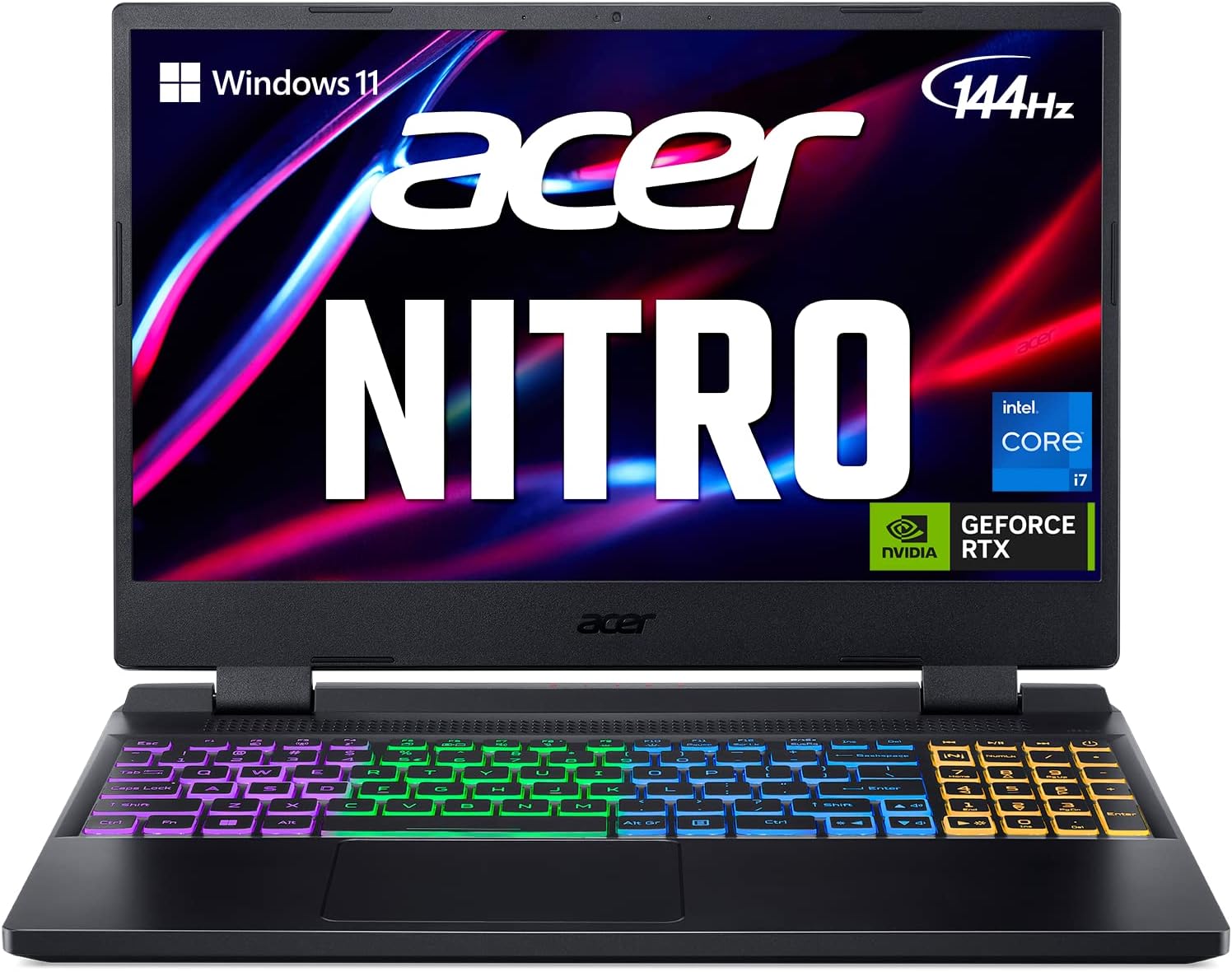
The Acer Nitro 5 is one of the most recognisable names in budget gaming, and for very good reason. It balances a capable NVIDIA RTX 4050 or RTX 4060 GPU with a competitive Intel Core i5/i7 or AMD Ryzen processor, all wrapped in Acer’s signature red-accented chassis. It’s the go-to recommendation for first-time PC gamers who want proven performance without financial risk.
Best for: First-time gamers and price-conscious students who want brand-name reliability.
Key Specifications
| Processor | Intel Core i7-13700H / AMD Ryzen 5 7535HS |
| Graphics Card | NVIDIA GeForce RTX 4050 / RTX 4060 (6–8 GB GDDR6) |
| RAM | 16 GB DDR5 (expandable to 32 GB) |
| Storage | 512 GB – 1 TB PCIe Gen 4 SSD |
| Display | 15.6″ Full HD IPS (1920×1080) |
| Refresh Rate | 144 Hz |
| Battery | 57.5 Wh — up to 7 hours light use |
Gaming Performance
The Nitro 5 handles modern AAA titles like Forza Horizon 5, Call of Duty: Modern Warfare III, and Cyberpunk 2077 at 55–75 FPS on High settings at 1080p using the RTX 4060 configuration. DLSS 3 Quality mode pushes frame rates even higher, often breaking 90 FPS. For esports titles like Valorant, CS2, and Apex Legends, the 144 Hz panel becomes the limiting factor as the GPU rockets past 150 FPS with ease. Streaming is feasible thanks to the hardware NVENC encoder on the RTX GPU, and OBS Studio runs in the background without noticeable frame drops.
Key Features
- 144 Hz Full HD IPS display for smooth gameplay
- NVIDIA DLSS 3 and Ray Tracing support
- Dual-fan CoolBoost thermal system keeps temperatures in check
- Two M.2 slots and two RAM slots for easy upgrades
- Backlit keyboard with red accent lighting
✅ Pros
- Solid 1080p gaming performance for the price
- Excellent upgrade path – RAM and storage are user-accessible
- Wide availability on Amazon with frequent discounts
- Proven reliability across multiple generations
❌ Cons
- Display could be brighter (300 nits)
- Plastic build feels less premium than metal alternatives
- Battery life modest under gaming load
2. Lenovo LOQ 15 – $749 – $999
Overview
Lenovo’s LOQ line was purpose-built to answer one question: how much gaming can you get for under $1,000? The answer, it turns out, is a lot. The LOQ 15 features an Intel Core i5/i7 paired with up to an RTX 4060, housed in a clean, understated chassis that looks at home in a lecture hall or a LAN party. Lenovo’s software ecosystem and build quality add genuine value over some cheaper rivals.
Best for: Students and remote workers who need a versatile daily driver that also games well.
Key Specifications
| Processor | Intel Core i5-13420H / Core i7-13700H |
| Graphics Card | NVIDIA GeForce RTX 4060 (8 GB GDDR6) |
| RAM | 16 GB DDR5-4800 |
| Storage | 512 GB PCIe Gen 4 SSD |
| Display | 15.6″ Full HD IPS (1920×1080) |
| Refresh Rate | 144 Hz |
| Battery | 60 Wh — up to 8 hours office use |
Gaming Performance
The RTX 4060 inside the LOQ 15 is one of the most capable mid-range mobile GPUs available. In Elden Ring, it sustains 80+ FPS at Ultra settings. In Hogwarts Legacy, High settings yield a smooth 65–75 FPS experience. The LOQ’s thermal management is quietly impressive – Lenovo’s Intelligent Cooling system dynamically adjusts fan speeds to prevent throttling during extended sessions, meaning the 25th minute of a gaming session feels identical to the first. The 144 Hz display keeps competitive titles like Overwatch 2 and Rocket League feeling buttery smooth.
Key Features
- RTX 4060 with full DLSS 3 Frame Generation support
- Excellent Lenovo Intelligent Cooling thermal management
- MUX Switch available on higher-tier configurations
- Understated, professional design works in any environment
- Upgradeable RAM up to 32 GB DDR5
✅ Pros
- Outstanding value for RTX 4060 performance
- Longer battery life than most gaming laptops
- Lenovo’s build quality and support network
- Works well for productivity, creative, and gaming tasks
❌ Cons
- Display brightness could use improvement (~300 nits)
- No per-key RGB – single-zone backlight only
- Webcam quality is only 720p
3. HP Victus 16 – $699–$899
Overview
HP’s Victus 16 is the brand’s direct assault on the budget gaming market, offering a larger 16.1-inch canvas paired with solid NVIDIA GPU options. The Victus line is aimed squarely at gamers who also study or work, making it an excellent choice for students who want a single device that covers everything. HP’s reliability track record adds confidence in the purchase.
Best for: College students who need a large-screen laptop for both gaming and studying.
Key Specifications
| Processor | AMD Ryzen 5 7535HS / Intel Core i7-13700H |
| Graphics Card | NVIDIA GeForce RTX 4060 (8 GB GDDR6) |
| RAM | 16 GB DDR5 (2× SODIMM, expandable) |
| Storage | 512 GB – 1 TB PCIe NVMe SSD |
| Display | 16.1″ Full HD IPS (1920×1080) |
| Refresh Rate | 144 Hz |
| Battery | 70.9 Wh — up to 8.5 hours |
Gaming Performance
The Victus 16’s larger display makes it a joy to play visually rich games like Starfield, The Witcher 3 Next-Gen, and Assassin’s Creed Mirage. At 1080p High settings, the RTX 4060 drives 60–80 FPS across most titles. The AMD Ryzen 7535HS variant offers excellent multi-threaded performance for streaming workloads, while the Intel i7 variant edges ahead in single-threaded gaming scenarios. Both configurations support NVIDIA DLSS 3, extending the performance ceiling even further. Esports titles run at well above 100 FPS, making full use of the 144 Hz panel.
Key Features
- Large 16.1″ screen for immersive gaming and productivity
- RTX 4060 with DLSS 3 and hardware ray tracing
- OMEN Gaming Hub software for fan and performance control
- 9 Wh battery for all-day use off-charger
- Dual SODIMM slots for RAM expansion
✅ Pros
- Biggest screen in this price range — great for immersive titles
- HP build quality and 1-year warranty
- AMD CPU variant offers strong multi-threaded performance for creators
- Dual M.2 SSD slots for easy storage expansion
❌ Cons
- Chassis is bulkier than 15″ competitors
- Fan noise at full load is noticeable
- No Thunderbolt 4 on AMD variants
4. ASUS TUF Gaming A15 – $699–$849
Overview
When ASUS says ‘TUF,’ they mean it. The TUF Gaming A15 is built to MIL-STD-810H military standards for durability — it passes drop, vibration, humidity, and temperature tests that lesser laptops would fail. This makes it the ideal laptop for gamers who travel frequently or students who carry their machine everywhere. Underneath the tough exterior lies a genuinely impressive gaming configuration.
Best for: Frequent travellers, students who commute daily, and gamers who need a durable, portable machine.
Key Specifications
| Processor | AMD Ryzen 7 7745HX / Ryzen 9 7940HX |
| Graphics Card | NVIDIA GeForce RTX 4060 (8 GB GDDR6) |
| RAM | 16 GB DDR5-4800 (expandable to 32 GB) |
| Storage | 512 GB PCIe Gen 4 SSD |
| Display | 15.6″ Full HD (1920×1080) IPS-level |
| Refresh Rate | 144 Hz / 165 Hz (variant dependent) |
| Battery | 90 Wh — up to 10 hours |
Gaming Performance
The AMD Ryzen 7000 series processors in the TUF A15 are exceptional workhorses. In CPU-intensive games like Microsoft Flight Simulator and Total War: Warhammer III, the Ryzen 7 7745HX significantly outperforms competing Intel solutions. The RTX 4060 keeps frame rates above 60 FPS in virtually every modern title at High settings, and DLSS 3 pushes performance well beyond that in supported games. The 90 Wh battery is one of the largest in this class, providing meaningful unplugged gaming sessions at reduced settings.
Key Features
- MIL-STD-810H military-grade durability certification
- AMD Ryzen 7000 series for superior multi-threaded performance
- 90 Wh battery — best-in-class for this price segment
- ASUS ROG-derived thermal design with 3D vapour chamber option
- 165 Hz high-refresh-rate display on select configurations
✅ Pros
- Military-grade durability for worry-free portability
- Best battery life in the budget gaming segment
- Strong AMD CPU performance for content creation and gaming
- User-upgradeable RAM and storage
❌ Cons
- Larger and heavier than typical 15″ laptops
- Design is functional rather than flashy
- No per-key RGB lighting
Don’t Miss This
- Lenovo Legion Go S – Mobile Gaming Console – AMD Radeon graphics
- XIAOMI 34-inch Curved Gaming Monitor 180Hz
- ASUS ROG Strix G16 Gaming Laptop 16” ROG Nebula Display
5. Dell G15 5530 – $749–$999
Overview
Dell’s G15 5530 carries the weight of one of the most trusted names in consumer technology. Aimed at gamers who want enterprise-grade reliability without the enterprise price tag, the G15 5530 pairs Intel’s 13th-gen HX processors with NVIDIA RTX 4050 or 4060 graphics. Dell’s build quality, customer support infrastructure, and software polish make it a safe, confident choice.
Best for: Conservative buyers who value brand reputation, build quality, and long-term reliability.
Key Specifications
| Processor | Intel Core i7-13650HX / i9-13900HX |
| Graphics Card | NVIDIA GeForce RTX 4050 / RTX 4060 (6–8 GB) |
| RAM | 16 GB DDR5-4800 (dual-channel) |
| Storage | 512 GB – 1 TB PCIe Gen 4 SSD |
| Display | 15.6″ Full HD (1920×1080) WVA Anti-glare |
| Refresh Rate | 165 Hz |
| Battery | 86 Wh — up to 8 hours |
Gaming Performance
The Intel HX-series processors in the Dell G15 5530 belong to the desktop performance class — they operate at significantly higher thermal limits than standard H-series chips, resulting in faster rendering, compilation, and simulation workloads. In gaming, this translates to consistently smooth frame delivery. Titles like Cyberpunk 2077 at High-Ultra settings with DLSS Quality clock in at 65–80 FPS. The 165 Hz panel adds a competitive edge in fast-paced shooters, where the extra frames between 144 and 165 Hz are genuinely noticeable in frantic combat situations.
Key Features
- Intel 13th Gen HX desktop-class processors
- 165 Hz anti-glare display — one of the best panels at this price
- Dell Alienware-derived thermal architecture
- Comprehensive port selection including USB-C with DisplayPort
- Dell SupportAssist and 1-year ProSupport on some configurations
✅ Pros
- Desktop-class Intel HX processor is a genuine differentiator
- 165 Hz panel is among the best in this price range
- Dell’s after-sales support is class-leading
- Solid dual-channel DDR5 memory configuration
❌ Cons
- Heavier than average at 2.86 kg
- Charger is large and heavy
- RTX 4050 base config is less powerful than competitors’ RTX 4060 entry points
6. MSI Katana 15 – $849–$999
Overview
MSI’s Katana 15 is built for the gamer who wants performance front and center — and doesn’t mind advertising it. The bold design, four-zone RGB keyboard, and aggressive ventilation grille make clear this is a gaming machine first. But beneath the theatrics is genuine substance: the Intel Core i7 and RTX 4060 combination delivers top-tier budget gaming performance, while user-upgradeable internals keep the laptop relevant for years.
Best for: Gamers who want high-visibility gaming aesthetics alongside solid RTX 4060 performance.
Key Specifications
| Processor | Intel Core i7-13620H |
| Graphics Card | NVIDIA GeForce RTX 4060 (8 GB GDDR6) |
| RAM | 16 GB DDR5-4800 (user-upgradeable) |
| Storage | 512 GB – 1 TB PCIe Gen 4 SSD |
| Display | 15.6″ Full HD IPS (1920×1080) |
| Refresh Rate | 144 Hz |
| Battery | 53.5 Wh — up to 7 hours |
Gaming Performance
The RTX 4060 inside the MSI Katana 15 delivers among the strongest 1080p gaming numbers in this price bracket. In Hogwarts Legacy and The Last of Us at High settings, expect 70–85 FPS consistently. Battlefield 2042 and Halo Infinite at Ultra settings run above 90 FPS. The four-zone RGB keyboard is the only budget laptop in this lineup to offer such a feature, a genuine delight for gamers who value atmospheric lighting setups. MSI’s user-accessible RAM and SSD slots make future upgrades a weekend afternoon project rather than a tech support call.
Key Features
- Four-zone RGB keyboard – unique at this price point
- RTX 4060 with DLSS 3 and Ray Tracing support
- User-upgradeable RAM, SSD, and Wi-Fi card
- MSI Center software for performance and fan control
- Cooler Boost 5 triple-fan cooling system
✅ Pros
- Four-zone RGB keyboard stands out in the budget segment
- RTX 4060 delivers strong sustained performance
- Excellent upgrade path – all key components are user-accessible
- MSI’s gaming brand heritage lends credibility
❌ Cons
- Battery life is on the shorter end for this class
- Build quality uses more plastic than rivals
- No webcam on some configurations – requires external camera for streaming
7. Acer Predator Helios Neo 16 – $899–$1,099
Overview
The Acer Predator Helios Neo 16 occupies the upper end of the ‘affordable’ bracket, but the specifications justify the price. The Predator brand sits above the Nitro line in Acer’s hierarchy, and the Neo 16 delivers noticeably higher performance levels, a better-quality display, and more aggressive cooling. If the standard budget laptops feel limiting, the Helios Neo 16 is the natural upgrade path.
Best for: Enthusiast gamers and content creators who want near-premium performance without reaching premium price territory.
Key Specifications
| Processor | Intel Core i7-13700HX / Core i9-13900HX |
| Graphics Card | NVIDIA GeForce RTX 4060 / RTX 4070 (8 GB GDDR6) |
| RAM | 16 GB DDR5-4800 (dual-channel, expandable to 32 GB) |
| Storage | 1 TB PCIe Gen 4 SSD |
| Display | 16″ WUXGA IPS (1920×1200) 16:10 aspect ratio |
| Refresh Rate | 165 Hz |
| Battery | 76 Wh — up to 7.5 hours |
Gaming Performance
The Predator Helios Neo 16’s Intel HX-class processor allows the RTX 4060 to operate near its maximum thermal design power, resulting in performance that consistently outpaces same-GPU competitors using lower-TDP chips. In Assassin’s Creed Mirage, Monster Hunter: Wilds, and Starfield, High-Ultra settings yield 70–90 FPS with DLSS Quality enabled. The 1920×1200 WUXGA panel provides additional vertical screen space – a genuine advantage for productivity tasks and cutscene-rich RPGs. On the RTX 4070 configuration, 1440p gaming via external monitor becomes a realistic option.
Key Features
- 16″ WUXGA 1920×1200 display with more vertical space than standard 1080p
- Intel HX desktop-class processor enabling full GPU power delivery
- 165 Hz high-refresh-rate IPS display
- PredatorSense software for granular performance tuning
- Comprehensive port selection, including Thunderbolt 4
✅ Pros
- WUXGA 16:10 display is a genuine quality-of-life improvement
- HX processor unlocks the GPU’s full TDP for maximum performance
- RTX 4070 option available for extra headroom
- Thunderbolt 4 expands connectivity to eGPU and high-speed docks
❌ Cons
- Heavier than standard 15″ budget laptops
- Higher price point approaches premium territory
- Fan noise under full load is significant
Don’t Miss This
- Lenovo Legion Go S – Mobile Gaming Console – AMD Radeon graphics
- XIAOMI 34-inch Curved Gaming Monitor 180Hz
- ASUS ROG Strix G16 Gaming Laptop 16” ROG Nebula Display
8. Gigabyte Aorus 15 – $999
Overview
Gigabyte’s Aorus brand is beloved by PC hardware enthusiasts, and the Aorus 15 represents the company’s flagship entry into the sub-$1,000 gaming laptop space. It is differentiated by its exceptional display – a QHD 240 Hz panel on select configurations – and an unusually thin-and-light chassis for this performance class. The Aorus 15 is for the discerning gamer who refuses to compromise on visual quality.
Best for: Display-obsessed gamers and streamers who want the best visual experience in the budget segment.
Key Specifications
| Processor | Intel Core i7-13700H |
| Graphics Card | NVIDIA GeForce RTX 4060 (8 GB GDDR6) |
| RAM | 16 GB DDR5-4800 (2× SODIMM) |
| Storage | 1 TB PCIe Gen 4 SSD |
| Display | 15.6″ QHD 2560×1440 or FHD 1920×1080 |
| Refresh Rate | 165 Hz – 240 Hz (variant dependent) |
| Battery | 99 Wh — up to 9 hours |
Gaming Performance
The Aorus 15’s optional QHD 240 Hz display is genuinely exceptional. While the RTX 4060 benefits more from DLSS 3 at QHD resolution (targeting native 1080p and upscaling), the resulting image quality is noticeably sharper and more vibrant than standard 1080p panels. In fast-paced esports titles like CS2, Valorant, and Apex Legends at FHD resolution, the 240 Hz panel at maximum frame rates delivers the smoothest motion in this entire review. Streaming benefits from the 99 Wh battery and the NVENC-powered hardware encoder, allowing extended off-charger streaming sessions at reduced quality settings.
Key Features
- Optional QHD 240 Hz display — class-leading visual quality
- 99 Wh battery for sustained gaming away from an outlet
- NVIDIA Advanced Optimus MUX switch for maximum gaming performance
- Relatively slim and light chassis for the specifications
- AI-powered fan control via GCC (Gigabyte Control Center)
✅ Pros
- Optional QHD 240 Hz display is best-in-class at this price
- 99 Wh battery is among the largest available
- MUX Switch is available and meaningful for competitive gaming
- Sleek chassis design stands apart from bulkier rivals
❌ Cons
- QHD + RTX 4060 demands DLSS to maintain high frame rates
- Price sits at the very top of the budget range
- Customer support reputation varies by region
9. Lenovo Legion Slim 5 – $849–$999
Overview
The Lenovo Legion Slim 5 is one of the most elegant gaming laptops ever designed at any price point. It proves decisively that gaming laptops do not have to be thick, heavy, or flashy to be powerful. The aluminium unibody chassis, subtle Legion branding, and minimal ventilation grille make it look indistinguishable from a premium business ultrabook — until you fire up a game and realise what’s inside.
Best for: Professional gamers, students, and content creators who prioritise portability and aesthetics alongside performance.
Key Specifications
| Processor | AMD Ryzen 7 7745HX / Ryzen 5 7640HS |
| Graphics Card | NVIDIA GeForce RTX 4060 (8 GB GDDR6) |
| RAM | 16 GB DDR5-5200 |
| Storage | 512 GB – 1 TB PCIe Gen 4 SSD |
| Display | 16″ WQXGA 2560×1600 or FHD 1920×1200 |
| Refresh Rate | 165 Hz |
| Battery | 80 Wh — up to 9 hours productivity |
Gaming Performance
The Legion Slim 5 surprises with performance that rivals bulkier gaming laptops. Lenovo’s thermal management intelligently balances GPU power delivery and chassis temperature to avoid thermal throttling during long sessions. In Forza Horizon 5 and Assassin’s Creed Valhalla, the RTX 4060 sustains 75–90 FPS at High settings. The optional WQXGA 2560×1600 display on the 16-inch model offers outstanding clarity for streaming dashboards, video editing timelines, and gaming simultaneously. AMD Ryzen 7000’s excellent efficiency also contributes to superior battery life compared to Intel-based alternatives.
Key Features
- Premium aluminium unibody chassis — professional aesthetics
- Optional WQXGA 2560×1600 16:10 display for exceptional clarity
- AMD Ryzen 7000 series for best-in-class CPU efficiency
- Legion AI Engine for dynamic performance profile switching
- Colour-accurate display option (DCI-P3 100% on premium panel)
✅ Pros
- Best-designed chassis in the budget gaming segment by a wide margin
- Optional colour-accurate display supports content creation workflows
- AMD CPU efficiency translates to real-world battery life gains
- Premium feel without the premium price tag
❌ Cons
- Performance slightly below thicker rivals due to slim thermals
- RTX 4060 TGP (Total Graphics Power) constrained by slim chassis
- Price can creep above $1,000 with higher-spec configurations
10. ASUS ROG Strix G16 – $999
Overview
ASUS ROG (Republic of Gamers) is the most prestigious gaming laptop brand in the world, and the ROG Strix G16 is their entry into the affordable segment. It carries genuine ROG DNA — including the iconic Slash lighting system, ROG Armoury Crate software, and the same thermal engineering found in laptops costing twice as much. At $999, the Strix G16 sits at the top of the budget bracket, but delivers a genuinely premium experience.
Best for: Hardcore gamers and streamers who want a flagship brand experience at a non-flagship price.
Key Specifications
| Processor | Intel Core i9-13980HX (up to 5.6 GHz) |
| Graphics Card | NVIDIA GeForce RTX 4060 (8 GB GDDR6) |
| RAM | 16 GB DDR5-4800 (expandable to 32 GB) |
| Storage | 1 TB PCIe Gen 4 SSD |
| Display | 16″ FHD+ (1920×1200) or QHD+ (2560×1600) |
| Refresh Rate | 165 Hz – 240 Hz |
| Battery | 90 Wh – up to 8.5 hours |
Gaming Performance
The ROG Strix G16 is powered by Intel’s i9-13980HX – a 24-core monster that obliterates any workload you throw at it. In gaming, this translates to near-zero CPU bottlenecking, meaning the RTX 4060 is always free to perform at its absolute maximum. The result is frame rates that consistently sit 10–15% above competing RTX 4060 laptops using lesser processors. In Warframe, Destiny 2, and Rainbow Six Siege, frame rates exceed 150 FPS at 1080p High settings comfortably. For streamers, the i9’s extra cores mean OBS encoding happens with no perceptible gaming impact. The ROG Strix G16 is the laptop you buy when you want the best in its class.
Key Features
- Intel Core i9-13980HX with 24 cores — zero CPU bottleneck
- ROG Nebula display with 165/240 Hz and wide colour gamut on premium configs
- ROG Slash customisable lighting panel on the lid
- MUX Switch with NVIDIA Advanced Optimus for maximum gaming FPS
- ROG Armoury Crate for deep hardware customisation and fan control
✅ Pros
- Intel i9 24-core processor eliminates any CPU bottleneck
- MUX Switch delivers maximum GPU-to-display bandwidth
- ROG brand prestige and Aura Sync RGB ecosystem
- Best gaming frame rates of any laptop in this budget review
❌ Cons
- At $999 it’s at the very ceiling of ‘affordable’
- Weight is higher than slim alternatives — not ideal for commuting
- Fan noise at Performance mode is aggressive
Buying Guide: How to Choose an Affordable Gaming Laptop
Choosing a gaming laptop is more nuanced than simply picking the one with the biggest number on the box. Use this guide to identify the right specifications for your specific gaming lifestyle.
1. GPU – The Single Most Important Component
The Graphics Processing Unit determines which games you can play and at what quality settings. In 2024-2025, the minimum recommended GPU for smooth modern gaming is the NVIDIA GeForce RTX 4050. The RTX 4060 offers a significant step up and is the recommended choice for most buyers. Both GPUs support DLSS 3, which uses AI to upscale lower-resolution frames to your native display resolution – effectively doubling perceived performance in supported titles.
Recommendation: Target RTX 4060 for the best balance of price and future-proofing. RTX 4050 is acceptable for esports-focused players.
2. RAM – Minimum 16 GB DDR5
Modern games alone consume 8-12 GB of system RAM. Add Windows 11, a browser, and a streaming application like OBS, and a 16 GB configuration starts to show strain. We strongly recommend 16 GB DDR5 as the baseline – DDR5 offers higher bandwidth than DDR4, which benefits both gaming and content creation workloads. Critically, ensure the laptop has at least one free RAM slot (or user-accessible dual slots) so you can upgrade to 32 GB later without replacing the laptop.
3. Storage – PCIe Gen 4 NVMe SSD Only
Traditional hard drives and even older PCIe Gen 3 SSDs are simply too slow for modern gaming. PCIe Gen 4 NVMe SSDs load open-world games like Hogwarts Legacy and Elden Ring in seconds rather than minutes, and Windows 11 boots in under 15 seconds. Look for at least 512 GB of storage, with 1 TB strongly preferred if you plan to maintain a library of installed games. An additional empty M.2 slot is a bonus for future storage expansion.
4. Display Refresh Rate – 144 Hz Minimum
A 60 Hz display makes fast-paced games feel sluggish and blurry regardless of how powerful your GPU is. 144 Hz is the minimum for a satisfying gaming experience – objects on screen move smoothly, reactions feel more responsive, and fast games like first-person shooters become dramatically easier to play. 165 Hz is a tangible improvement, and 240 Hz is the benchmark for competitive players who prioritise reaction time above all else.
5. Cooling System – Thermal Management Determines Sustained Performance
A gaming laptop can only sustain its rated performance if the cooling system keeps the CPU and GPU within safe temperature limits. Poor cooling leads to thermal throttling, where the processor deliberately slows itself down to avoid overheating – causing sudden, unexplained frame rate drops mid-game. Look for laptops with dual fans, multiple heat pipes, and large exhaust vents. ASUS TUF’s vapour chamber, Acer’s CoolBoost, and Lenovo’s Intelligent Cooling are all examples of well-engineered solutions.
Pro Tip: Replacing the default thermal paste with a high-quality alternative (such as Thermal Grizzly Kryonaut) on laptops with accessible CPU/GPU heat spreaders can reduce temperatures by 5-10°C.
6. Battery Life – Set Realistic Expectations
Gaming laptops consume 80-150 W of power under full gaming load, which drains even large batteries in under 2 hours. Expect 3-5 hours of casual gaming unplugged, and 7-10 hours of office/web workloads with the GPU idling. If portability is critical, prioritise configurations with 80+ Wh batteries (Lenovo Legion Slim 5, ASUS TUF A15, Gigabyte Aorus 15) and consider setting a ‘Quiet Mode’ performance profile for unplugged use.
Conclusion: Our Top Picks for Every Type of Gamer
| Category | Winner |
| Best Overall Budget Gaming Laptop | Lenovo LOQ 15 – Unbeatable RTX 4060 value with great thermals |
| Best for Students | ASUS TUF Gaming A15 – Military-grade durability + 90 Wh battery |
| Best for Esports Gamers | ASUS ROG Strix G16 – i9 + MUX Switch = maximum competitive FPS |
| Best for Streamers & Creators | Lenovo Legion Slim 5 – Colour-accurate display + AMD efficiency |
| Best Display Quality | Gigabyte Aorus 15 – Optional QHD 240 Hz panel |
| Best Budget Entry Point | Acer Nitro 5 – Proven value, frequent Amazon discounts |
| Best Build Quality | Lenovo Legion Slim 5 – Aluminium chassis, premium aesthetics |
| Best Performance per Dollar | HP Victus 16 – RTX 4060 in a large chassis at a fair price |
Every laptop on this list has been carefully selected for delivering the best possible gaming performance within an affordable budget. Whether you are launching your first gaming setup, replacing a tired old machine, or hunting for a do-it-all student laptop, there is a perfect option for you in this review.
The budget gaming laptop market moves fast – new configurations and deals appear on Amazon weekly. Always check the current pricing through the links below to ensure you are getting the best available deal at the time of purchase.
🎮 Check the Latest Prices & Deals on Amazon >
Use the affiliate links above to find the best current price for each laptop. Prices and availability change frequently – always verify before purchasing.