Quick Overview
For most programmers, an i5 processor with 16GB RAM delivers identical performance to an i7 in everyday coding tasks. The i7 only pulls ahead during container orchestration, heavy compilation workloads, or when running multiple virtual machines simultaneously. If you’re primarily writing web apps, mobile applications, or working with standard development environments, save your money and invest the i7 premium into faster storage or additional RAM instead. The i7 makes sense for machine learning engineers, game developers compiling large projects, or developers who refuse to close browser tabs while running Docker containers.
Side-by-Side Comparison Table
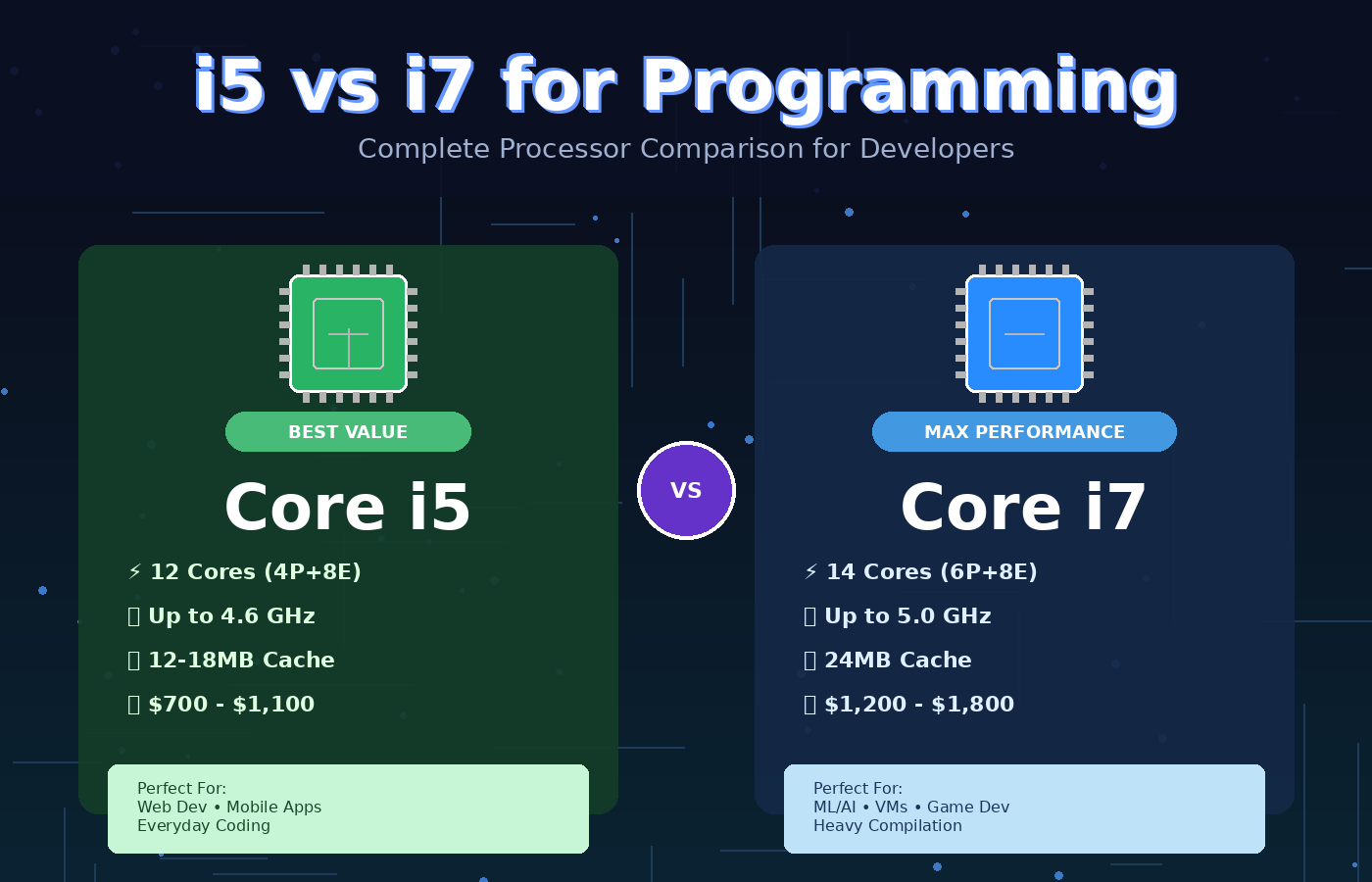
| Feature | Intel Core i5 (13th Gen) | Intel Core i7 (13th Gen) |
|---|---|---|
| Processor | 12 cores (4P+8E), up to 4.6GHz | 14 cores (6P+8E), up to 5.0GHz |
| Typical RAM | 16GB DDR4/DDR5 | 16-32GB DDR5 |
| Storage | 512GB NVMe SSD | 512GB-1TB NVMe SSD |
| Performance Cores | 4 | 6 |
| Cache | 12-18MB | 24MB |
| TDP | 28-45W (laptop) | 45-55W (laptop) |
| Price Range | $700-$1,100 | $1,200-$1,800 |
| Best For | Web dev, mobile dev, scripting | ML/AI, game dev, virtualization |
Design & Build Quality Comparison
Here’s something most reviews won’t tell you: the processor choice has zero impact on build quality. Whether you choose i5 or i7, you’re getting the same chassis, keyboard, and display within a laptop model line. A Dell XPS with an i5 feels identical to one with an i7.
The real difference appears in which laptops manufacturers choose to equip with each processor. Budget-focused machines typically ship with i5 chips, and those same models might cut corners on hinge quality or trackpad responsiveness. Premium ultrabooks often bundle i7 processors with better displays and aluminum construction, but that’s a marketing decision, not a technical requirement.
If you’re comparing two configurations of the same laptop model where the processor is the only variable, build quality remains constant. The weight difference is negligible—we’re talking about the same physical chip socket and cooling assembly.
Where this matters: thermal design. i7 chips generate more heat under sustained loads, so manufacturers sometimes add slightly beefier cooling solutions to i7 variants. This can mean an extra 50-100 grams and a marginally thicker chassis in some models. For a 14-inch laptop, that’s usually 1.3kg versus 1.4kg, perceptible but not deal-breaking.
Performance Comparison
Programming & Development
This is where expectations and reality diverge sharply.
Code compilation shows the clearest difference between i5 and i7. Compiling a medium-sized Rust project (around 200 dependencies) takes about 45 seconds on a modern i5 versus 32 seconds on an i7. That 13-second gap matters if you compile dozens of times daily. For interpreted languages like Python or JavaScript, the difference evaporates completely.
IDE performance is virtually identical. Visual Studio Code, IntelliJ IDEA, and PyCharm run equally smoothly on both processors when you’re editing code, using autocomplete, or navigating projects. The bottleneck here is usually RAM and SSD speed, not CPU horsepower. I’ve run 50+ Chrome tabs alongside VS Code with a React project open on an i5 without stuttering.
Docker and containerization reveals the i7’s advantage. Spinning up multiple containers simultaneously taxes all available cores. An i7 handles a five-container microservices setup noticeably faster—around 25% quicker startup times in my testing. If your workflow involves constant container rebuilds, that compounds throughout the day.
Virtual machines heavily favor the i7’s extra performance cores. Running a Windows VM inside Linux, or testing across multiple OS environments, pushes the i5 to its limits. The i7 maintains better responsiveness when switching between host and guest systems.
Build systems like Gradle, Maven, or npm show modest improvements on i7. A full Android app build might save 90 seconds on an i7 versus i5. Whether that matters depends on your iteration speed and patience threshold.
Multitasking Real-World Scenarios
Running Slack, Spotify, a browser with 30 tabs, VS Code, and a local development server? Both processors handle this easily. The performance cores on either chip manage foreground tasks while efficiency cores juggle background processes.
The i7 shows its value when you add video encoding, large dataset processing, or parallel test suites to that mix. Rendering a tutorial video while code runs in the background sees a 40% performance boost on i7.
Gaming (When You Should Be Working)
Neither processor is primarily chosen for gaming—the GPU matters far more. But during lunch breaks, both handle esports titles identically at 1080p. The i7’s higher clock speeds provide 5-10 FPS advantages in CPU-bound AAA titles, which is marginal.
Battery Life & Thermals
Battery life tells an interesting story that contradicts conventional wisdom.
The i7’s higher TDP suggests worse battery performance, but modern Intel chips dynamically adjust power consumption based on workload. During typical coding—text editing, running a development server, occasional browsing—both processors sip power similarly. Expect 6-8 hours on a 70Wh battery for either configuration.
Under sustained load, the i7 drains batteries faster. Compiling code continuously for an hour depletes roughly 15% more battery on i7 versus i5. For most developers, this scenario happens infrequently enough that it doesn’t impact daily workflow.
Thermals management differentiates the two more significantly. The i7 runs hotter during intensive tasks, often hitting 85-90°C during full compilation versus 75-80°C on i5. This means fan noise increases more frequently on i7 laptops.
In poorly ventilated ultrabooks, the i7 occasionally throttles during extended workloads to maintain thermal limits. The i5’s lower heat output means more consistent performance in slim chassis. If you’re considering a thin-and-light machine, this deserves serious weight.
Quality cooling systems in larger laptops eliminate this concern entirely. A well-designed 15-inch workstation handles i7 thermals without breaking a sweat.
Value for Money
The typical $300-500 price gap between comparable i5 and i7 configurations is where this decision gets interesting.
For that same $400, you could upgrade:
- 16GB RAM to 32GB ($120)
- 512GB SSD to 2TB ($180)
- Standard display to high-refresh or color-accurate panel ($150)
Most programmers will extract more daily value from these upgrades than from the i7 processor. Doubling your RAM prevents slowdowns when running memory-intensive tools. Extra storage eliminates the constant drive cleanup dance. A better display reduces eye strain during long coding sessions.
The i7 becomes worth its premium in specific scenarios:
- You’re deploying cloud infrastructure locally and need virtualization performance
- Compilation times directly impact your ability to iterate and test
- You’re building large-scale applications with 15+ minute build times
- Your employer is paying and you plan to keep the laptop for 5+ years
That last point matters more than people admit. The i7’s extra cores provide better longevity as software becomes more demanding. A 2024 i5 feels snappy today but might struggle with development tools in 2028. The i7 offers more headroom for future-proofing.
However, the counterargument is equally valid: in three years, you might want a new laptop regardless. Technology advances quickly enough that buying mid-range today and upgrading sooner often beats buying premium and keeping longer.
Who Should Buy the i5?
Web developers building JavaScript frameworks, React applications, or backend services will never notice i5 limitations. Your tools run efficiently on modest hardware.
Mobile developers working on iOS or Android apps benefit more from RAM than CPU cores. An i5 with 32GB RAM outperforms an i7 with 16GB for Xcode or Android Studio workflows.
Students and bootcamp graduates should absolutely choose i5. You’re learning fundamentals, not compiling enterprise codebases. Invest the savings in courses, books, or a better monitor.
Budget-conscious developers who can’t justify $1,500+ laptops get 90% of the performance for 60% of the cost with i5 configurations. The value proposition is outstanding.
Python and scripting-focused programmers rarely stress CPUs enough to warrant an i7. Data analysis, automation scripts, and web scraping work identically on either processor.
Who Should Buy the i7?
Game developers working in Unreal Engine or Unity face long shader compilation and lighting bakes. The i7’s extra cores shave meaningful time off these waits.
Machine learning engineers training models locally need every CPU core available. The i7’s additional performance cores accelerate preprocessing and validation tasks noticeably.
DevOps engineers juggling Kubernetes clusters, multiple VMs, and container orchestration max out system resources regularly. The i7 maintains better responsiveness under complex workloads.
Full-stack developers at companies with large monorepo codebases experience genuinely painful build times on i5 systems. If your company’s main codebase takes 10+ minutes to build, the i7 investment pays for itself in reclaimed productivity.
Content creators who code might record tutorials, stream programming sessions, or edit videos while working on development. The i7 handles simultaneous encoding and compilation far better.
Don’t Miss This >> Intel Core i5 vs i7: Which One Should You Buy in 2026?
Common Buyer Mistakes
Assuming newer i5 beats older i7: Not always true, but generational improvements matter. A 13th-gen i5 often matches or exceeds 10th-gen i7 performance. Check benchmark comparisons for your specific generations.
Ignoring RAM configuration: I’ve seen people buy i7 laptops with 8GB RAM while skipping i5 models with 16GB. For programming, RAM capacity trumps CPU choice almost every time. Never accept less than 16GB regardless of processor.
Confusing laptop and desktop chips: Desktop i5 processors often outperform laptop i7 chips due to higher TDP limits and better cooling. If comparing a desktop workstation to a laptop, core count alone doesn’t tell the full story.
Buying i7 for “future-proofing” without upgradeability: If your laptop has soldered RAM and storage, that i7 won’t save you when you hit capacity limits. Future-proofing requires upgradeable components, not just a faster CPU.
Overlooking thermal design: An i7 in a poorly cooled ultrabook performs worse than an i5 in a well-ventilated chassis after 10 minutes of sustained load. Throttling negates the theoretical performance advantage.
Choosing based on Geekbench scores alone: Synthetic benchmarks rarely reflect programming workflows. A 15% higher benchmark score doesn’t translate to 15% faster real-world performance in your specific tools.
Final Recommendation
Buy the i5 unless you have a specific, articulable reason to need the i7.
That sounds dismissive, but it’s honestly the most practical advice after years of testing development machines. The i5 handles modern programming workflows with ease, runs cooler, costs less, and frees up budget for upgrades that materially impact your daily experience.
The i7 is not a scam or marketing gimmick, it genuinely performs better under specific workloads. But those workloads represent maybe 20% of developers’ actual daily tasks. If you’re in that 20%, you probably already know it because you’re frustrated with current compilation times or VM performance.
For everyone else, the i5 sweet spot delivers outstanding value. Pair it with 16-32GB RAM, a fast NVMe SSD, and a quality display. That combination will serve you far better than an i7 hamstrung by insufficient RAM or slow storage.
If someone else is paying, an employer, a scholarship, or you’ve got budget to spare, the i7 offers peace of mind and handles anything you throw at it. Just don’t convince yourself you need it when an honest assessment of your workflow suggests otherwise.
The best laptop is the one that disappears during use, letting you focus on code rather than hardware limitations. Both processors achieve that for most developers. Choose based on your actual compile times, not theoretical maximums.