Quick Verdict
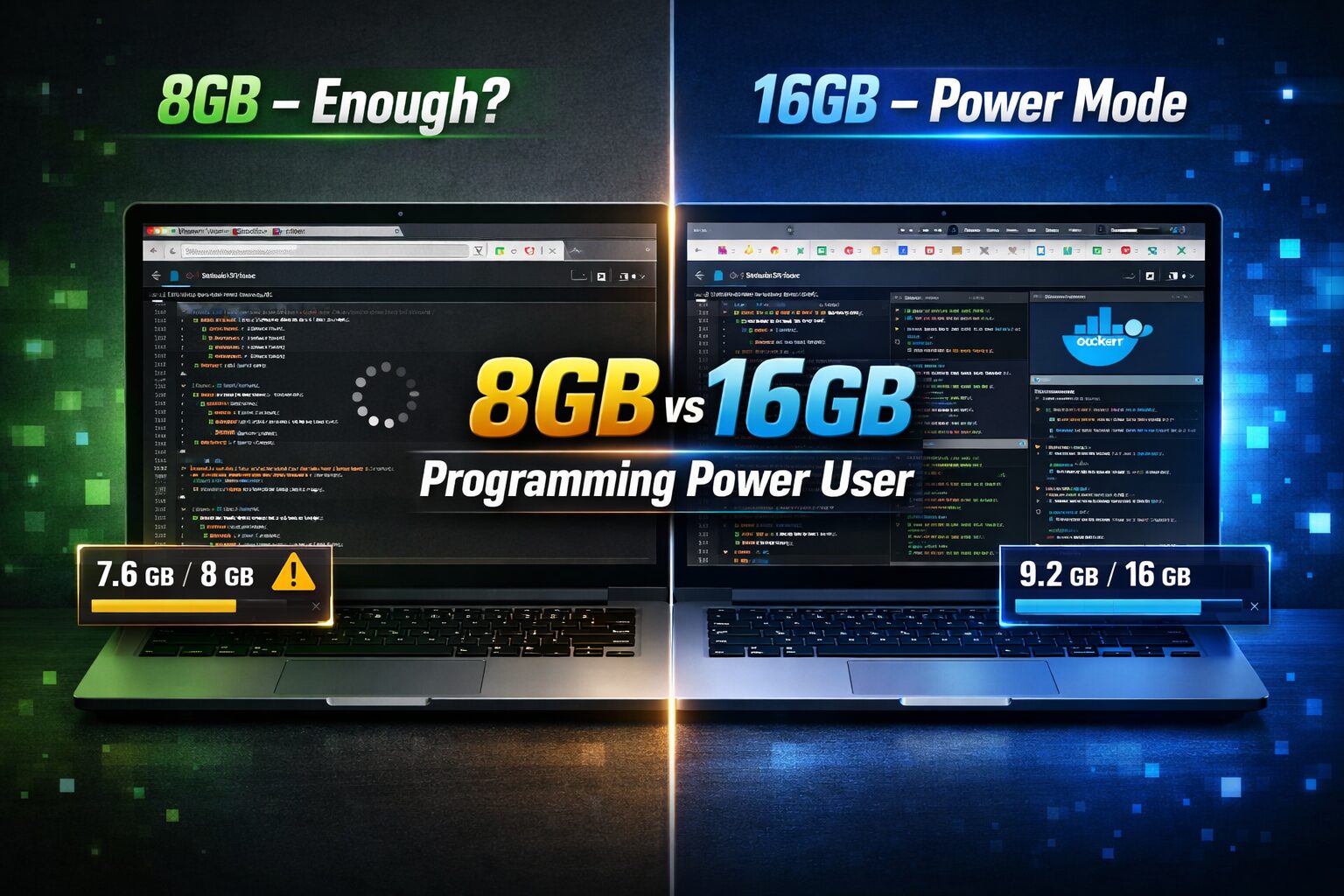
If you write code for a living – or want to – 16GB RAM is the smarter buy in 2024, full stop. Modern development environments, browser-heavy workflows, and even mid-tier IDEs have quietly crossed a threshold where 8GB starts showing its seams under real pressure. That said, 8GB isn’t dead.
The honest split: choose 8GB if budget is genuinely constrained and your stack is lean. Choose 16GB if you run Docker containers, juggle multiple projects simultaneously, use JetBrains IDEs, work with large datasets, or plan to keep the machine for more than two years. Trying to future-proof on 8GB is a gamble that most power users lose.
Side-by-Side Comparison Table
| Feature | 8GB RAM Configuration | 16GB RAM Configuration |
| Processor | Intel Core i5 / AMD Ryzen 5 | Intel Core i7 / AMD Ryzen 7 or Apple M-series |
| RAM | 8GB LPDDR4x / LPDDR5 | 16GB LPDDR5 / LPDDR5X |
| Storage | 256GB–512GB NVMe SSD | 512GB–1TB NVMe SSD |
| Display | 1080p IPS (entry-level) | 1080p–2K IPS / OLED (mid–high tier) |
| Battery | 45–60Wh | 60–86Wh |
| Build Quality | Plastic chassis, budget hinges | Aluminum alloy, MIL-SPEC rated |
| Weight | 1.4–1.8 kg | 1.2–1.9 kg (varies) |
| Price Range | $500–$900 | $900–$1,800+ |
| Best For | Students, lightweight scripting | Full-stack devs, data engineers |
Design & Build Quality Comparison
Most laptops shipping with 8GB RAM in 2024 sit in an entry-to-mid tier that comes with polycarbonate or mixed plastic bodies. That’s not necessarily bad – modern engineering has made plastic chassis surprisingly rigid – but it shows up in the hinge feel, the keyboard deck flex, and the long-term wear on high-contact surfaces. Ports are typically fewer and slower, which matters if you’re running external monitors or fast storage.
The 16GB bracket mostly overlaps with the premium and prosumer tier. You’re getting full magnesium-aluminum unibody construction in machines like the Dell XPS 15, Lenovo ThinkPad X1 Carbon, ASUS ProArt Studiobook, or Apple MacBook Pro. These feel different the moment you open them – there’s a rigidity and thermal density to the chassis that communicates longevity before you’ve even opened an IDE.
The key design difference isn’t weight – it’s material resilience and port ecosystem maturity, which genuinely affect daily developer ergonomics.
Performance Comparison
Programming
Opening IntelliJ IDEA with a medium-sized Spring Boot project on an 8GB machine means your OS, the IDE, the JVM, and a few background processes are fighting for the same pool of memory. You’ll see it in the indexing time, the lag when switching between files, and the occasional UI freeze during a Gradle sync. It doesn’t kill productivity, but it creates a subtle tax on your attention every session.
On 16GB, those friction points mostly disappear. You can have your IDE open, a local dev server running, Docker Desktop with one or two containers, and a browser with ten tabs – without the OS touching swap. For most backend developers, this is the difference between a smooth afternoon and a frustrating one.
Multitasking
8GB handles single-task focus reasonably well. The moment you add Slack, a browser session, Spotify, a database client, and your IDE running simultaneously, you’re asking the memory manager to make decisions for you. It will – usually by swapping the least-recently-used process out to disk. Even on fast NVMe SSDs, swap isn’t RAM.
16GB absorbs that workload without drama. Switching between a database client, your IDE, and a browser with multiple documented APIs open happens instantly rather than after a brief disk thrash.
Gaming
8GB is manageable for lighter titles and indie games. Anything AAA in 2024 – especially open-world games – starts hitting 8GB headroom directly. On 16GB, you have comfortable overhead for modern titles without compromising background tasks. Neither configuration is a gaming powerhouse at this RAM level, but 16GB keeps you in the conversation for another two or three years of game releases.
Office Work
Both configurations handle email, documents, spreadsheets, and video calls without issue. If office work is your primary use case, 8GB is more than sufficient. The gap here is negligible.
Video Editing
8GB is borderline for 1080p editing in DaVinci Resolve or Premiere Pro, and it gets painful fast at 4K with effects. 16GB is the minimum serious recommendation for any editing workflow beyond simple cuts and color grading. If editing is part of your dev work – recording tutorials, making demo reels – 16GB is a meaningful step up.
Don’t Miss This >> i5 vs i7 for Programming: Is the Upgrade Worth It?
Battery Life & Thermals
Battery life depends more on the silicon than the RAM tier, but the configurations those RAM tiers typically ship with tell a secondary story.
8GB laptops, being in the budget bracket, often come with smaller battery packs (45–55Wh is common). That translates to real-world runtimes of 5–7 hours under mixed load. The lower-tier processors they pair with tend to run hotter at sustained loads since thermal management engineering is less refined.
16GB machines more commonly ship with 70–86Wh batteries and better thermal architectures. Apple Silicon laptops at 16GB are in a class of their own – the M3 and M4 chips consistently deliver 12–18 hours under real workloads with minimal thermal signature, something no x86 laptop has reliably replicated.
On the Windows side, 16GB configs paired with AMD Ryzen 7000 series or Intel Meteor Lake show strong thermal behavior with proper vapor chamber cooling, though sustained compile jobs will still spin fans noticeably.
Value for Money
An 8GB laptop at $650 looks like great value on a spec sheet. A 16GB machine at $1,100 looks like a $450 premium. But the right question is: what is that $450 buying you over three years?
If 8GB forces you into swap-heavy workflows, you’re effectively paying in time and frustration every single day. If you outgrow 8GB in 18 months and buy a replacement, you’ve spent more than the $450 gap – plus the lost time migrating your setup.
Assuming the RAM is soldered (which it is on most modern thin-and-light laptops, including every Apple Silicon machine), 8GB is permanent. There is no upgrade path. 16GB at a reasonable price from a reputable brand is very close to the minimum viable spec for a developer in 2024 who expects the machine to stay relevant through 2026 and beyond. The value math, when amortized over ownership duration, tends to favor the upgrade.
Who Should Buy the 8GB Configuration?
- The Computer Science Student in Year One or Two – Learning data structures and algorithms, writing Python scripts, working through introductory web projects. The workload doesn’t require more, and the budget savings are real at this life stage.
- The Casual Scripter or Automation Developer – Someone who writes Python or Bash to automate personal workflows, not running complex environments or large dependency trees.
- The Secondary / Travel Machine Buyer – If you have a powerful desktop at home and need something portable for light sessions on the road, 8GB is a legitimate choice.
- The Strict Budget-Constrained Buyer – If the honest choice is between an 8GB laptop now or waiting six months for a 16GB one, and you need to start working immediately, 8GB gets you productive today.
Who Should Buy the 16GB Configuration?
- The Full-Stack or Backend Developer – Running local servers, database containers, IDEs, and browsers simultaneously is your daily baseline. 16GB is not a luxury here; it’s the entry point.
- The Data Scientist or ML Engineer – Even before you get to GPU memory, your CPU-side data processing pipelines and Jupyter environments will eat 8GB for breakfast on any reasonably sized dataset.
- The DevOps or Platform Engineer – Kubernetes locally via Minikube, Docker Compose stacks with multiple services, cloud SDKs all open at once. 8GB will throttle you on a daily basis.
- The Freelancer or Agency Developer – Juggling multiple client projects means multiple repos, multiple dev servers, possibly multiple browsers with different profiles. 16GB maintains your context without forcing you to close everything every time you context-switch.
- The Long-Term Investor – If you want this machine to serve you for four or five years, 16GB is the practical floor for what developer workflows will look like in 2027.
Common Buyer Mistakes
Assuming 8GB is fine because it ran fine at the store. Demo units at retail stores show you a clean OS boot with no active workloads. That experience will not repeat once you have your full dev environment, communication tools, and browser sessions running.
Treating spec sheets like ceilings instead of floors. RAM is a floor – you need at least that much for your workload. The spec telling you the machine “supports” a certain RAM amount doesn’t mean it thrives there.
Ignoring soldered RAM on thin laptops. If the product page says “onboard” or “soldered memory” and you’re buying 8GB, that’s your forever configuration. Many buyers only realize this when they go looking for upgrade slots and find none.
Conflating “enough for now” with “enough long-term.” Software gets heavier over time, not lighter. Chrome’s memory usage per tab in 2024 is meaningfully higher than in 2020. IDEs have added more background intelligence and live tooling. This trend continues.
Letting the sticker price anchor the decision. The real cost of a machine includes the productivity loss from a constrained environment and the replacement cost if you outgrow it sooner than expected.
Final Recommendation
If you’re a programming power user reading a comparison article this detailed, you almost certainly belong in the 16GB camp.
The 8GB vs 16GB decision stopped being genuinely close for developers around 2021–2022 as IDEs got smarter, containerization went mainstream, and browser engines became memory-hungry infrastructure tools in their own right. Today, 8GB is a survivable configuration – it’s not a comfortable one for anyone doing serious development work day in and day out.
Buy 8GB if you’re a student just starting out, if budget is genuinely tight right now, or if this is a secondary machine with a narrow use case. Be honest with yourself about those conditions.
Buy 16GB if programming is your primary profession or serious pursuit, if you expect to own this machine for three or more years, and if your daily workflow involves more than one or two active processes at a time. The right tool does the job without making you fight it. 16GB is the right tool for most programmers in 2024.